Maintaining unique and meaningful record numbers in Dynamics 365 is essential for efficient business operations. Whether you’re managing customers, cases, opportunities, service requests, invoices, or custom entities, a consistent numbering strategy improves traceability, reporting accuracy, and compliance.
Microsoft Dataverse includes native AutoNumber columns that automatically generate unique identifiers for records. However, as organizations scale across multiple business units, regions, environments, and business processes, standard autonumbering often falls short of modern enterprise requirements. Organizations frequently need advanced capabilities such as automated counter resets, attribute-based numbering, multiple numbering sequences within the same entity, and environment-independent counter management.
To address these challenges, Soluzione’s Advanced Auto Counter for Dynamics 365 provides a flexible and configurable solution that we will discuss in this blog post.
Native Numbering in Dynamics 365
Before comparing solutions, it’s important to understand how record numbering works in modern Dynamics 365 applications. Dynamics 365 uses Microsoft Dataverse as its underlying data platform, and native record numbering is managed through Dataverse AutoNumber columns. These columns automatically generate unique identifiers when new records are created and are commonly used for entities such as Accounts, Cases, Opportunities, and custom tables.
Microsoft Dataverse supports AutoNumber columns that automatically generate identifiers when records are created. These capabilities work well for basic scenarios involving simple prefixes, suffixes, and sequential numbering.
Also Read: Simplify Record Numbering in Dynamics 365 with Advanced Auto-Counter
Limitations in Dynamics 365 Auto Numbering
Organizations usually need advanced numbering functionality to support complex business requirements. But due to the following limits, they often need to implement custom plugins, Power Automate flows, or third-party solutions:
- No automated monthly or yearly reset functionality
- Limited business-unit-specific numbering strategies
- Lack of advanced conditional numbering logic
- Challenges managing numbering across multiple environments
- Limited support for multiple independent counters on a single record
- Additional development effort required for advanced business scenarios
How Advanced Auto Counter Solves Modern Numbering Challenges
The Advanced Auto Counter extends Dynamics 365 with enterprise-grade numbering capabilities that are easy to configure and manage.
1. Configurable Prefixes and Suffixes
Create meaningful record numbers using business-specific prefixes and suffixes. This helps users identify record types and business contexts at a glance. Examples:
- ACC-000001
- CASE-US-2026-0001
- INV-NY-000123
- SUP-2026-00001
2. Dynamic Date Formatting
Auto-generate values using date-based formats within the numbering structure. This includes:
- Use format “[d]” to Return only date
- Use format “[m]” to Return only month
- Use format “[y]” to Return only year
- Use format “[ddd]” to Return Day First Three Letters
- Use format “[dddd]” to Return Day Name
- Use format “[mm]” to Return Month Number In Integer
- Use format “[mmm]” to Return Month First Three Alphabets
- Use format “[mmmm]” to Return Month Name
- Use format “[y]” to Return Year Last Value
- Use format “[yy]” to Return Year Last Two Value
- Use format “[yy]” to Return Year Last Three Value
- Use format “[yyyy]” to Return Year Last Four Value
3. Automated Counter Resets
Unlike standard numbering approaches, Advanced Auto Counter can automatically reset sequences according to business requirements. This keeps numbering manageable and reporting-friendly. Reset options may include:
- Weekly
- Monthly
- Quarterly
- Yearly
4. Business Unit Specific Numbering
Organizations operating across multiple departments or regions often require separate numbering sequences. Separate counters reduce confusion and improve operational visibility.
5. Support for Standard and Custom Entities
Organizations can standardize numbering across their entire Dynamics 365 ecosystem. The solution supports numbering for:
- Accounts
- Contacts
- Opportunities
- Cases
- Leads
- Orders
- Custom Dataverse tables
- Industry-specific entities
6. Attribute-Based Number Generation
Generate record numbers based on field values. This creates more meaningful and easily recognizable identifiers, such as:
- Country
- Region
- Department
- Product Category
- Business Unit
- Customer Segment
7. Multiple Counters on a Single Record
Many businesses require multiple numbering schemes within the same entity. Advanced Auto Counter supports multiple independent counters without customization.
Examples:
- Customer Number
- Contract Number
- Reference Number
- Internal Tracking Number
Important Considerations for Dual-Write Environments
Organizations using Dynamics 365 Finance & Operations together with Dataverse should carefully manage numbering strategies.
Microsoft recommends aligning number sequences and AutoNumber columns to avoid synchronization issues in dual-write scenarios. Businesses must ensure that numbering formats, ranges, and sequence settings remain compatible across systems. Improper configuration can result in validation errors and synchronization conflicts.
Advanced Auto Counter helps organizations establish consistent numbering strategies that support enterprise-scale deployments and integrated Dynamics 365 environments.
How One Can Configure Soluzione Advanced Auto Counter Add-On
One can configure this Add-on Auto Counter for “Dynamics 365” as per the example given below.
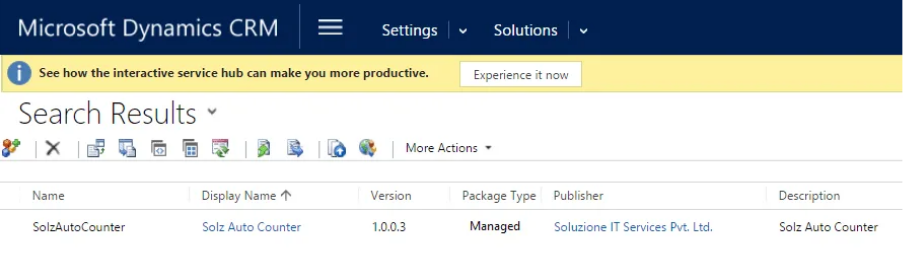
- Install/import the Solz Auto Counter solution in Dynamics 365 by importing the managed solution. Make sure that you tick the “Enable any SDK message processing steps included in the solution” option under “Post Import Actions” when importing the solution. After the solution is successfully installed, you should have Solz Auto Counter in your solutions as shown below.
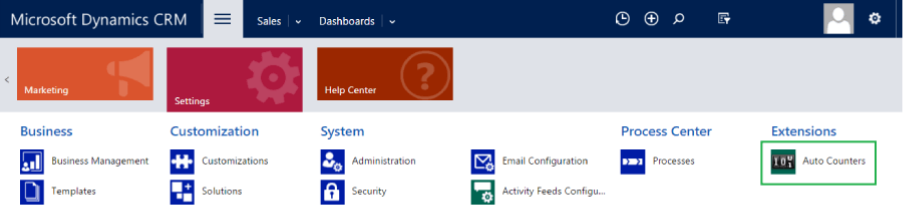
- Clicking on the Auto Counter to navigate the sub-grid.
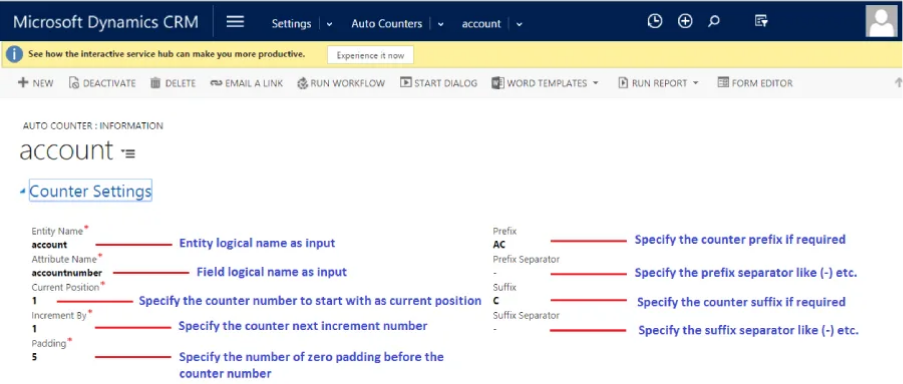
- Create a new auto counter record to configure the counter settings.
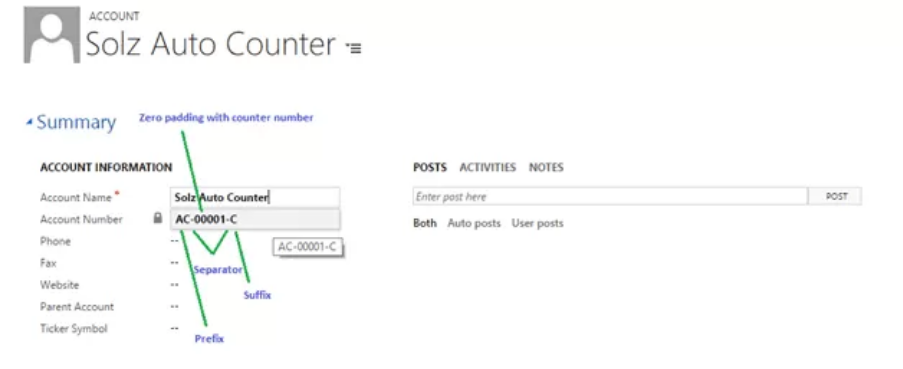
- Go to the Account entity, create a new record, and save
Key Takeaway
As Dynamics 365 and Microsoft Dataverse continue to evolve, organizations require smarter approaches to record numbering. While native AutoNumber columns provide a strong foundation, many businesses need greater flexibility, governance, and scalability than out-of-the-box functionality can deliver.
The Advanced Auto Counter for Dynamics 365 helps organizations automate numbering, maintain consistency across entities, support complex business requirements, and simplify long-term administration.
Whether you’re managing sales records, customer cases, service operations, or custom business processes, Advanced Auto Counter provides a powerful and user-friendly solution for intelligent record numbering in Dynamics 365.
For more insight, you can explore the add-on along with other useful add-ons, or get a free live demo to see it in action. Contact us to know more.
Read More Such Insights: Blogs & Articles