In this era of constant change and digitization, it is a genius idea to use the PowerApps development platform to create applications for mobile and web. As with other high-end developer tools available in the market, they are mostly reserved for developers.
Microsoft Power Apps’ ease of customization and low-code development approach enable all kinds of users (tech and non-tech) to build apps. Moreover, the platform can significantly help businesses increase their efficiency and adapt to ever-changing requirements.
Power Apps is gradually becoming an integral part of a digital strategy for modern companies. In this blog post, we will examine some characteristics of Microsoft Power Apps, its advantages, specific use cases, and more.
- What Is Microsoft Power Apps?
- Types Of Apps You Can Build With Power Apps
- Features Of Microsoft Power Apps
- Benefits Of Using Microsoft Power Apps
- Uses of Microsoft Power Apps
- Microsoft Power Apps vs Traditional App Development
- Industries Leveraging Power Apps
- Challenges And Limitations Of Power Apps
- Final Thoughts
- Frequently Asked Questions
What Is Microsoft Power Apps?
Microsoft Power Apps is a low-code application development platform within the Microsoft Power Platform that enables businesses to build custom applications without having to go through complicated coding.
Rather than developing everything from scratch, teams can use a visual interface, pre-built templates, and ready-to-use connectors to quickly create apps for web and mobile. This makes it easier for both developers and business users to turn ideas into working applications.
At its core, Power Apps brings together apps, data, and logic in one environment. It works seamlessly with Microsoft services like Dynamics 365, Microsoft 365, and Dataverse, while also connecting to external systems such as SQL Server, SharePoint, and third-party tools.
From a practical business perspective, Power Apps is not just about building apps—it’s about solving everyday operational challenges. Whether it’s streamlining internal workflows, digitizing manual processes, or enabling real-time data access, it helps organizations move faster without overcomplicating development.
Because it’s part of the broader Power Platform ecosystem, Power Apps also works closely with:
- Power Automate for workflow automation
- Power BI for analytics and reporting
- Power Pages for creating websites and portals
- Dataverse for secure data management
- Copilot for AI-assisted app development
Types Of Apps You Can Build With Power Apps
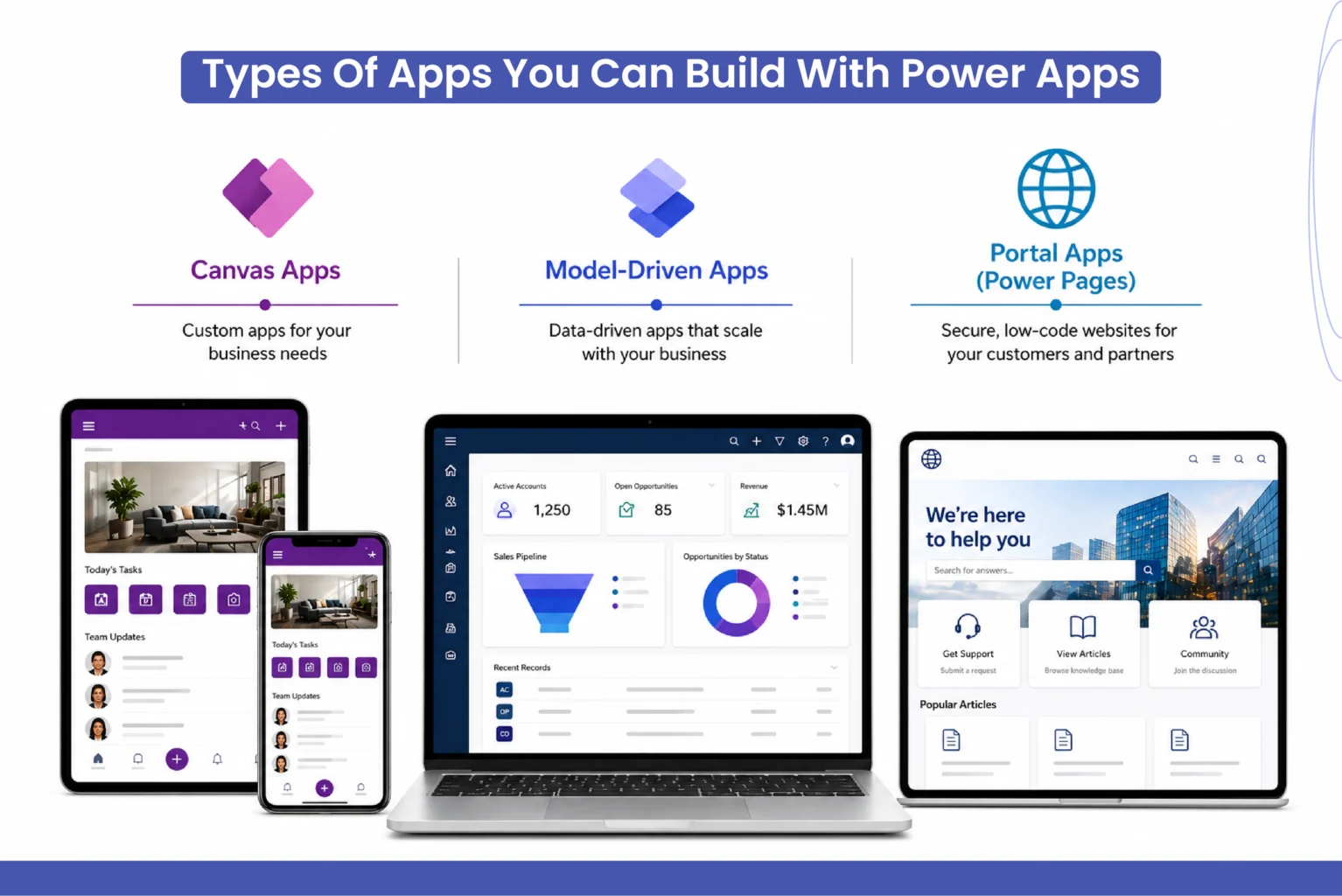
Before choosing the right app type, it’s important to understand how each one fits different business needs. Power Apps offers multiple options, each designed for specific use cases and levels of complexity.
1. Canvas Apps
Canvas apps are designed with flexibility in mind. Users have full control over layout, design, and user experience, making them ideal for highly customized applications.
Canvas apps work well when the focus is on how the app looks and feels. You can design pixel-perfect interfaces using drag-and-drop controls and connect to multiple data sources such as SharePoint, Excel, SQL Server, and Dataverse.
They are commonly used for task-based or mobile-friendly apps where simplicity and speed matter.
- Best for: Lightweight apps, custom UI, mobile use cases
- Key advantage: Design flexibility and quick development
- Data sources: 200+ connectors available
2. Model-Driven Apps
Model-driven apps are built around data models and business logic. Instead of focusing on design, these apps focus on how data is structured and how processes flow within the system. They are powered by Dataverse, which allows you to define entities, relationships, business rules, and workflows. Based on this structure, Power Apps automatically generates a responsive user interface.
Model-driven apps are better suited for applications where consistency, scalability, and process automation are more important than UI customization.
- Best for: Complex business processes, CRM-like systems
- Key advantage: Strong data structure and built-in logic
- Built on: Microsoft Dataverse (formerly Common Data Service) for secure and scalable data management
3. Portal Apps (Power Pages)
Portal apps, now rebranded to Power Pages in 2022, allow external users such as customers, vendors, or partners to interact with your system through secure web interfaces.
While Canvas and Model-driven apps are primarily used internally, Power Pages extends this capability outside the organization. It enables businesses to create portals for self-service, onboarding, or collaboration.
These portals are connected to Dataverse, ensuring secure access and controlled data sharing.
- Best for: External-facing websites and portals
- Key advantage: Secure access for external users
- Use cases: Customer portals, partner portals, vendor interaction
Features Of Microsoft Power Apps
1. Low-Code Development Environment
Power Apps reduces the need for heavy coding by offering a drag-and-drop interface. This makes it accessible to both developers and business users.
At the same time, it doesn’t limit advanced users. Developers can still extend functionality using custom code, APIs, and integrations.
2. Wide Range of Data Connectors
One of the most useful features is the ability to connect with multiple data sources, including:
- Microsoft Excel
- SharePoint
- SQL Server
- Dynamics 365
- Third-party platforms
This means businesses don’t have to move their data; they can simply connect to it.
3. Pre-Built Templates for Faster Start
Power Apps provides ready-made templates for common use cases, such as:
- Leave management
- Inventory tracking
- Expense reporting
These templates can be customized, saving time and effort.
4. AI Builder and Smart Automation
AI Builder allows users to add intelligence to their apps without deep AI expertise. For example:
- Extracting data from invoices
- Predicting outcomes
- Automating approvals
This reduces manual work and improves accuracy.
5. Integration with Microsoft Ecosystem
Power Apps works naturally with tools like:
- Microsoft Teams
- Dynamics 365
- Azure services
This makes it easier for organizations already using Microsoft products to adopt and scale solutions.
6. Secure and Scalable Data Management
With Dataverse, Power Apps ensures that data is stored securely and can scale as the business grows.
7. Cross-Platform Compatibility
Apps built on Power Apps can run on:
- Mobile devices
- Tablets
- Web browsers
This ensures accessibility for both office and field teams.
Benefits Of Using Microsoft Power Apps
1. Faster Time to Market
Applications can be built and deployed quickly, helping businesses respond faster to changing needs.
2. Reduced Development Costs
Since less coding is required, organizations can reduce the cost of development and maintenance.
3. Improved Collaboration Between Teams
Business users and IT teams can work together more effectively, reducing communication gaps.
4. Better Process Automation
Routine tasks can be automated, saving time and reducing errors.
5. Centralized Data Access
Data from different sources can be accessed in one place, improving visibility and decision-making.
6. Scalability for Long-Term Growth
Apps can evolve as the business grows, without requiring complete redevelopment.
7. Supports Digital Transformation Goals
Power Apps plays a key role in helping organizations modernize their operations.
For many businesses, investing in power apps development is not just about building apps; it’s about creating long-term operational efficiency.
Uses of Microsoft Power Apps
Power Apps can be used across different roles and business functions, making it flexible for both technical and non-technical users. Here are some instances where it can be used:
1. For Business Users and Teams
Microsoft Power Apps allows teams to build applications that solve everyday operational challenges without relying heavily on developers.
- Employee onboarding and HR management
- Inventory and asset tracking
- Project and task management
- Approval and workflow automation
2. For External and Customer-Facing Scenarios
With Power Pages, businesses can extend applications to external users through secure web portals.
- Customer self-service portals
- Partner and vendor collaboration
- Case submission and tracking systems
3. For Administrators
Through the Power Platform admin center, administrators can manage environments, monitor usage, and maintain governance across applications.
- Environment and deployment management
- Data and storage monitoring
- Security and access control
4. For Developers
Developers can extend Power Apps capabilities using code when needed, enabling deeper customization and integrations.
- Custom connectors and APIs
- Plugin and workflow extensions
- Integration with external systems
5. For Enterprise-Level Solutions
Power Apps is widely used to build scalable business applications that support structured processes and data-driven operations.
- CRM and customer management systems
- Field service and operations tracking
- Compliance and audit tracking
Microsoft Power Apps vs Traditional App Development
When choosing between modern low-code platforms and traditional development, it’s important to understand how they differ in terms of speed, cost, and flexibility. The table below highlights the key differences to help you make a more informed decision.
| Microsoft Power Apps | Traditional App Development |
| Faster development (days to weeks) | Slower development (months) |
| Low-code / minimal coding required | Requires extensive coding |
| Cost-effective for most business apps | Higher development and maintenance costs |
| Easy integration with Microsoft tools | Custom integration needed |
| Suitable for rapid business solutions | Suitable for rapid business solutions |
| Easier maintenance and updates | Requires dedicated technical support |
| Enables citizen developers (non-tech users) | Limited to skilled developers |
| Scales well within the Microsoft ecosystem | Highly scalable but resource-intensive |
This shift is one reason why businesses are increasingly adopting power platform services to modernize their systems.
Industries Leveraging Power Apps
- Healthcare is used for patient management, scheduling, and internal workflows.
- Education helps manage student data, attendance, and communication.
- Retail and e-commerce support order tracking, inventory management, and customer engagement.
- Manufacturing improves production tracking, quality checks, and reporting.
- Financial Services enables better compliance, reporting, and approval processes.
Across industries, the focus remains the same: simplifying operations and improving efficiency.
Challenges And Limitations Of Power Apps
1. Learning Curve for Advanced Features
While basic apps are easy, complex solutions require expertise.
2. Licensing and Cost Planning
Understanding pricing models is important to avoid unexpected costs.
3. Performance in Large Applications
Large-scale apps need proper design to maintain performance.
4. Dependency on Microsoft Ecosystem
Power Apps works best within Microsoft environments, which may not suit every organization.
Working with an experienced power platform consultant such as Soluzione, a Microsoft Solutions Partner, can help overcome these challenges effectively.
Final Thoughts
Moreover, Microsoft Power Apps is much more than low-code development; it is an excellent opportunity for enterprises to implement their innovative concepts within a reasonable timeframe. With ongoing environmental changes, the ability to create, validate, and evolve applications quickly proves to be a substantial competitive advantage.
Nevertheless, even such a powerful platform is only effective when used correctly. The proper methodology combining business objectives, design, and implementation plays a critical role in achieving the desired outcome. Based on our observations, companies that incorporate Power Apps into their digital transformation efforts achieve the best results.
When exploring the potential of this platform, one should bear in mind that the best results will be obtained by focusing on specific problems. When used appropriately, Power Apps can help optimize processes and improve internal communication.
Soluzione has been helping users make the most of this tool with their expert consulting, implementation, customization, support, and maintenance services.
Read More: https://www.solzit.com/blog/
Frequently Asked Questions
What are the main features of Microsoft Power Apps?
Key features include low-code development, pre-built templates, data connectors, AI Builder, workflow automation, secure data storage, and seamless integration with Microsoft tools like Teams, Dynamics 365, and Azure services.
What types of applications can be built using Power Apps?
Businesses can build canvas apps, model-driven apps, and portal apps for internal operations, customer engagement, data management, workflow automation, and industry-specific solutions tailored to unique business needs.
How does Power Apps integrate with other Microsoft tools?
Power Apps integrates with Power BI, Power Automate, Teams, Dynamics 365, and Azure, enabling smooth data sharing, workflow automation, analytics, and collaboration across the Microsoft ecosystem without complex integrations.
What are the key benefits of using Microsoft Power Apps for businesses?
Power Apps offers faster development, lower costs, improved productivity, better data access, automation, scalability, and enables collaboration between business users and IT teams, supporting efficient digital transformation and operational improvements.
How can businesses use Power Apps for workflow automation?
Businesses use Power Apps with Power Automate to automate approvals, notifications, data entry, reporting, and task management, reducing manual work, improving accuracy, and streamlining processes across departments efficiently.