Microsoft offers not just multiple software solutions for users’ every day, business, and personal needs, but also flexible Microsoft licensing options. With flexible subscription options, multiple plan tiers, per-user and per-device models, and specialized solutions for different user types, it’s easy to feel overwhelmed.
Many businesses search for “Microsoft 365 plans” and stop there, but today’s needs often span far beyond email and Office apps. You might be building low-code solutions on Power Platform, managing customer relationships in Dynamics 365, or securing frontline operations — all of which require thoughtful licensing decisions.
That’s why we created this practical Microsoft licensing guide. Drawing from our hands-on experience as a trusted Microsoft Solution Partner, real client implementations, and the latest Microsoft offerings, we will provide clarity on choosing the right fit for your needs.
- Why Getting Licensing Right Matters?
- Key Factors to Consider in Your Microsoft Licensing Assessment
- Understanding Microsoft Licensing Models & Flexibility
- Best Practice to Choose the Right Microsoft Licenses
- Microsoft 365 Licenses Plans: The Foundation Most Organizations Start With
- Important Tips When Buying Microsoft 365 Licenses
- Microsoft Licensing Use Cases
- What Are the Common Mistakes To Avoid When Selecting Microsoft Licenses?
- What factors Should Businesses Consider When Choosing a Microsoft License?
- Final Thoughts
- Frequently Asked Questions
Why Getting Licensing Right Matters?
Licensing is important for helping your business grow, but if it’s not handled correctly, it can lead to unnecessary complications. Here’s why getting licensing rights is so important:
- Avoid overspending on unused features while preventing costly compliance gaps.
- Scale intelligently as your team grows, whether you have 20 or 2,000 users.
- Match security and compliance to your industry risks and regulatory needs.
- Enable flexibility for hybrid work, offline access, device types, and emerging AI tools like Copilot.
- Future-proof your investment across productivity, CRM, ERP, and the Power Platform.
Key Factors to Consider in Your Microsoft Licensing Assessment
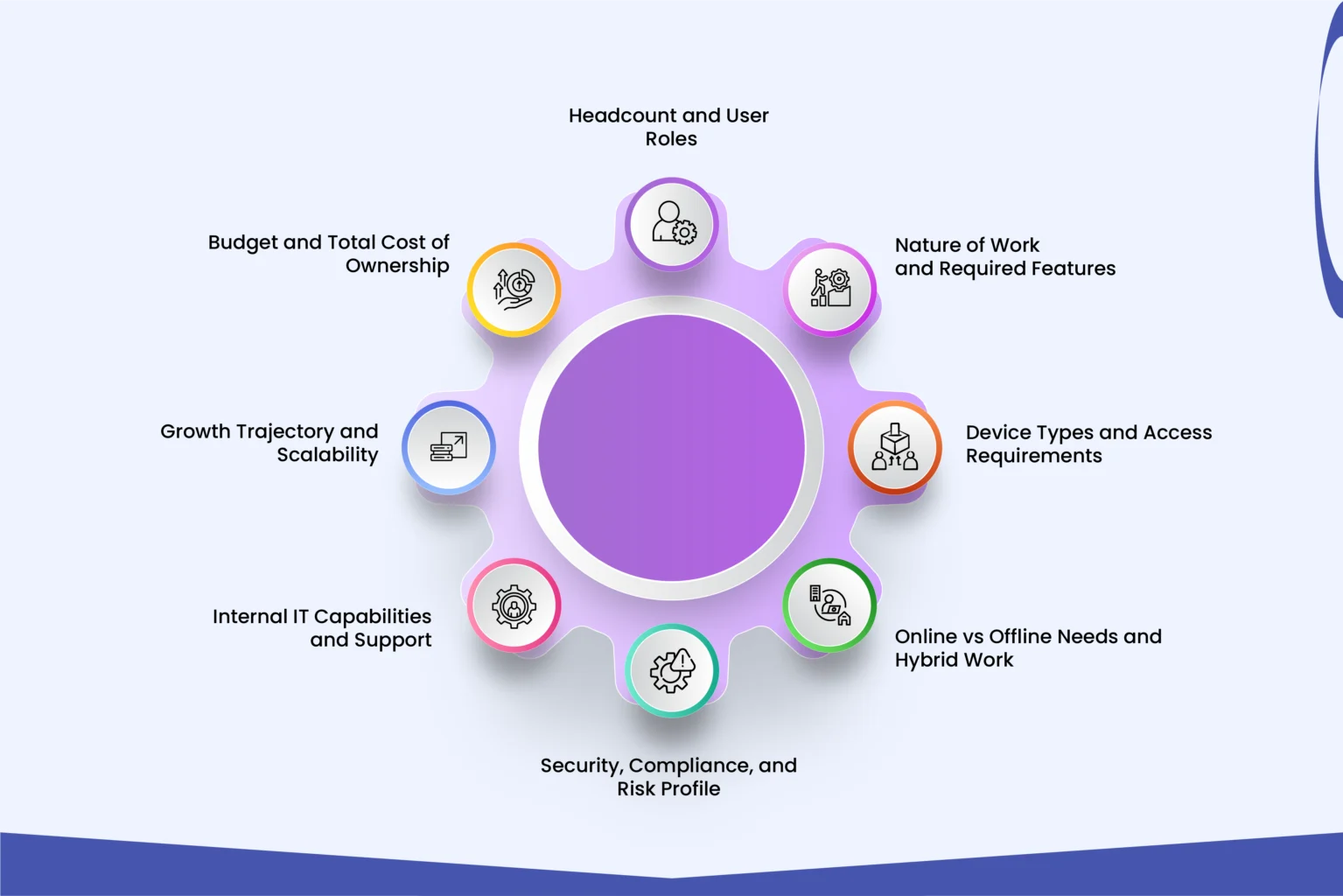
To begin with the licensing, proper assessment is a must — whether for Microsoft 365, Dynamics 365 (CRM/ERP), Power Platform, or a combination — it is not about picking the most popular plan. It’s about aligning your investment with how your business actually operates today and how it plans to grow tomorrow.
Here’s a practical framework we use with our clients to avoid the common pitfalls of buying based on marketing hype or what a neighbor company chose:
Headcount and User Roles
- How many employees, contractors, or external users need access?
- Segment your workforce: knowledge workers, executives, frontline staff, occasional users, or developers.
- Not everyone needs the same license. A sales team might require Dynamics 365 Sales + Microsoft 365, while warehouse staff may only need a Frontline F3 plan with basic apps and task management.
Nature of Work and Required Features
- What core tools do your teams need? Email, Teams collaboration, desktop Office apps, advanced analytics, custom apps, automation flows, or AI capabilities like Copilot?
- For Microsoft Power Platform users: Will they build simple apps/flows (per-app licensing) or require full development capacity (per-user premium licenses)?
- Dynamics 365/ERP/CRM: Do you need full user access, device-based access, or attach licenses for multiple modules?
Device Types and Access Requirements
- Will users work primarily on company-managed PCs, personal devices (BYOD), mobiles, or shared kiosks?
- Do you need full desktop apps or is web/mobile access sufficient?
- Consider offline capabilities — some plans offer better sync and offline functionality than others.
Online vs Offline Needs and Hybrid Work
- How critical is reliable internet access for your operations?
- Remote or hybrid teams often benefit from stronger cloud security, conditional access, and endpoint management features.
Security, Compliance, and Risk Profile
This is often the most overlooked yet critical factor.
- Basic protection (Business Premium) vs advanced (E3/E5)
- Data Loss Prevention (DLP) needs — especially for Teams chats, emails, and files
- Industry regulations (GDPR, HIPAA, ISO, etc.)
- Sensitivity of data (client information, intellectual property, financials)
Higher-tier plans like Microsoft 365 E5 provide comprehensive Purview DLP, advanced threat protection, and compliance tools that lower tiers simply don’t include.
Internal IT Capabilities and Support
- Do you have a strong in-house IT team that can manage advanced security settings and governance?
- Or would you benefit from managed services and simpler administration tools available in Business Premium or E3 plans?
Organizations with limited IT resources often achieve better outcomes with plans that include stronger default security and management features.
Growth Trajectory and Scalability
- How fast do you expect to grow in the next 12–24 months?
- Will you need to add AI features, advanced analytics, or new Dynamics/Power Platform modules soon?
- Consider licensing models that allow easy scaling without major disruptions.
Budget and Total Cost of Ownership
Look beyond monthly per-user pricing. Factor in:
- Potential add-ons
- Cost of unused licenses
- Productivity gains or losses
- Risk of non-compliance or security incidents
Understanding Microsoft Licensing Models & Flexibility
One of the biggest advantages we help our clients leverage is Microsoft’s flexible licensing structure. Unlike traditional perpetual licenses of the past, modern Microsoft licensing (across Microsoft 365, Dynamics 365, Power Platform, and more) is built on subscriptions that offer real adaptability — if you know how to use it.
Microsoft generally offers three main ways to purchase most licenses (Basic, Standard, Premium, Business):
1. Annual Commitment (Paid Annually)
Commit for one year and pay upfront. Usually, the most cost-effective option.
2. Annual Commitment (Paid Monthly)
Commit for one year but spread payments over 12 months. Still benefits from annual pricing.
3. Month-to-Month (Flexible)
No long-term commitment. You can add, reduce, or cancel licenses with high flexibility (typically at a ~20% premium compared to annual plans).
Best Practice to Choose the Right Microsoft Licenses
Here’s a practical tip we frequently recommend:
Mix Annual and Monthly Licenses
Assign core, stable users to annual subscriptions for the best pricing. Use month-to-month licenses for seasonal staff, contractors, project-based teams, or during rapid growth phases.
This hybrid approach prevents you from paying for unused licenses long-term while still securing the lowest rates for your permanent workforce. It’s especially valuable for businesses with fluctuating headcounts or those testing new solutions.
Test Before You Commit
Microsoft’s “try before you buy” capability is powerful when considering upgrades from Business to Enterprise plans or adding AI and automation capabilities.
- Start with 1-month trials on many plans
- Add temporary month-to-month licenses to test advanced features (e.g., Copilot, advanced DLP, Power Platform premium connectors, or specific Dynamics 365 modules)
- Evaluate real usage before moving to annual commitments
Other Important Flexibility Considerations
- User Count Impact: Adding a large number of users at once (especially during upgrades) can sometimes involve additional processing time or true-up processes in volume licensing.
- Scalability Across Solutions: The same principles apply to Dynamics 365 (per-user or capacity-based), Power Platform (per-user, per-app, or per-flow), and Frontline worker plans.
- Add-ons and Mix-and-Match: You can combine base plans with specific add-ons (e.g., Microsoft 365 Apps + Teams + Security features) rather than buying everything in one premium bundle.
- Plans With or Without Teams: Microsoft continues to offer options for organizations that need suites without Teams due to specific requirements or regulations.
Important Note for 2026: Microsoft has implemented pricing updates effective July 2026, with monthly billing generally carrying a higher cost than annual commitments. Planning your mix of commitments carefully has become even more valuable for cost control.
Microsoft 365 Licenses Plans: The Foundation Most Organizations Start With
While Microsoft licensing spans across Dynamics 365 (CRM & ERP), Power Platform, Windows, and more, the majority of businesses begin with Microsoft 365 for productivity, collaboration, and email. Understanding these core plans helps you make better decisions across the entire Microsoft ecosystem.
Microsoft 365 Business License Plans
(Ideal for Organizations with up to 300 Users)
| Plan | Best For | Key Features |
| Business Basic | Startups, small teams needing essentials | Web versions of Office apps, Professional email, Teams, 1 TB storage |
| Business Standard | Growing businesses need desktop apps | Business Basic full desktop Office apps Advanced Teams features Video editing & design tools |
| Business Premium | Small to medium businesses wanting security | Business Standard Important security features Device management features |
Microsoft 365 Enterprise Plans
(E1, E3 & E5 – Best for 300+ Users or Complex Needs)
| Plan | Best For | Key Strengths |
| E1 | Cost-conscious large teams | Web apps, basic Teams & email |
| E3 | Most mid-to-large organizations | Full desktop apps, enhanced security & compliance |
| E5 | Organizations needing maximum security & compliance | Everything in E3 + advanced threat protection, full Purview capabilities, analytics, and AI readiness |
Key Tip on Security (DLP): Business Premium and E3 offer basic-to-moderate data protection. Only E5 delivers full Microsoft Purview DLP across emails, files, and Teams conversations.
Microsoft 365 Frontline Plans
(F1 & F3 – Best for deskless or frontline workers)
- Microsoft 365 F1: Lowest cost offering – foundational security, Teams, and read-only access to Office web/mobile apps. No mailbox in many configurations.
- Microsoft 365 F3: More capable as it includes better productivity tools, a 2 GB mailbox, workflow automation, and stronger device management.
Important Tips When Buying Microsoft 365 Licenses
Microsoft 365 plans often act as the base license on top of which you add Dynamics 365, Power Apps, Power Automate, or other specialized solutions. Choosing the right Microsoft 365 tier early prevents expensive rework later when integrating CRM, ERP, or custom Power Platform applications.
The same flexibility principles (mixing annual & monthly, testing features, matching user roles) apply whether you are licensing 50 Microsoft 365 users or 200 Dynamics 365 & Power Platform users.
Microsoft Licensing Use Cases
The best licensing decisions come from understanding your organization’s unique profile. Here are the most common scenarios we help clients with:
Startups and Growing Small Businesses
- Recommended starting point: Microsoft 365 Business Basic or Standard.
- Move to Business Premium as soon as you handle client data, work remotely, or need device management and basic endpoint protection.
- For Power Platform experimentation: Begin with included rights in Microsoft 365 licenses and add per-app or per-user premium licenses only when citizen developers start building production apps.
- Key benefit: Month-to-month flexibility during uncertain growth phases.
Tip: Avoid over-committing annually in the first 12–18 months. Use flexible licensing to test features before locking in.
Established Organizations and Mid-Market Companies
Mature companies with 100–2,000+ users often need a balance between standardization, security, and scalability.
- Common choice: Microsoft 365 E3 as the baseline, with selective E5 upgrades for key departments.
- Dynamics 365 and Power Platform adoption usually accelerates here — attach licenses or capacity-based models become more cost-effective.
- Hybrid licensing (mix of Enterprise + Business + Frontline) is very common for optimized costs.
Focus areas: Governance, consistent user experience, and preparing for broader AI adoption (Copilot).
Frontline-Heavy Organizations
Retail, manufacturing, hospitality, logistics, field service, and healthcare providers often have a large percentage of deskless workers.
- Microsoft 365 F1: For basic communication, read-only access, and lightweight tasks (lowest cost).
- Microsoft 365 F3: Better for workers who need to run custom Power Apps, basic automation, edit documents, or have fuller email/Teams capabilities.
- Combine with full licenses for supervisors and managers.
High-Risk or Targeted Threat Environments
Organizations that have faced security incidents or operate in high-threat industries need stronger protection by default.
- Strongly consider E5 (or E3 + security add-ons) for advanced threat protection, comprehensive DLP (including Teams chats), and Microsoft Purview capabilities.
- Greater value emerges when consolidating multiple point security tools into the Microsoft stack.
Regulated Industries (Finance, Healthcare, Legal, Government)
Compliance is non-negotiable here — data residency, auditing, retention policies, and advanced eDiscovery matter.
- E3 often meets baseline requirements.
- E5 becomes the smarter long-term choice for full Purview DLP, advanced compliance, and reduced risk of fines.
- Dynamics 365 implementations in these sectors usually require careful licensing of premium connectors and data residency options.
Remote or Hybrid Workforces
Distributed teams increase the importance of security, device management, and seamless collaboration.
- Business Premium works well for smaller hybrid teams.
- Enterprise plans (E3/E5) provide superior Conditional Access, endpoint management (Intune), and enterprise-grade security policies.
- Ensure licensing supports offline capabilities and multiple device types where needed.
What Are the Common Mistakes To Avoid When Selecting Microsoft Licenses?
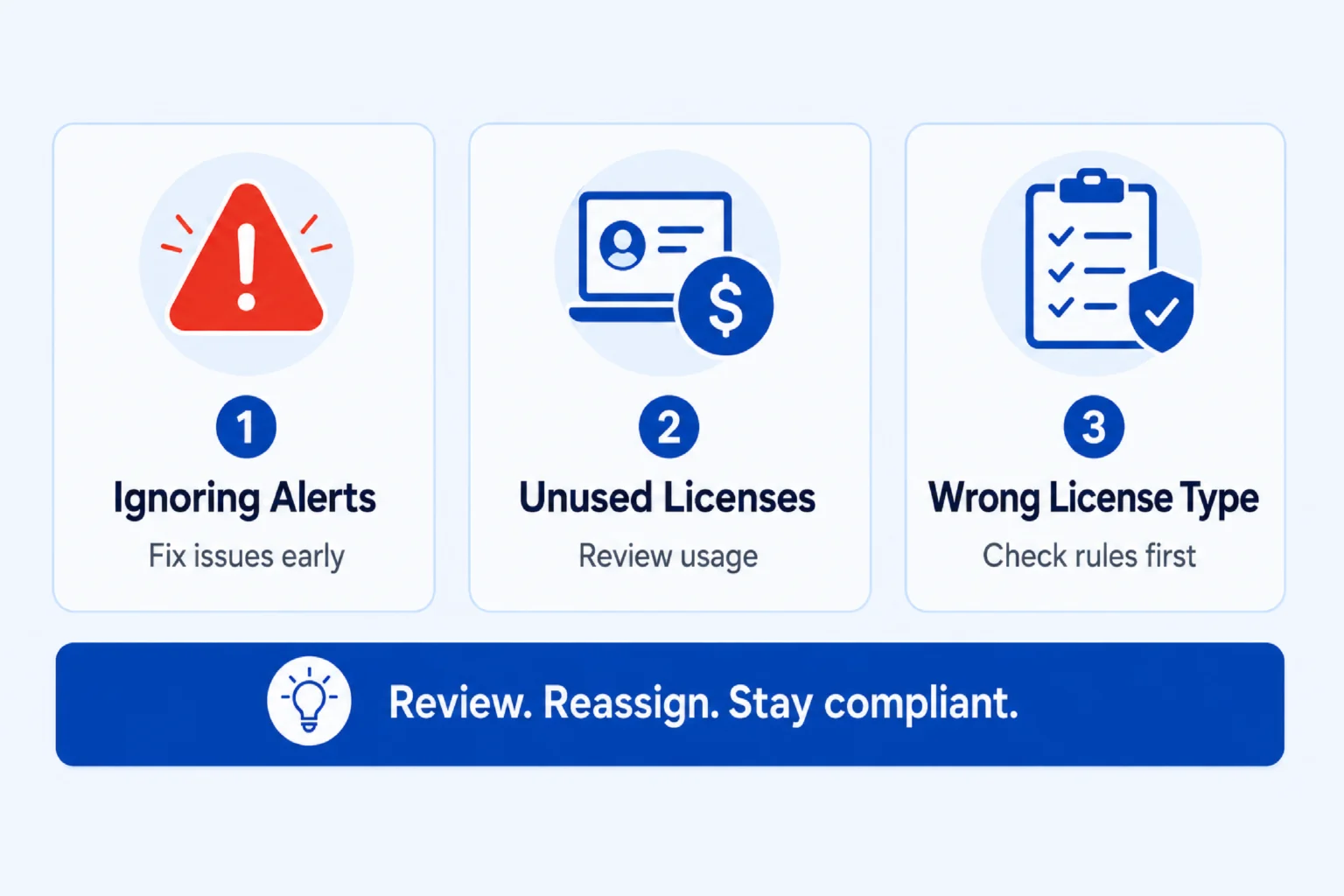
We frequently help clients correct licensing issues before they become expensive or risky. Here are the most common mistakes and clear steps to resolve them:
1. Ignoring Licensing or Activation Notifications
Microsoft often sends alerts when it detects activation problems or potential non-compliance. If you receive such an alert, we recommend that you immediately follow the instructions in the notification or run the Microsoft activation troubleshooter. If unresolved, contact your authorized Microsoft reseller or licensing partner without delay.
2. Overpaying for Unused Licenses
This is extremely common after team changes, completed projects, or rapid growth. This is why you should review your license usage monthly or quarterly. Remove or reassign unused licenses and shift variable users to month-to-month plans to avoid paying Microsoft licensing costs.
3. Misunderstanding Volume Licensing Rules
Especially with Windows, many people buy upgrade licenses thinking they are full licenses, or install software on more devices than they are entitled to. Thus, always verify license type and prerequisites with a qualified partner before deployment.
What factors Should Businesses Consider When Choosing a Microsoft License?
Choosing the right Microsoft licenses becomes significantly easier and safer when you work with an experienced partner. Microsoft themselves recommend its users to reach out to a trusted Microsoft partner in the following situations:
- You are confused between different license types (especially Windows upgrade licenses vs full licenses).
- Planning to move from Business to Enterprise plans or significantly scaling user numbers.
- Integrating multiple Microsoft clouds (Microsoft 365 + Dynamics 365 CRM/ERP + Power Platform).
- Managing a mixed workforce (office staff + frontline workers).
- Operating in regulated industries or handling sensitive client data.
- You want to optimize costs through smart mixing of annual and monthly subscriptions.
- You’ve received any licensing or compliance notification from Microsoft.
- You lack internal expertise to evaluate security, compliance, or Power Platform licensing needs.
A reliable partner will conduct a proper needs assessment, uncover hidden savings, prevent compliance risks, and design a licensing strategy that actually supports your business goals.
Final Thoughts
Choosing the right Microsoft license is not a one-time purchase — it’s a strategic decision that directly impacts your organization’s productivity, security, cost efficiency, and ability to grow. Whether you are a startup building your foundation, an established business integrating Dynamics 365 and the Power Platform, or a frontline-heavy organization looking for smart optimization, the right licensing mix can deliver significant savings while reducing risk. While a small licensing mistake can easily cost thousands — or create compliance headaches, the right guidance can unlock both savings and better business outcomes.
As a trusted Microsoft partner, with partnerships with Pax8 and Crayon, Soluzione offers independent, practical licensing assessments tailored to your exact business needs. Reach out to our team and let’s build a strategy that truly works for you.
Read More: https://www.solzit.com/blog/
Frequently Asked Questions
How can businesses optimize Microsoft licensing costs?
Cost optimization is one of the biggest benefits we deliver for our clients. Key strategies include:
- Mix annual commitments (for core users) with month-to-month licenses (for variable or seasonal staff).
- Match license tiers to actual user needs instead of giving everyone the highest plan.
- Regularly audit and remove unused licenses.
- Use Frontline plans (F1/F3) for deskless workers instead of full plans.
- Start with trials and month-to-month subscriptions when testing new features or solutions.
- Bundle Microsoft 365 with Dynamics 365 or Power Platform where entitlements overlap.
Can multiple Microsoft services be bundled under one license?
Yes, but with important nuances. Microsoft 365 plans serve as the foundation and include rights to use certain features of other services. For example:
- A Microsoft 365 E3/E5 license gives base access for Power Platform and some Dynamics 365 capabilities.
- However, heavy usage of Dynamics 365 CRM/ERP or advanced Power Platform features usually requires additional attach licenses or dedicated licenses.
Why should businesses work with a Microsoft partner for licensing?
Working with an authorized Microsoft partner like Soluzione provides several advantages:
- Access to better pricing and exclusive programs.
- Unbiased advice based on your actual business needs rather than a single product.
- Proper license guidance to avoid compliance risks.
- Faster support for plan changes, true-ups, and migrations.
- Expertise across the full Microsoft stack (M365, Dynamics 365, Power Platform, Security, etc.).
How can a Microsoft partner help reduce licensing costs and complexity?
A good Microsoft partner simplifies everything by:
- Conducting a thorough licensing assessment.
- Designing a tailored mix of plans instead of a “one-size-fits-all” approach.
- Identifying unused entitlements and over-licensed users.
- Recommending the right balance between Business vs Enterprise and full vs Frontline plans.
- Helping you plan for future needs (AI, growth, new modules) without expensive surprises.
- Managing renewals and optimizations on an ongoing basis.