If you’re running Microsoft Dynamics 365 CRM, notifications play a critical role in keeping teams aligned with new leads, case escalations, opportunity stage changes, approvals, and follow-ups. Normally, it’s important in any organization that the right people are notified at the right time. But when this is missed, things become complicated as teams have to rely on Power Automate flows, classic workflows, or custom plugins to manage notifications.
Honestly, teams don’t necessarily need to involve coding or complex automation layers to manage Dynamics 365 CRM notifications. With the right approach, business users can configure event-based triggers, apply precise filters, and send structured email notifications directly from within CRM.
In this blog, we’ll walk through a practical, no-code way to manage Dynamics 365 CRM Notifications.
Why Simplifying Notifications in Dynamics 365 CRM Matters?
Notifications bridge the gap between data and action. Without them, changes often go unnoticed until someone manually checks views or reports — which is neither efficient nor scalable.
Microsoft Dynamics 365 CRM alerts and notifications can be surfaced in multiple ways, such as via native in-app alerts, workflow-triggered emails, Power Automate automations, and template-based notifications. But these ways to manage notifications have several practical limitations.
For example, in-app notifications require specific configuration and are limited to individual users unless duplicated logic is applied. Power Automate flows work well initially, but become harder to manage as conditions grow and business rules evolve. However, given the limitations, it’s important to keep the team promptly updated.
When notifications are timely and relevant, teams respond faster, collaborate better, and spend less time manually checking dashboards or chasing updates. This is why simplifying notification management matters. When notifications are easy to configure, precisely filtered, dynamically routed to the correct recipients, and delivered using structured email templates — without heavy automation layers — CRM becomes more reliable, more actionable, and easier to govern.
To achieve this without relying on coding, workflows, or fragmented automation setups, a more controlled, CRM-native approach is needed. Notify365 is designed specifically for that purpose.
What is Notify365?
Notify365 is an easy-to-configure, rule-based notification management D365 add-on built specifically for Dataverse environments. It allows business users to configure and manage email notifications directly inside Dynamics 365 — without relying on Power Automate flows, classic workflows, or custom plugins.
Instead of building layered automation outside the system, Notify365 keeps everything within CRM. Users can define triggers on create, update, or delete events, apply precise filtering conditions, select dynamic recipients from related records (owners, teams, lookups), and send structured emails using existing CRM templates — all through a controlled, no-code interface.
What makes it different is not just that it sends notifications, but that it centralizes how they are configured and tracked. Each notification rule is visible, manageable, and logged, giving teams clarity over what is sent, when, and why.
How Does Notify365 Manage Dynamics 365 CRM Notifications?
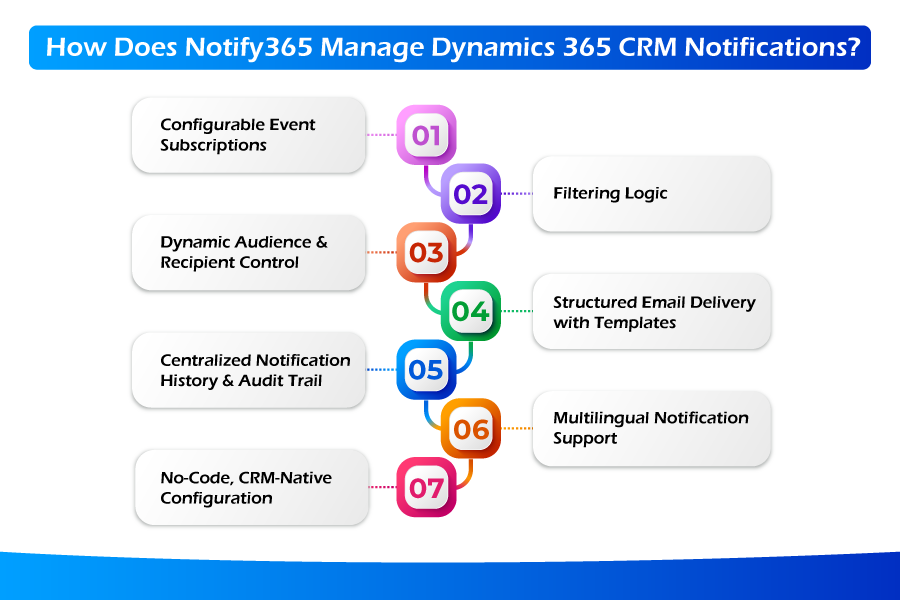
Notify365 simplifies notification management by keeping configuration structured, controlled, and entirely inside Dynamics 365. Here’s how it works in practice:
1. Configurable Event Subscriptions
Notifications can be triggered based on real CRM events — record Create, Update, Delete, or specific field-level changes. Instead of sending alerts on every modification, you define exactly which event or condition should initiate communication.
2. Filtering Logic
Notify365 allows you to apply detailed filtering logic using FetchXML — similar to Advanced Find or saved views. This ensures notifications are sent only when meaningful business conditions are met.
For example: notify leadership only when an Opportunity’s Estimated Value exceeds a defined threshold and reaches a specific stage. This level of precision reduces unnecessary alerts and improves relevance.
3. Dynamic Audience & Recipient Control
Recipients are not limited to static email addresses. Notify365 dynamically pulls recipients from record relationships, such as:
- Record owner
- Lookup fields (e.g., Account Owner, Case Manager)
- Teams
- Security roles
- Related entities
You can configure To and CC logic based on data conditions, ensuring notifications adapt automatically as ownership or assignments change.
4. Structured Email Delivery with Templates
Notifications leverage existing Dynamics 365 email templates with dynamic placeholders, allowing consistent, branded communication. Since templates are managed within CRM, content stays aligned with organizational standards.
Optional acknowledgement emails can also be configured to confirm receipt or inform stakeholders that an action has been triggered.
5. Centralized Notification History & Audit Trail
Each notification is logged within CRM, providing visibility into what was sent, when it was triggered, and who received it. This supports operational clarity, compliance requirements, and easier troubleshooting.
6. Multilingual Notification Support
For organizations operating across regions, notification messages can be configured to support multiple languages, ensuring communication remains relevant to different user groups.
7. No-Code, CRM-Native Configuration
All rules are configured through an intuitive interface inside Dynamics 365. Business users can create, test, modify, activate, or deactivate notification rules without writing code, importing solutions, or raising development requests.
Changes are applied directly within the CRM environment, maintaining governance and reducing technical dependency.
Use Cases: Who Can Benefit from Notify365, A No-Code Notification Solution in Dynamics 365
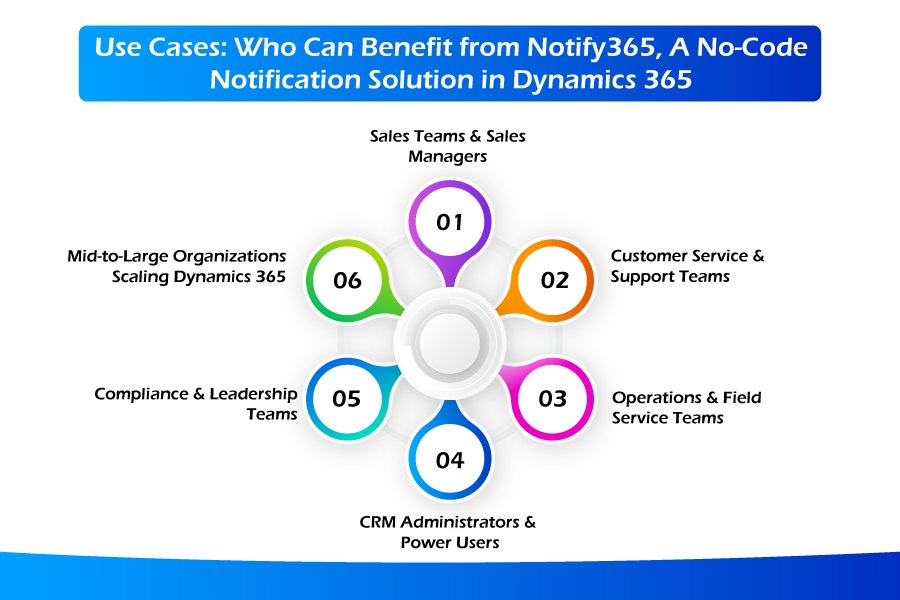
If you’re using Dynamics 365 Sales, Customer Service, Field Service, or custom model-driven apps, managing notifications without coding can significantly improve responsiveness and operational control. Here’s where no-code notification solutions like Notify365 make a measurable difference:
1. Sales Teams & Sales Managers
Sales environments depend heavily on timing. For example:
- A high-value opportunity remains in the “Proposal” stage for more than a defined period.
- A lead is reassigned to a new owner.
- A deal crosses a specific revenue threshold.
Automated notifications can alert the opportunity owner and their manager with full record context using structured email templates. Faster visibility supports quicker interventions and stronger pipeline control.
2. Customer Service & Support Teams
Notify365 allows alerts to be dynamically routed to the assigned rep, team lead, or related account owner based on record relationships. This reduces response delays and improves service consistency.
3. Operations & Field Service Teams
Operational processes often involve frequent record updates — work orders, appointment changes, inventory adjustments, or dispatch modifications. Configurable event-based notifications help ensure technicians, supervisors, or coordinators are informed immediately, reducing coordination gaps.
4. CRM Administrators & Power Users
For CRM admins, Notify365 removes dependency on development cycles. Instead of creating or maintaining complex flows, administrators can define precise conditions, apply logical` filters, and manage recipient logic directly inside CRM.
5. Compliance & Leadership Teams
In regulated industries or high-accountability environments, having a centralized notification history is important. Being able to track who was notified, when, and under what conditions provides better governance and audit readiness.
6. Mid-to-Large Organizations Scaling Dynamics 365
As organizations grow, notification complexity increases. A structured, no-code notification framework helps restore trust in the system by making alerts precise, maintainable, and transparent.
Dynamics 365 CRM Notifications Simplified
Staying informed in real time is not optional for modern businesses. In many Dynamics 365 environments, notification logic slowly becomes dependent on developers, workflows, or layered Power Automate flows. What starts as a simple requirement eventually turns into multiple automation rules, maintenance overhead, and coordination for every small change. Over time, this adds complexity rather than control.
Notify365 ensures that managing CRM notifications should not require development cycles or fragile automation chains. This is a more structured, no-code approach that allows business users to define clear rules, apply precise filtering, and manage recipients directly inside the system.
You can connect with the Soluzione team for deeper insights or start with a free trial to evaluate how it fits your environment.
Read More: https://www.solzit.com/blog/
Frequently Asked Questions
Is it possible to send email alerts in Dynamics 365 without using Power Automate?
Yes. Email alerts in Dynamics 365 can be configured without Power Automate by using workflow-based approaches or CRM-native notification tools such as Notify365.
What are the limitations of using Power Automate for CRM notifications?
Power Automate is powerful, but for notification-heavy scenarios, flows become increasingly complex as business logic grows, tracking becomes difficult, and maintenance becomes more complex.
How do no-code notification solutions work in Dynamics 365 CRM?
No-code notification solutions work by allowing users to configure:
- Event triggers (create, update, delete, or field-level changes)
- Conditional filtering logic
- Dynamic recipients pulled from record relationships
- Email templates with dynamic content
- Notification history tracking
All configuration is handled through a user interface inside Dynamics 365, making it accessible to CRM admins and power users without writing code.
What types of events can trigger notifications in Dynamics 365?
Notifications in Dynamics 365 can typically be triggered by three events such as:
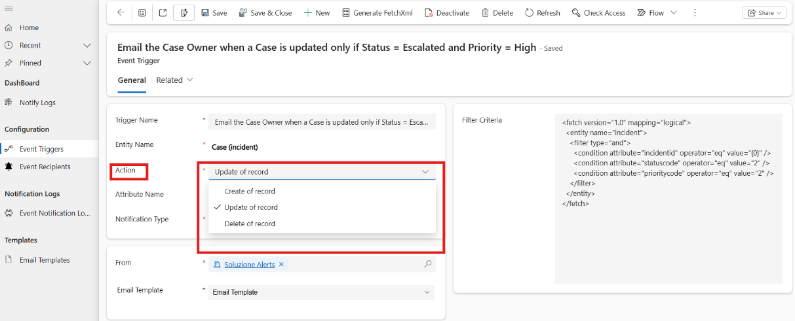
- Create- when a new record is created.
- Update- When an existing record is modified.
- Delete-When a record is deleted.
With precise filtering logic, notifications can be configured to trigger only when defined business conditions are met, reducing unnecessary alerts.