Most teams working across multiple systems don’t immediately notice the problem—but they experience it every day. Sales works in Microsoft Dynamics 365 CRM. Finance relies on Xero. Both systems function well individually, but when they don’t stay aligned, the gap starts showing up in operations—manual updates, delayed payment visibility, mismatched records, and constant back-and-forth between teams.
This is why growing organizations start exploring options for CRM integration with accounting software ended up opting for either ready-made or custom solutions.
But what actually changes once you integrate Xero with Dynamics 365 CRM? Does the integration really solve these gaps, or does it just add another layer to manage? And more importantly, is it even worth it for your business?
This blog focuses on the impact businesses experience due to Dynamics 365 CRM and Xero integration.
- What Gets Synced Automatically with Dynamics 365 CRM and Xero Integration?
- What Actually Changes with Dynamics 365 CRM and Xero Integration?
- Real-World Results From Xero Dynamics 365 Integration
- How the Integration Works Without Coding
- The Capabilities of the Soluzione Xero Accounting Connector
- Final Thoughts
- Frequently Asked Questions
What Gets Synced Automatically with Dynamics 365 CRM and Xero Integration?
Once a proper integration is live, most solutions enable two-way synchronization so data flows between Dynamics 365 CRM and Xero without manual effort.
Integrations typically handle two main categories of data:
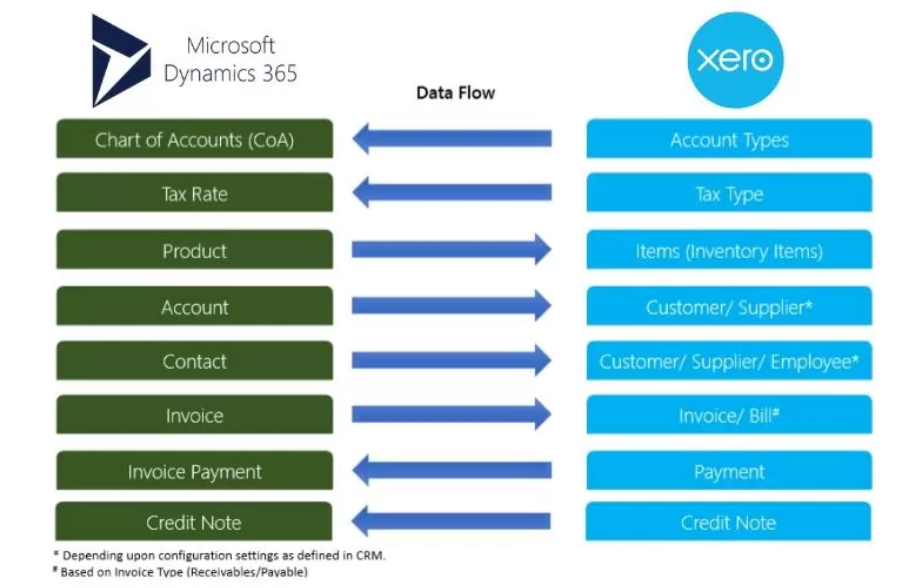
Dynamics CRM – Xero Connector Overview
- Master Data: Tax Rates, Chart of Accounts, and sometimes Branding Themes stay consistent across both systems. This helps ensure all transactions are built on accurate foundational information.
- Transactional Data: Accounts, Contacts, Invoices, Payments (including pre-payments), and Credit Notes usually move automatically in both directions.
This clear separation means your core records remain reliable while day-to-day business transactions stay up to date.
What Actually Changes with Dynamics 365 CRM and Xero Integration?
Here’s what businesses typically experience once the Dynamics 365 CRM Xero Connector is implemented:
1. No More Duplicate Data Entry
Invoices created in Dynamics 365 are automatically synced to Xero. Finance teams no longer need to re-key the same information manually.
2. Instant Visibility into Payments
Payments and Credit Notes recorded in Xero automatically appear in Dynamics 365. Sales teams can finally see the real payment status of invoices without constantly asking the finance team.
3. Better Customer Record Accuracy
Accounts and Contacts stay synchronized. You no longer face situations where one system has outdated contact details or mismatched customer information.
4. Clear Synchronization Visibility
You can easily track sync status and history, so teams know what has been updated and when.
5. Accurate Handling of Payments & Credit Notes
When payments or credit notes are synced from Dynamics 365 to Xero, they are properly reflected against their linked invoices. This maintains complete financial accuracy and avoids reconciliation issues.
6. Flexible Control Through Field Mapping
Most integrations allow you to control how records (such as Accounts and Contacts) map to Xero entities like Customers or Suppliers, so the integration fits your business process.
Real-World Results From Xero Dynamics 365 Integration
When Dynamics 365 CRM and Xero start working together through a proper integration, the improvements go far beyond just syncing data. Here’s what businesses typically experience in day-to-day operations:
– Significant Time Savings
Teams often report cutting down several hours per week on manual data entry and follow-ups. Finance no longer needs to re-key invoices, while sales teams stop chasing payment confirmations. This freed-up time allows staff to focus on higher-value activities like customer engagement and business growth.
– Faster Month-End and Financial Close
With accurate, real-time data flowing between systems, reconciliation becomes much smoother. Fewer discrepancies mean shorter month-end cycles, reduced stress on the finance team, and quicker access to reliable financial reports.
– Fewer Errors and Credit Notes
Manual data handling is one of the biggest sources of mistakes. Automated synchronization greatly reduces errors in invoices, payments, and customer records, leading to fewer credit notes, less rework, and cleaner books.
– Improved Collaboration Between Sales and Finance
The constant back-and-forth (“Has this invoice been paid?” or “Where’s the latest customer details?”) almost disappears. Both teams work from a more unified view of the customer, resulting in better coordination and fewer misunderstandings.
– Stronger Customer Experience
Sales and account managers can speak confidently with customers because they have up-to-date payment and account information directly in Dynamics 365. This leads to more professional interactions, timely follow-ups, and higher customer satisfaction.
– Better Decision Making
Leaders gain clearer visibility across sales pipelines and financial health without waiting for manual reports. Real-time insights help identify cash flow issues early, spot trends faster, and make more informed strategic decisions.
How the Integration Works Without Coding
The Soluzione Xero Accounting Connector Add-on is built as a native solution for Dynamics 365 CRM. You install it directly inside your environment, configure the connection to your Xero organization, set up field mappings, and define your sync preferences.
There is no custom coding, no complex scripting, and no need for developers in most cases. The entire setup is designed to be straightforward and user-friendly.
It is a secure, robust, and reliable cloud-hosted service to synchronize and link customer records, invoices, and payments between Dynamics 365 CRM and Xero, ensuring that all the information is up-to-date, saving you time, money, and improving your customer relationships.
The Capabilities of the Soluzione Xero Accounting Connector
1. Flexible Field Mapping for Accounts and Contacts
You can easily define field mappings to decide what a Dynamics 365 Account or Contact record becomes in Xero — for example, a Customer, Supplier (Vendor), Employee, or any other supported type. This ensures the integration aligns with your specific business processes.

Xero Field Mapping
2. Default Mapping Behavior
If no specific mapping value is found for an Account or Contact, the system safely defaults to creating it as a “Contact” in Xero. It will not automatically create a Customer or Supplier in such cases.
3. Add and Sync on Creation
Contacts and Accounts can be added and synchronized to Xero at the time of creation in Dynamics 365.
4. Xero Details Section for Synchronization Status

On the Account and Contact entities in Dynamics 365, you’ll find a dedicated Xero Details section. This allows you to quickly check the synchronization status, including whether the sync was successful and when it last occurred.
5. Automatic Invoice Synchronization
Invoices created in Dynamics 365 are automatically synced to Xero. Once the synchronization completes, the system updates the Status and “Last Synced On” date and time on the invoice record.
6. Handling of Write-in Products
When using write-in products on an invoice, the Chart of Accounts (COA) and Tax Rate must be added manually in Xero.
7. Payments and Credit Notes Synchronization

Payments (including pre-payments and batch payments) and Credit Notes are synchronized as part of transactional data. These records typically sync from Xero to Dynamics 365 on a day-to-day basis.
8. Accurate Reflection of Payments and Credit Notes

When payments are synced from Dynamics 365 to Xero, they are properly reflected against the linked invoice in Xero. Similarly, when Credit Notes are synced from Dynamics 365 to Xero, they are correctly applied to the respective linked invoices.
This combination of flexible mapping, clear visibility through the Xero Details section, and accurate handling of transactional data helps maintain consistency and reduce manual reconciliation efforts between your CRM and accounting system.
Final Thoughts
Bringing software systems together is all about making things easier for your teams and improving how your business runs. When done correctly, you can really see the benefits in everyday operations. Teams can work faster, make fewer mistakes, and month-end tasks are completed more quickly. Plus, both sales and finance teams can access the same, trustworthy information about customers.
The true benefit comes from how much simpler daily tasks become, allowing your team to focus more on growing the business instead of fixing data problems.
The Soluzione Xero Accounting Connector makes this easy without the need for complicated setups. It provides a straightforward and reliable way to connect your customer management software with your accounting system. If you want to see how it works, just reach out to us for a free demo and trial—don’t wait!
Read More: https://www.solzit.com/blog/
Frequently Asked Questions
Does the connector support bi-directional sync?
Yes. It provides full two-way synchronization for Accounts, Contacts, Invoices, Payments, Credit Notes, and master data.
How do you track whether sync is working?
A dedicated Xero Details section on records shows Status, “Last Synced On” timestamp, and Success/Failure remarks.
Can we control how data maps between the systems?
Yes. Flexible field mapping allows you to decide how Accounts and Contacts should appear in Xero (Customer, Supplier, Employee, or default Contact).
Are payments and credit notes properly linked to invoices?
Yes. Payments and credit notes are correctly reflected against their linked invoices in Xero, maintaining financial accuracy.
Is any coding required for this integration?
No with ready-made connectors, such as the one offered by the Soluzione Xero Connector, is a complete no-code solution designed for easy setup and maintenance.