Artificial intelligence (AI) is no longer a futuristic concept; it’s becoming an essential part of the modern workplace. And Microsoft 365 Copilot brings the power of AI directly into the tools that employees use every day, helping them work more efficiently and accomplish more in less time.
It serves as an intelligent assistant that automates routine tasks, streamlines workflows, and provides valuable insights from business data.
By integrating seamlessly with Microsoft 365 applications, Copilot allows teams to work faster, smarter, and with greater accuracy.
In this blog, we will explore how Microsoft Copilot, one of the most powerful AI tools, is empowering daily business operations.
- What Is Microsoft Copilot?
- How Microsoft Copilot Works
- Microsoft Copilot Overview: Key Features and Business Impact
- How Microsoft Copilot Helps in Everyday Business Tasks
- Copilot in Dynamics 365
- Copilot in Microsoft Power Platform
- How Microsoft Copilot Services Deliver Long-Term Business Value
- The Future of Work with Microsoft Copilot
- Conclusion
- Frequently Asked Questions
- References
What Is Microsoft Copilot?
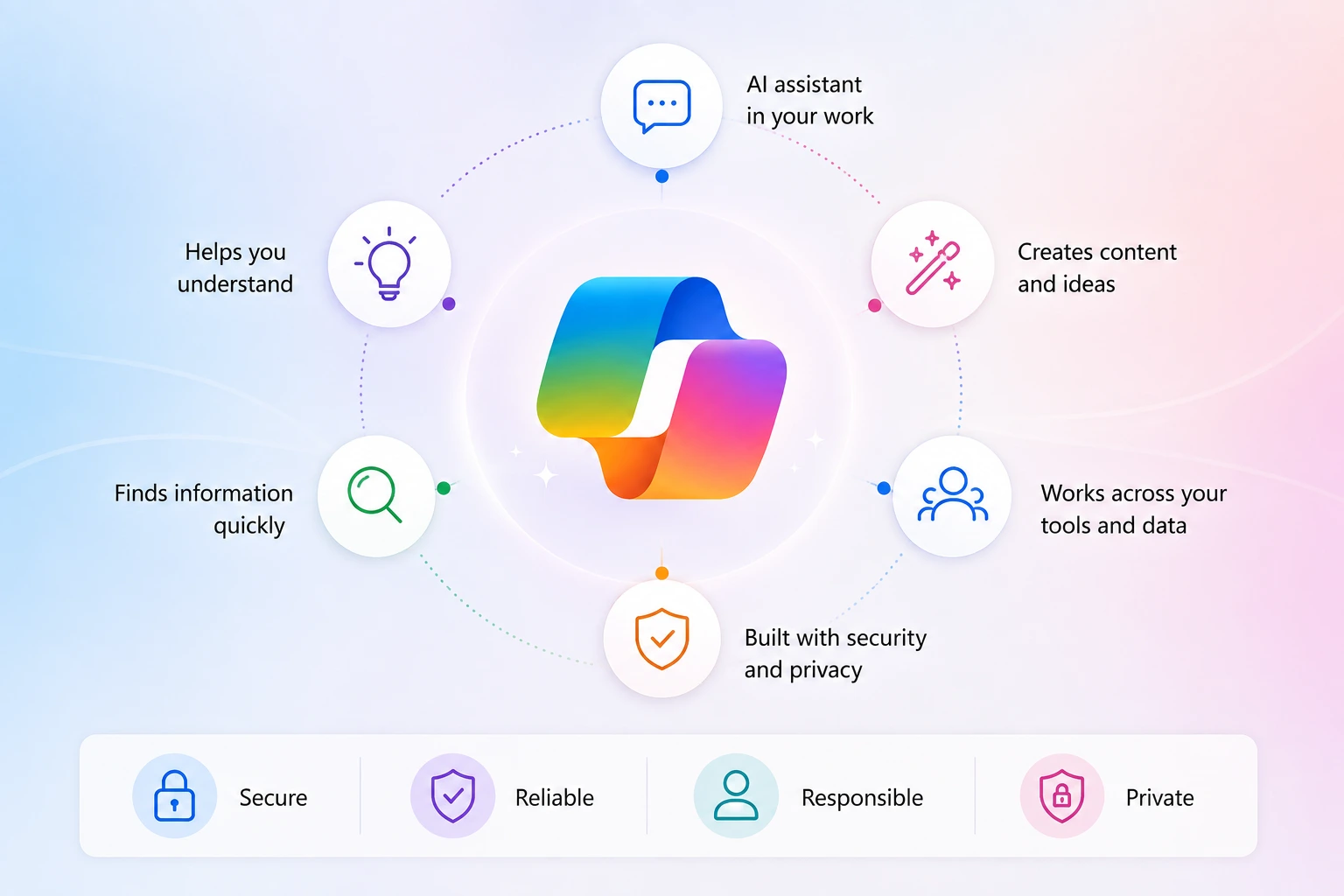
Microsoft Copilot is an intelligent AI system that is integrated across the entire Microsoft ecosystem, including Teams, Outlook, Excel, Word, PowerPoint, and Dynamics 365.
The overall solution is powered by large language models (LLMs) and organizational data. The tool helps you complete tasks faster, generate insights, and automate workflows using natural language prompts.
Microsoft Copilot was officially launched on November 1, 2023, but it was available only for enterprise customers. Further, it was launched as Bing Chat on February 7, 2023, and then Microsoft 365 Copilot was officially launched on March 16, 2023.
Today, over 60% of Fortune 500 companies have already adopted Copilot, and over 77% of enterprise businesses have seen growth in employee productivity.
How Microsoft Copilot Works
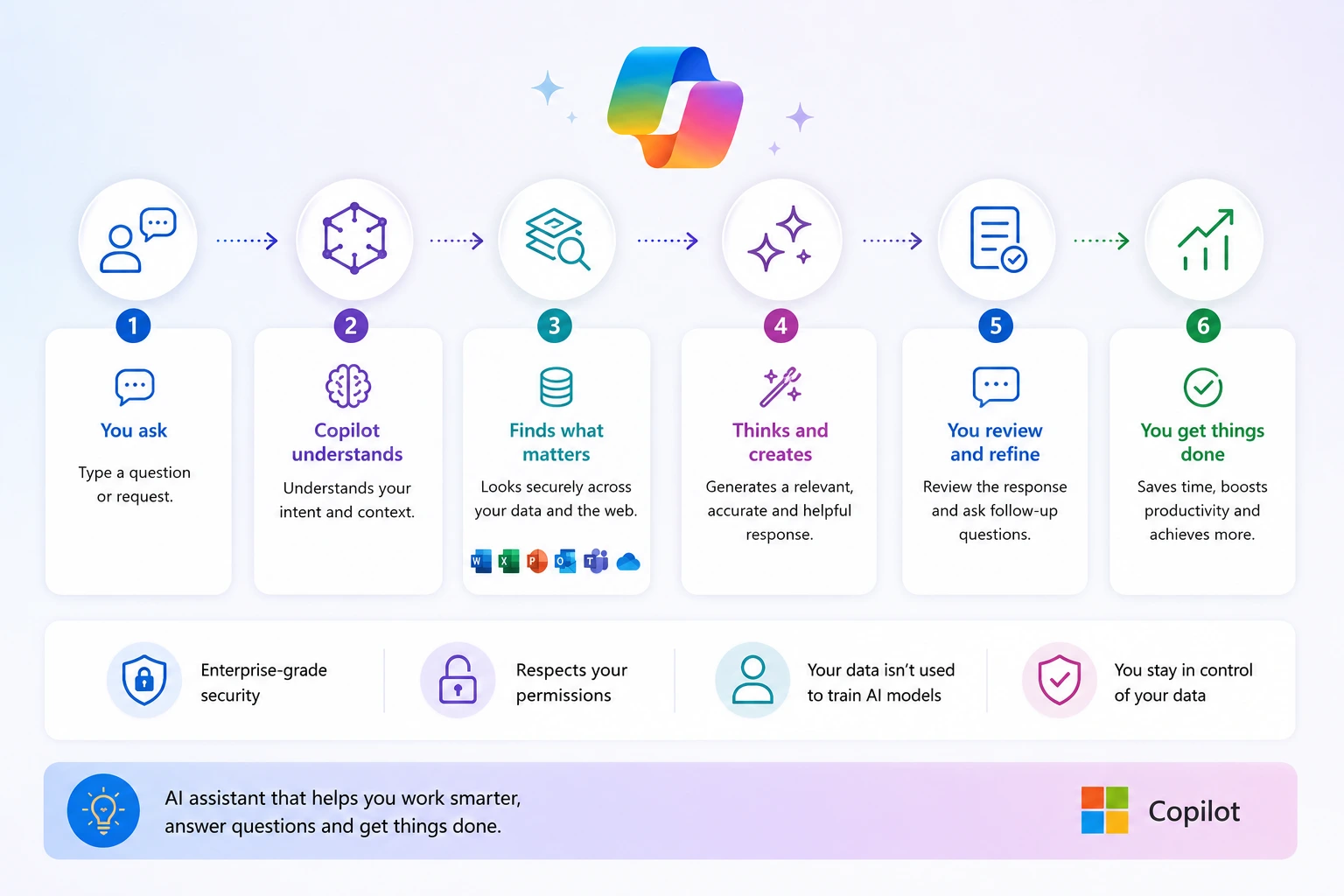
Microsoft Copilot is not like a traditional automation tool. It understands the context, learns, and assists users in real-time. By leveraging AI technology, Copilot supports users in drafting professional documents, analyzing complex data, and offering endless other features. That’s why Copilot is often called a valuable companion across businesses.
This AI tool uses Natural Language Processing (NLP) to understand your commands. With your controls and contextual understanding, it delivers actionable results and performs tasks in real time. Let’s have a comprehensive look at how it works.
- Natural Language Interaction: NLP makes user interaction easy and eases the ERP software’s technical complexity, making it available for users with non-tech backgrounds.
- Contextual Understanding: Microsoft Copilot reads, evaluates, and understands the data saved on Microsoft Business Central. Further leveraging those insights and knowledge, it presents the required information to the user.
Also Read: What Is Dynamics 365 Copilot and Why Is It Important for Business
Microsoft Copilot Overview: Key Features and Business Impact
Thinking about what Microsoft Copilot can actually do? Here is a table showcasing the real-life Microsoft Copilot features:
| Feature | Capability | Business Impact |
| AI-Powered Content Creation | Generates, rewrites, summarizes, and refines emails, documents, presentations, and reports directly within Microsoft 365 applications. | Reduces time spent on content creation, improves consistency, and accelerates communication workflows. |
| Intelligent Meeting Management | Captures meeting discussions, generates summaries, highlights key decisions, and recommends action items in Teams. | Enhances collaboration, improves accountability, and ensures critical information is not missed. |
| Advanced Data Analysis | Analyzes large datasets in Excel, identifies trends, creates visualizations, and provides natural language insights. | Enables faster decision-making and helps teams to gain actionable business intelligence insights without advanced analytical expertise. |
| Workflow & Task Automation | Automates repetitive activities such as note-taking, data retrieval, document formatting, and routine administrative tasks. | Increases operational efficiency, reduces manual effort, and allows employees to focus on higher-value work. |
| Contextual Search & Knowledge Discovery | Retrieves relevant information across Teams, Outlook, SharePoint, OneDrive, and organizational documents using natural language queries. | Improves knowledge accessibility, reduces time spent searching for information, and supports faster problem-solving. |
| Enterprise Security & Compliance Integration | Operates within Microsoft’s security, compliance, and permission frameworks while respecting organizational data policies. | Helps organizations to leverage AI responsibly while maintaining governance, security, and regulatory compliance. |
| Cross-Application Assistance | Works seamlessly across Word, Excel, PowerPoint, Outlook, Teams, and other Microsoft 365 applications. | Creates a unified AI experience that boosts productivity across departments and business functions. |
These capabilities make Microsoft Copilot for business a game-changing tool for SMBs and enterprises alike.
How Microsoft Copilot Helps in Everyday Business Tasks
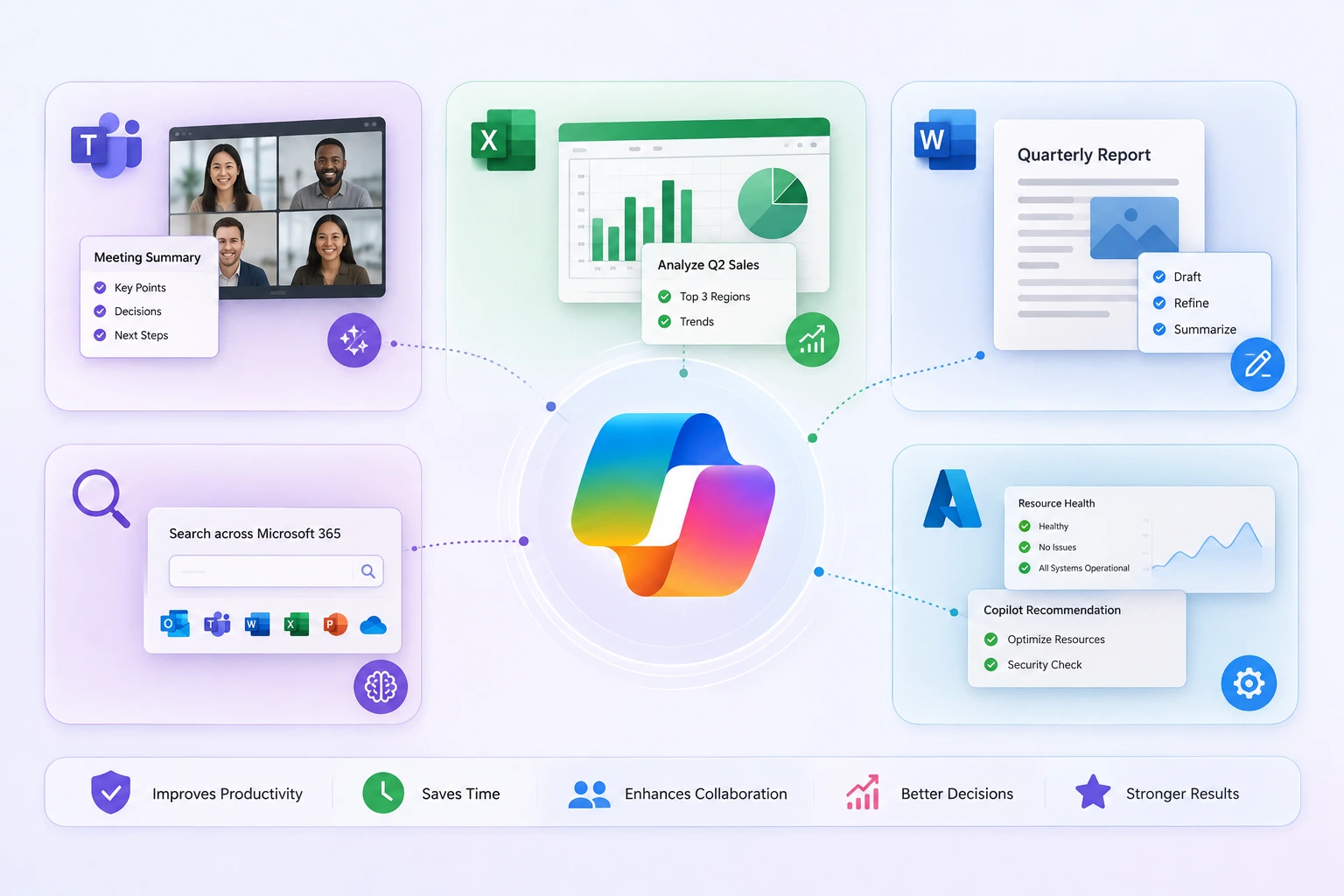
Microsoft Copilot proves itself by reshaping routine business tasks. By working along with other Microsoft solutions, Copilot helps employees to complete their tasks faster.
Making Meetings More Productive
During meetings, employees need to take notes, summarize discussion points, and more. Microsoft Copilot can help you simplify the process by automatically capturing meeting conversations, generating summaries, identifying key discussion points, and highlighting the next steps within Microsoft Teams.
If an employee joins a meeting late, they can simply ask Copilot for a summary of what has been discussed, instead of interrupting the conversation. This ensures everyone stays informed while improving productivity and connectivity across teams.
Faster Data Analysis and Reporting
In Excel, working with large datasets traditionally requires an expert along with significant manual effort. But Microsoft Copilot makes data analysis easier and allows users to interact with their data with natural language prompts.
For example, a business analyst can use Copilot to analyze the Q2 sales data and isolate the top three underperforming regions, discover trends, compare performance metrics, or generate visual charts showing the variance.
Within seconds, the code is executed at the backend, and the visual output is delivered on the screen.
Creating Business Documents in Less Time
Creating reports, proposals, presentations, and business documentation can be time-consuming. Copilot helps streamline the overall content creation process by generating drafts based on existing information, such as meeting notes, emails, or internal documentation.
Moreover, within Microsoft Word, users can quickly create structured documents, refine content, adjust tone, and generate summaries. This allows your teams to produce high-quality business content more efficiently while maintaining consistency across documents.
Improved Knowledge Discovery
Employees often spend a lot of time searching through emails, chat conversations, documents, and shared files to find the information. And Copilot helps to eliminate this challenge by retrieving relevant information across Microsoft 365 applications.
Instead of manually searching through multiple sources, users can simply ask a query and receive relevant answers. This reduces the overall time spent on searching and also improves the overall productivity.
Simplifying Cloud and IT Management with Azure Copilot
Microsoft Copilot also helps IT teams in Azure management. By using natural language prompts, administrators can quickly troubleshoot issues, investigate security issues, and monitor resources without navigating complex dashboards.
By providing intelligent recommendations and access to critical insights, Copilot helps organizations to improve cloud operations, enhance security, and reduce the time spent on routine administrative tasks.
Copilot in Dynamics 365
While Microsoft Copilot offers clear benefits across everyday Microsoft 365 applications, its impact becomes even more powerful when integrated with Dynamics 365. This is where businesses can experience better output from their customer, sales, finance and operational data.
| Dynamics 365 Module | How Copilot Helps | Business Outcome |
| Sales | Generates lead summaries, drafts customer emails, recommends next actions, and tracks deal progress. | Sales teams spend less time on administrative tasks and more time on building customer relationships and closing deals. |
| Customer Service | Suggests responses, summarizes customer interactions, and quickly retrieves relevant knowledge-based articles. | Faster issue resolution, improved agent productivity, and a better customer experience. |
| Finance & Operations | Automates data analysis, highlights exceptions, summarizes financial information, and also assists with routine processes. | Improved accuracy, faster financial reporting, and more informed decision-making. |
| Supply Chain Management | Provides demand forecasting insights, monitors inventory levels, and identifies potential supply chain risks. | Better inventory planning, reduced disruptions, and improved operational efficiency. |
| Customer Insights (Marketing) | Analyzes customer behavior data, suggests audience segments, generates personalized campaign content, and predicts customer churn. | More targeted marketing campaigns, higher engagement rates, and improved customer retention. |
| Field Service | Recommends optimal scheduling for technicians, predicts equipment failures using IoT data, and auto-generates service reports. | Reduced downtime, faster on-site resolution, lower operational costs, and higher first-time fix rates. |
| Project Operations | Summarizes project status, flags budget overruns and timeline risks, and assists with resource allocation recommendations. | Better project visibility, proactive risk management, and improved on-time delivery. |
| Human Resources | Assists with drafting job descriptions, summarizing employee performance data, and answering HR policy queries via natural language. | Faster hiring cycles, reduced HR administrative load, and a better employee experience. |
By combining AI with your CRM and ERP data, Copilot helps your teams to work more efficiently, uncover valuable insights, and make faster decisions.
Check This: Microsoft’s Unified Copilot For Power Apps, D365, And MS365
Copilot in Microsoft Power Platform
Microsoft Copilot doesn’t stop at Dynamics 365 and Microsoft 365 — it extends deeply into the Power Platform, empowering both developers and non-technical business users to build, automate, and analyze with greater speed and confidence.
| Power Platform Tool | How Copilot Helps | Business Outcome |
| Power Apps | Generates app layouts and screens from natural language descriptions, suggests data connections, and writes Power Fx formulas automatically. | Faster app development with little to no coding knowledge required, reducing dependency on IT teams and accelerating digital transformation. |
| Power Automate | Builds automation flows from plain English prompts, recommends relevant triggers and actions, and helps debug failing workflows. | Business users can automate repetitive processes independently, cutting manual effort and reducing time-to-automation significantly. |
| Power BI | Generates reports and visuals from natural language queries, explains data trends in plain language, and suggests relevant KPIs for dashboards. | Faster, democratized access to business intelligence — decision-makers get insights without waiting on data analysts. |
| Power Pages | Assists in building external-facing web portals with AI-generated layouts, content suggestions, and form configurations. | Faster deployment of customer and partner portals with reduced development effort and consistent design quality. |
| Copilot Studio | Enables businesses to build custom AI-powered chatbots and agents using a low-code interface, with pre-built connectors to Microsoft 365 and Dynamics 365 data. | Organizations can deploy tailored AI assistants for customer service, HR, or internal helpdesks — without extensive AI or development expertise. |
Read This: Transform Business with Fusion Teams And Low-Code Copilot | Soluzione
How Microsoft Copilot Services Deliver Long-Term Business Value
The benefits of Microsoft Copilot are not limited to simply saving time on daily tasks. Companies that adopt it strategically often experience:
- Faster decision-making through quick access to insights and information
- Better employee productivity by reducing repetitive and time-consuming tasks
- Lower operational costs through automation and streamlined workflows
- Improved customer experiences with faster response times and more personalized interactions
- Greater innovation by allowing teams to focus on strategic and creative work
- Increases business agility through faster adaptation to changing market conditions
In short, Microsoft Copilot is not just a productivity tool; it’s a strategic investment that helps businesses to work smarter, respond faster, and prepare for the future.
Must Read: How Copilot & AI Agents Are Transforming LOB App Workflows
The Future of Work with Microsoft Copilot
Microsoft Copilot represents a significant shift in how people interact with technology. And, as Microsoft continues to expand its Copilot capabilities across its ecosystems, businesses can expect better automation, intelligence and personalization.
For instance:
- Proactive Problem Solving: Copilot might detect disruptions—like factory shutdowns or transport delays—and autonomously reroute shipments or source alternate suppliers before human intervention is needed.
- Content Personalization on Steroids: Marketing teams could leverage Copilot to dynamically generate campaign strategies personalized for micro-segments—down to individual customer journeys.
- Evolving Decision Frameworks: Instead of static dashboards, Copilot could learn decision-making preferences over time.
- Predictive Demand Management: AI could forecast consumer demand weeks ahead with precision, ensuring just-in-time inventory replenishment.
- Automated Deal Progression: AI might monitor contracts and communication to flag delays or push automated reminders, keeping deals on track.
- Dynamic Pricing Models: For businesses in retail or SaaS, Copilot could analyze demand elasticity and competitor behavior in real-time, enabling hyper-responsive pricing that maximizes revenue without sacrificing customer satisfaction.
- Intelligent Workforce Planning: Copilot could predict future skill gaps and recommend training programs or new hires to prepare for upcoming challenges.
Organizations that adopt this shift early will gain clear benefits through increased efficiency, better decision-making, and more consistent outcomes.
Conclusion
Microsoft Copilot is no longer a futuristic concept; it’s already helping businesses to work smarter every day. Its AI capabilities enable organizations to improve productivity, streamline operations, and make faster decisions.
However, realizing the full potential of Copilot is not limited to simply purchasing licenses. It needs the right strategy, implementation approach, and ongoing support to ensure successful adoption.
That’s where Soluzione can help. As a trusted Microsoft Copilot consulting and implementation partner, we help businesses to select the right licensing options, deploy Copilot effectively, and align AI capabilities with their business goals.
With our Microsoft Copilot consulting services, organizations can confidently begin their AI journey and see the results from day one.
Read More: Blogs & Articles
Suggested Reads
Copilot in Power BI: Transforming Data Analytics with AI
Integrating AI into Dynamics 365 for Sales Beyond Copilot
Microsoft Release Wave 2: How Copilot & AI are Transforming Dynamics 365 & Power Platform
What Copilot Agents Change for Real Automation in D365 & Power Platform?
New AI Innovations in Microsoft Dynamics 365, Power Platform & Copilot Studio
Frequently Asked Questions
Can Microsoft Copilot automate routine business processes?
Absolutely. Microsoft Copilot can help you to automate various business tasks. This reduces the manual efforts and improves overall operational efficiency. Furthermore, with tools like AI Copilot Studio, organizations can develop customized AI-powered workflows to handle processes like updating records, generating reports, and much more.
How does Copilot help analyze data and create insights in Excel?
Microsoft Copilot in Excel allows users to analyze large datasets with simple prompts. It can help you to identify trends, create formulas, generate charts, highlight anomalies, and summarize key findings even if you are a beginner. Furthermore, Copilot for Dynamics 365 businesses can get you better operational and financial insights for faster and data-driven decision-making.
What is the difference between Microsoft Copilot and Copilot for Business?
Microsoft Copilot is the broader name for Microsoft’s AI assistant across Microsoft products and experiences. It can refer to the general Copilot experience for individuals, web chat, Windows, Microsoft 365, Dynamics 365, GitHub, Security, Azure, and more.
Copilot for business usually refers to Microsoft 365 Copilot / Microsoft 365 Copilot Business used inside a company’s Microsoft 365 environment. It is designed for work use, connects with business data, and runs within Microsoft’s security, compliance, and permission framework.
Is Microsoft Copilot suitable for small and medium-sized businesses?
Microsoft Copilot is one of the most compatible AI assistants for small and medium-sized businesses. In fact, it is designed to meet the needs of businesses of all sizes. It deals with their operational inefficiencies and resolves them accordingly. Here are certain features that make Microsoft Copilot a perfect choice for small and medium-sized businesses-
- It is affordable to use.
- Easy to integrate, navigate, and use even without an IT team.
- Specific features help businesses to grow and scale.
What industries benefit the most from Microsoft Copilot & AI assistance?
Microsoft Copilot development covers a wider range of industries. Despite your industry background and business bottlenecks, Microsoft Copilot delivers results as per your expectations. There are customized features that cater to your requirements, making it the most suitable option for all industries.
Does Microsoft Copilot require technical expertise to implement?
Absolutely not, Microsoft Copilot API integration does not require considerable technical expertise to be used. It is developed on the principle of usability, which makes it accessible to individuals or businesses even without technical expertise. Here are some features that simplify its implementation.
- Pre-Integrated with Microsoft 365: Copilot works seamlessly with widely used tools like Word, Excel, PowerPoint, and Teams, ensuring users can get started quickly without learning new systems.
- Guided Assistance: The AI provides step-by-step instructions, reducing the need for technical expertise.
- Cloud-Based Operation: With minimal setup, businesses can begin using Copilot through the cloud, eliminating the need for complex on-premises installations.
For all types of businesses or enterprises with limited technical resources, it is the most convenient yet beneficial AI assistance.
What is the cost of using Microsoft Copilot for businesses?
Microsoft Copilot pricing depends on several factors, including the scope of use and the Microsoft 365 business subscription plan. Copilot is primarily available as a supplementary feature that must be added to either the Microsoft 365 Business or Enterprise Plan. However, additional charges would be calculated based on the number of users. However, this investment is a value for money as:
- Even after its associated charges, businesses utilize its service because of the high productivity, which is further enhanced by time savings and reduction of errors.
- While it's a key contributor to the growth of SMBs, automating repetitive processes and significantly improving decision-making abilities often outweigh the initial costs.
- For better understanding and precise information, a Microsoft Copilot consultant can provide the latest and most accurate pricing details tailored to the business's needs.
References
- https://www.velosio.com/blog/microsoft-copilot-use-cases/
- https://www.hp.com/in-en/shop/tech-takes/post/copilot-automation-productivity
- https://rabb-it.co.uk/blog/how-microsoft-copilot-is-changing-day-to-day-productivity-across-industries/
- https://www.microsoft.com/en-us/microsoft-365/blog/2026/04/13/bring-your-everyday-business-apps-into-the-flow-of-work-with-agents-in-microsoft-365-copilot/
- https://www.microsoft.com/en-us/microsoft-365-copilot/copilot-for-work
- https://learn.microsoft.com/en-us/microsoft-365/copilot/microsoft-365-copilot-overview
- https://www.longviewsystems.com/blog/everything-you-need-to-know-to-streamline-business-operations-with-microsoft-365-copilot/