When businesses look for software solutions, they also need to think about what approach works best for them. This includes considering how urgent the need is, cost factor, custom requirements, and scalability.
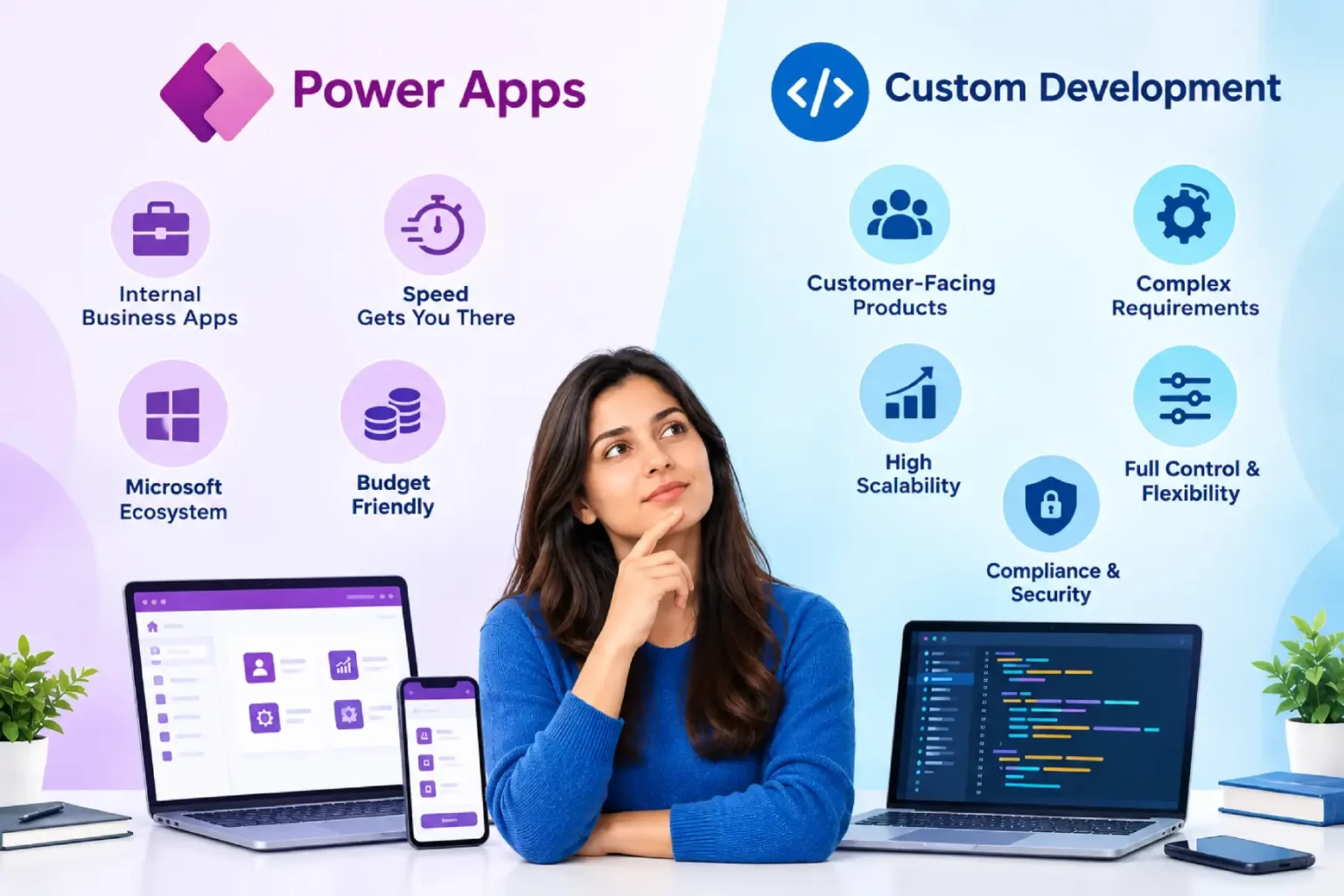
This raises an important question around the two popular approaches to software development: Should a business choose Microsoft Power Apps or go for custom software development? Microsoft Power Apps provides quick, low-code solutions, allowing users to create applications without needing extensive programming skills. On the other hand, custom development gives businesses full control over how the application works, how it looks, and how it connects with other systems.
Both options are designed to address specific business challenges, but the right choice depends on a company’s unique needs and goals. In this blog, we will explain both solutions in detail to help businesses select the option that best fits their development strategy and objectives.
- Power Apps: For Fast & Low-Cost Business Tools
- What Is Power Apps?
- Key Features of Power Apps for Development
- Advantages of Power Apps
- Limitations of Power Apps
- Custom Development: For Scalable and Performance-Heavy Applications
- What Is Custom Development?
- Key Features of Custom Development
- Advantages of Custom Development
- Limitations of Custom Development
- Power Apps vs Custom Development: The Key Differences
- When Should You Choose Each Development Approach?
- Summing Up
- Frequently Asked Questions
- References
Power Apps: For Fast & Low-Cost Business Tools
What Is Power Apps?
Power Apps is a low-code application development platform within Microsoft Power Platform. It allows enterprises to create business applications using visual development tools, pre-built connectors, Dataverse, and Power Fx (Microsoft’s formula language).
Instead of writing every single line of code from scratch, users can create screens, forms, rules and dashboards through a simple UI. Professional developers can also use APIs, custom connectors, plug-ins, Power Automate flows and code components whenever required.
Businesses generally use Power Apps for processes like employee onboarding, approvals, inventory tracking, application management, customer service and internal request management.
Key Features of Power Apps for Development
1. Low-Code Visual Development Environment
Power Apps provides a drag-and-drop interface that enables users to build applications using visual components, forms, business rules, and workflows with minimal coding. Professional developers can also extend applications with custom code when needed.
2. Extensive Data Connectivity
The platform includes hundreds of pre-built connectors that integrate with Microsoft 365, Dynamics 365, SharePoint, SQL Server, Salesforce, Azure services, and other third-party applications, enabling centralized access to business data.
3. Microsoft Dataverse Integration
Power Apps can leverage Microsoft Dataverse as a secure and scalable data platform for storing, managing, and governing business data. Dataverse supports relationships, business rules, security controls, and data standardization across applications.
4. Power Fx Formula Language
The platform uses Power Fx, Microsoft’s low-code formula language, allowing users to define business logic, automate actions, validate data, and customize application behavior using an Excel-like syntax.
5. Built-In Automation with Power Automate
Power Apps integrates natively with Power Automate, allowing businesses to create automated workflows for approvals, notifications, document processing, data synchronization, and other routine business processes.
6. AI and Copilot Capabilities
Organizations can enhance applications with AI Builder and Copilot features, enabling capabilities such as document processing, language detection, sentiment analysis, data extraction, AI-powered assistance, and intelligent recommendations.
7. Cross-Platform Deployment
Mobile apps built with Power Apps can be accessed through web browsers, tablets, and mobile devices, helping organizations deliver a consistent user experience across multiple platforms without separate development efforts.
8. Enterprise-Grade Security and Governance
Power Apps includes role-based access controls, compliance features, governance policies, and integration with Microsoft security services, helping organizations maintain data security and regulatory compliance.
Advantages of Power Apps
- Faster development
- Lower upfront costs
- Seamless Microsoft ecosystem integration
- Great for internal apps
- Quick deployment
Limitations of Power Apps
- Minimal flexibility
- Performance limitations
- Dependency on Microsoft Licenses
- Not an ideal solution for large public apps
Custom Development: For Scalable and Performance-Heavy Applications
What Is Custom Development?
Custom application development means building an application specifically to meet business needs. The development mainly involves technologies such as .NET, Java, Python, React, Angular, Node.js, cloud services, APIs, databases, and mobile development frameworks.
Unlike a low-code platform, custom development gives an organization full flexibility over the application architecture, backend, database, APIs, and user experience according to the project’s needs.
Custom software development services are preferred when an application has a high number of users, processes complex data, or works as a core product. This approach is not for your internal tool.
It is the right choice if your application is a core product for your business or one your firm plans to commercialize.
Key Features of Custom Development
1. Fully Customizable Application Architecture
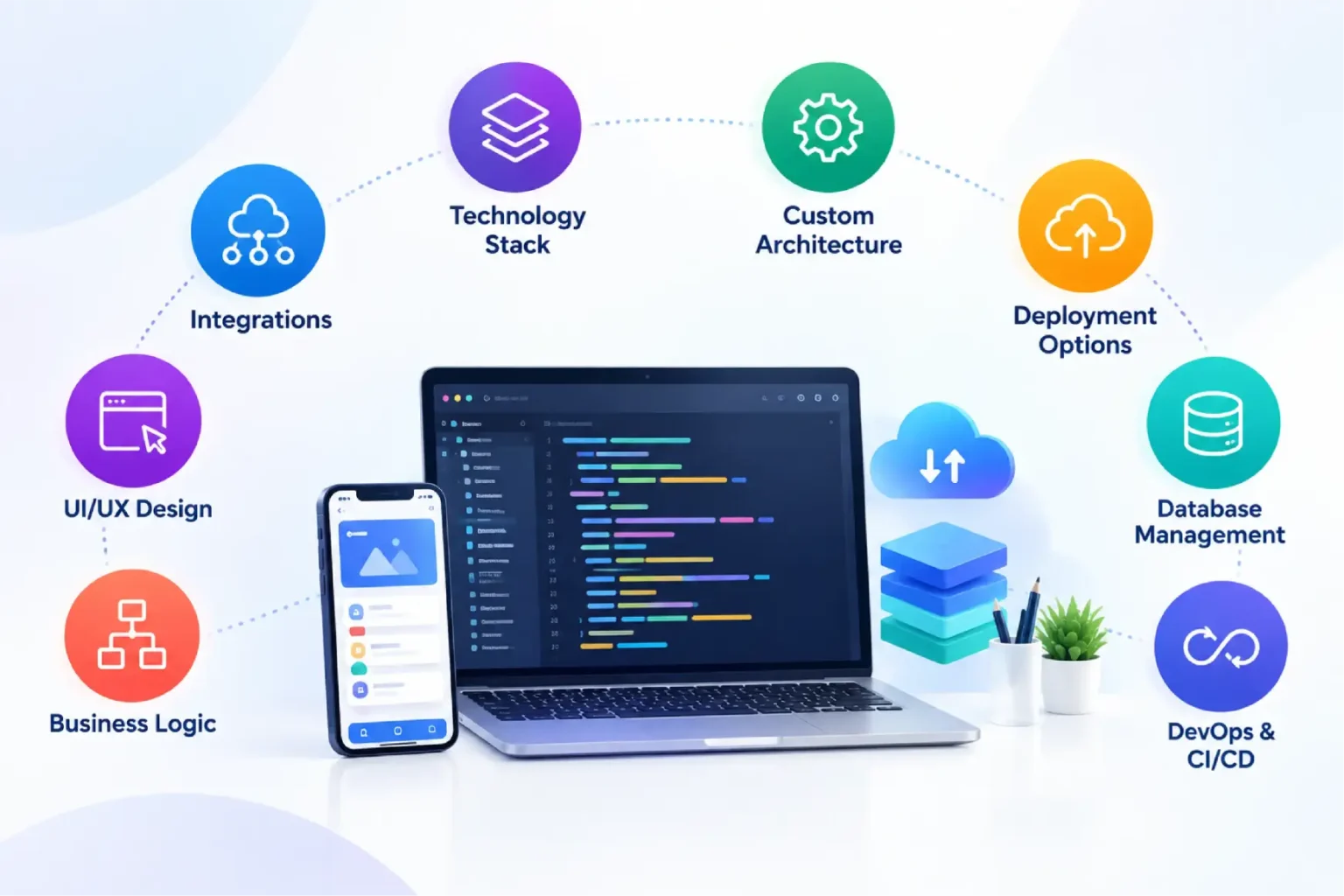
Custom development enables organizations to design every layer of the application, including the frontend, backend, database structure, integrations, and deployment architecture, based on specific business requirements.
2. Choice of Technology Stack
Businesses can select the programming languages, frameworks, databases, cloud platforms, and development tools that best align with their technical needs, performance goals, and long-term strategy.
3. Advanced Integration Capabilities
Custom applications can integrate with ERP systems, CRM platforms, payment gateways, third-party services, legacy software, IoT devices, and proprietary systems through APIs and custom connectors.
4. Tailored User Experience and Interface Design
Organizations have complete control over the application’s user interface, workflows, navigation, branding, and user journeys, allowing them to create experiences that align with specific business processes and customer expectations.
5. Custom Business Logic and Workflows
Unlike low-code platforms that may have platform limitations, custom development allows developers to build complex workflows, validation rules, automation processes, and business-specific functionalities without restrictions.
6. Flexible Deployment Options
Applications can be deployed on public cloud, private cloud, hybrid cloud, or on-premises environments, depending on business, security, compliance, and operational requirements.
7. Dedicated Database and Data Management
Custom applications support database technologies and data architectures tailored to the project’s needs, enabling organizations to manage large volumes of data, optimize queries, and design custom data models.
8. DevOps and Continuous Delivery Support
Modern custom development supports CI/CD pipelines, automated testing, monitoring, version control, and release management practices that help maintain application quality and accelerate updates.
Advantages of Custom Development
- Complete flexibility
- Better performance and scalability
- Greater security control
- Better user experience
- Ideal for complex and customer-facing applications
Limitations of Custom Development
- Higher upfront cost
- Long development time
- Requires skilled teams
- Continuous maintenance responsibility
Power Apps vs Custom Development: The Key Differences
Choosing between Microsoft Power Apps and custom application development depends on multiple factors. The right choice depends on what your business needs most.
| Factor | Power Apps | Custom Development |
| Development speed | Generally faster | Usually takes longer |
| Coding requirement | Low-code with optional pro-code extensions | Primarily code-based |
| Microsoft integration | Strong, especially with Microsoft ecosystem | Requires development effort |
| UI flexibility | Good, particularly with canvas apps | Very high |
| Complex functionality | Suitable for many business processes | Better for highly specialized requirements |
| Scalability | Suitable for many enterprise scenarios, subject to architecture and platform limits | Can be engineered around specific requirements |
| Initial development effort | Usually, lower | Usually, higher |
| Maintenance | Platform-managed plus solution maintenance | Fully managed by development team |
| Licensing | Platform licensing may apply | Infrastructure, software and development costs vary |
| Best suited for | Internal business applications and process digitization | Highly specialized or product-grade applications |
Now let’s compare the differences between Power Apps vs Custom Coding in a bit of detail.
When Should You Choose Each Development Approach?
1. For Internal Business Applications
Power Apps is an excellent choice for internal business processes such as employee onboarding, approval workflows, inventory management, helpdesk requests, expense management, and departmental applications. It allows organizations to digitize operations without building complex systems from scratch.
2. When Speed Is a Priority
If your goal is to develop and deploy an application quickly, Power Apps can significantly reduce development timelines. Its low-code approach, pre-built connectors, and ready-to-use components make it possible to launch solutions within weeks rather than months.
3. When You Already Use Microsoft Technologies
Organizations that rely on Microsoft 365, Dynamics 365, SharePoint, Teams, or Dataverse can benefit from Power Apps’ native integrations. This makes it easier to connect data, automate workflows, and create a unified user experience across the Microsoft ecosystem.
4. For Budget-Conscious Projects
Power Apps can be a cost-effective option for organizations looking to solve specific business challenges without making substantial investments in custom infrastructure, extensive development resources, or large engineering teams.
5. For Customer-Facing Products
If you are building a customer portal, SaaS platform, e-commerce solution, mobile application, or any product that directly serves external users, custom development provides the flexibility and control required to create unique user experiences and advanced functionality.
6. For Complex Business Requirements
Applications that involve sophisticated workflows, industry-specific processes, advanced integrations, real-time data processing, or highly customized features are typically better suited for custom development, where there are fewer platform limitations.
7. For High Scalability Requirements
Organizations expecting significant user growth, large transaction volumes, or increasing performance demands should consider custom development. It allows application architecture, infrastructure, and performance optimization strategies to evolve alongside business growth.
8. For Complete Control and Long-Term Flexibility
Custom development gives businesses full ownership over the application’s architecture, user experience, integrations, security controls, and future enhancements. This makes it particularly suitable when the application is a strategic asset or a long-term revenue-generating product.
9. For Specialized Compliance and Security Needs
Industries such as healthcare, finance, insurance, and government often have specific regulatory, security, and data governance requirements. Custom development provides greater flexibility to implement tailored security controls and compliance measures.
| Quick Rule of Thumb When Choosing Between Power Apps & Custom Development Choose Power Apps if you need a fast, cost-effective solution for internal business processes and are already invested in the Microsoft ecosystem. Choose Custom Development if you’re building a complex, customer-facing, highly scalable application that requires extensive customization, specialized integrations, or long-term product ownership. |
Summing Up
In the end, both Microsoft Power Apps and custom software development services in today’s world.
Choose Power Apps if you want to digitize internal operations quickly, streamline data entry across your team, maximize your existing Microsoft investment, and launch solutions within a few weeks. On the other hand, if you are building an application that needs to scale, offer unique features or handle complex processes, custom development can be the better investment.
And still, if you are unsure, a technical assessment can help you to choose the right solution. Soluzione, we help you find the right application strategy for your business.
We believe technology is just only one part of the decision. A reliable solution is the one that solves your business problem effectively, stays secure, and works for the long term.
Looking to modernize an existing process or build a new business application? Talk to SoluziOne Now!
Frequently Asked Questions
Can Power Apps scale for enterprise applications?
Yes. Power Apps can support enterprise applications, particularly when they are designed with the right architecture, governance, security and licensing.
When should a business choose Power Apps instead of custom development?
A business should consider Power Apps when it needs to digitise internal processes quickly, connect existing business data and integrate with Microsoft services such as Microsoft 365, Dynamics 365, SQL Server or Dataverse.
Can custom applications provide more advanced functionality than Power Apps?
Yes. While Microsoft Power Apps is highly effective for rapidly building business applications with low-code development, custom applications can provide more advanced functionality when businesses have unique, complex, or highly specialized requirements. Custom software allows organizations to implement tailored features, complex business logic, third-party integrations, industry-specific workflows, advanced user experiences, and greater scalability that may go beyond the capabilities of a low-code platform.
Can custom software be built around existing business workflows?
Absolutely. One of the key advantages of custom software development is that applications can be designed around an organization's existing processes and workflows rather than requiring employees to adapt to off-the-shelf software. This approach helps improve user adoption, maintain operational efficiency, and reduce disruptions during implementation.
References
https://radixweb.com/blog/powerapps-vs-custom-development
https://nexvoria.tech/blog/power-apps-vs-custom-development.php
https://www.monarch-innovation.com/insights/power-apps-vs-custom-development
https://learn.microsoft.com/en-ca/power-apps/powerapps-overview?utm_source=chatgpt.com