Notify365 for Microsoft Dynamics 365 CRM & Power Platform
Stay in the loop with automated email notifications that keep CRM users informed and engaged in real-time!
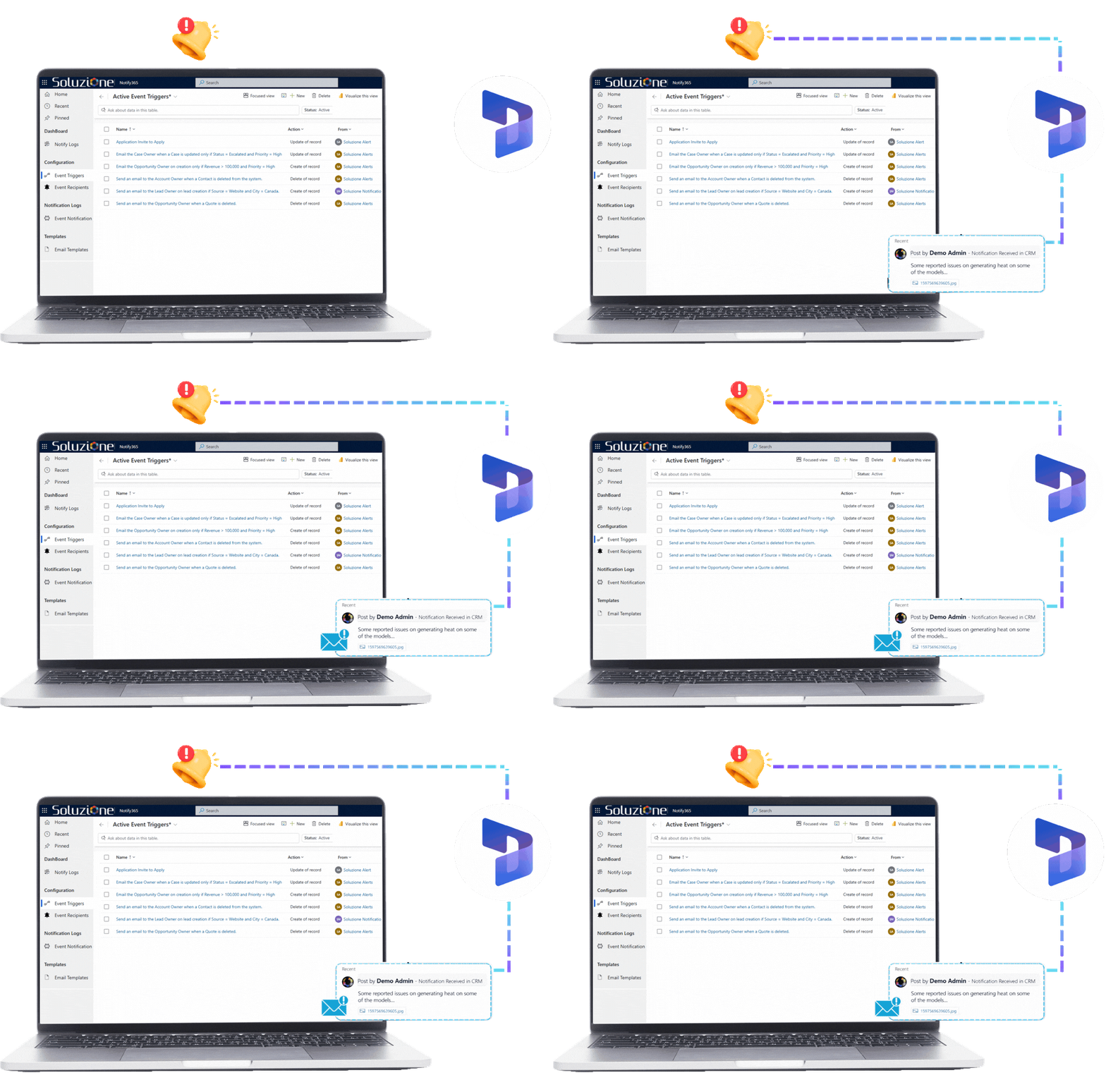

What Is Notify365 for Dynamics 365?
Notify365 is a powerful Dynamics 365 add-on to automate and manage notifications within your CRM system and model-driven apps on Dataverse. Designed specifically to empower business users with reliable, scalable communication solutions, it eliminates the need for manual processes, custom development, or external automation tools.
With Notify365, users can send timely email notifications and acknowledgement emails based on specific triggers and predefined conditions. This ensures the right information reaches the right people at the right time through a no-code, CRM-native experience.
The solution eliminates the need to use Power Automate flows, CRM Workflows or custom plugin logs or API-based configurations, which can become complex, time-consuming, or require developer involvement for advanced triggers and scalability. Instead, Notify365 provides a direct and efficient way to deliver targeted email communications to keep CRM users informed and alert.
Key Features of Notify365
Our Dynamics 365 extension delivers timely notification alerts that enable D365 users to maintain seamless and reliable email communications.
Define notification triggers precisely on the record to trigger events to create, update, or delete. Advanced filtering can be used to ensure notifications are triggered only when specific conditions are met, eliminating broad or irrelevant alerts.
Intelligently manage recipients using Event Subscribers. Users can dynamically pull To and CC recipients from any related CRM entities, supporting complex recipient logic based on record data, roles, or relationships for truly targeted delivery.
Users can send automated, professional emails that are triggered by predefined events and conditions. The Dynamics 365 infrastructure can be fully utilized to ensure reliable delivery, keeping stakeholders informed in real time.
Create highly contextual, personalized emails using standard Dynamics 365 email templates that come with dynamic placeholders. Merge data from triggering records and related entities to create more impactful communication.
Our D365 add-on creates and send notifications and acknowledgement in desired languages to match CRM users’ language preferences, eliminating the need for complex conditional logic.
Every notification attempt is automatically logged with clear status tracking – pending, successful, partial success, or failed. The tool can also capture details or error messages, making troubleshooting fast and straightforward.
Key Features of Notify365
The notification alerts via our Dynamics 365 extension keep D365 users focused on reliable email communications.
Define notification triggers precisely on the record to trigger events to create, update, or delete. Advanced filtering can be used to ensure notifications are triggered only when specific conditions are met, eliminating broad or irrelevant alerts.
Intelligently manage recipients using Event Subscribers. Users can dynamically pull To and CC recipients from any related CRM entities, supporting complex recipient logic based on record data, roles, or relationships for truly targeted delivery.
Users can send automated, professional emails that are triggered by predefined events and conditions. The Dynamics 365 infrastructure can be fully utilized to ensure reliable delivery, keeping stakeholders informed in real time.
Create highly contextual, personalized emails using standard Dynamics 365 email templates that come with dynamic placeholders. Merge data from triggering records and related entities to create more impactful communication.
Our D365 add-on creates and send notifications and acknowledgement in desired languages to match CRM users’ language preferences, eliminating the need for complex conditional logic.
Every notification attempt is automatically logged with clear status tracking – pending, successful, partial success, or failed. The tool can also capture details or error messages, making troubleshooting fast and straightforward.
Why Invest in Notify 365?
Specialized notification solutions like Notify365 are dedicated no-code email notification engines built for enterprise CRM needs, enhancing user productivity.
Configure everything through the intuitive CRM UI – no custom workflows, plugins, or developer resources required, empowering the admin team to manage notification logic independently.
Automated email notifications and acknowledgements in our Dynamics CRM add-ons ensure timely communication for customer updates, case escalations, opportunity changes, and internal actions.
This add-on replaces scattered workflows, Power Automate flows, or custom plugins with a simple, intuitive UI configuration, so no technical support is really required.
Standardize how notifications are triggered, delivered, and logged across the organization to maintain detailed audit trails, regulatory compliance, and comprehensive notification history.
Configure everything through the intuitive CRM UI – no custom workflows, plugins, or developer resources required, empowering the admin team to manage notification logic independently.
Automated email notifications and acknowledgements in our Dynamics CRM add-ons ensure timely communication for customer updates, case escalations, opportunity changes, and internal actions.
This add-on replaces scattered workflows, Power Automate flows, or custom plugins with a simple, intuitive UI configuration, so no technical support is really required.
Standardize how notifications are triggered, delivered, and logged across the organization to maintain detailed audit trails, regulatory compliance, and comprehensive notification history.
Are important CRM updates getting missed?
If users don’t act on time, it’s often not a process problem—it’s a notification gap. Notify365 makes sure the right people are informed automatically.
How Does it Work?
Notify365 follows a straightforward 4-step workflow to get started easily and seamlessly

Step 1. Select Trigger Event
Users need to first choose when they want notifications to alert for records, such as create, update, or delete.
Step 1. Select Trigger Event
Users need to first choose when they want notifications to alert for records, such as create, update, or delete.
Step 2. Define FetchXML Filter Criteria
Apply any kind of filter to the desired records that meet your specific business conditions.

Step 2. Define FetchXML Filter Criteria
Apply any kind of filter to the desired records that meet your specific business conditions.

Step 3. Configure Notification Details
For efficient notification management in Dynamics 365, you need to select email templates, define sender queues, and specify a notification trigger.
Step 3. Configure Notification Details
For efficient notification management in Dynamics 365, you need to select email templates, define sender queues, and specify a notification trigger.
Step 4. Activate Subscription
Now enable the subscription, and Notify365 will automatically monitor and trigger notifications.
Step 4. Activate Subscription
Now enable the subscription, and Notify365 will automatically monitor and trigger notifications.
Why Do You Need an Extension for Dynamics 365 CRM Alerts & Notifications
| Feature | Microsoft’s Native | Notify365 |
|---|---|---|
| Trigger Events (Create/Update/Delete) | ✅ Via Power Automate flows (Dataverse triggers) | ✅ Simple UI selection with real-time event monitoring |
| Precise Filtering (FetchXML Criteria) | Partial (flow conditions or “List rows” with FetchXML, more steps) | ✅ Direct FetchXML-based filter criteria for exact business conditions |
| Dynamic Recipient Management | Partial (queries/actions in flows, complex for advanced logic) | ✅ Event Subscribers with FetchXML queries; supports multiple To/CC from related entities |
| Email Notification Support | ✅ Via Power Automate “Send email” action | ✅ Fully leverages Dynamics 365 queues and infrastructure for reliable delivery |
| Use Standard Dynamics 365 Email Templates | Partial (compose manually in flows; limited direct merge) | ✅ Direct integration with CRM templates and dynamic placeholders from related entities |
| No-Code Configuration | Partial (Power Automate is no-code but separate designer) | ✅ Intuitive CRM UI—no flows, plugins, or developer resources required |
| Centralized Notification Logs | ❌ Flow run history (separate from CRM) | ✅ In-CRM logs with status (Pending/Successful/Partial/Failed) and error details |
| Audit Trail & Compliance | Partial (flow history, no unified CRM view) | ✅ Detailed history, tracking, and standardization for regulatory needs |
| Integrated in CRM UI | ❌ Separate Power Automate portal | ✅ Full configuration and management within Dynamics 365 |
Next In-Line Notify365 Features
We understand you need more than just email, hence we are already working to introduce upcoming enhancements across multiple channels.
Native Dynamics 365 notifications that appear directly in the user interface for immediate attention.
Reach users on their mobile devices with push notifications through the Dynamics 365 mobile app.
Text message support for critical alerts and time-sensitive communications.
Support WhatsApp-based notifications for selected alerts, enabling faster and more conversational communication for time-critical updates.
Native Dynamics 365 notifications that appear directly in the user interface for immediate attention.
Reach users on their mobile devices with push notifications through the Dynamics 365 mobile app.
Text message support for critical alerts and time-sensitive communications.
Support WhatsApp-based notifications for selected alerts, enabling faster and more conversational communication for time-critical updates.
Faster responses start with timely visibility
When CRM users are notified at the right moment, teams act faster and communication improves automatically.
Check Our Other Productivity Booster Add-Ons for CRM & Power Platform

Frequently Asked Question
To get started with Notify365 within Dynamics 365 or even model-driven apps built on Dataverse, you need to create event subscriptions and now just choose the trigger event to define when the D365 add-on creates, updates, or deletes. Users can now select a standard email template, add To/CC recipients, and set timing preferences. After enabling the add-on automatically monitors records and sends email notifications or acknowledgement messages based on the defined rules.
Notify365 is designed to support all Dynamics 365 users and teams who need reliable, rule-based email notifications without technical complexity. It is suitable for business users, CRM administrators, and organizations to use this Dynamics CRM add-on.
Yes—Notify365 is 100% no-code. All configuration happens through an intuitive UI directly inside Dynamics 365 and model-driven apps built in Dataverse.
Yes, it is designed for non-technical CRM administrators and power users. The interface is guided and CRM-native, like configuring views or forms. Non-developers can set up sophisticated rules (e.g., multi-condition filters, dynamic recipients from related records) without writing code or leaving the CRM environment.
No. One of Notify365’s core benefits is empowering CRM admins to manage everything independently, reduce dependency on IT teams, and speed up changes.
Notification management for CRM users is one of Notify365's core roles. It simplifies the notification management through the following:
1. Offering full visibility through in-CRM notification logs (status, errors, delivery history) instead of checking separate flow run histories.
2. Replacing scattered Power Automate flows or legacy workflows with a single, centralized CRM area for all email subscriptions.
3. Providing precise FetchXML-based filtering and dynamic recipient logic.
4. Enabling quick updates—no redeploying flows or re-testing connections.
5. Delivering audit trails and compliance-ready history natively.
Notify365 triggers on standard Dataverse record operations:
1. Create — New record created (e.g., new Lead, Case, Opportunity).
2. Update — Any field change on an existing record (filtered precisely via FetchXML, e.g., status or priority change).
3. Delete — Record deleted (useful for cleanup alerts or archival notifications).
These events are monitored in real time, with FetchXML enabling very granular conditions across records and related entities.
Not entirely—Power Automate is a broad automation platform with hundreds of connectors, approvals, integrations, and actions. So for broader automations (e.g., integrating with external systems, creating records, or multi-step processes), Power Automate remains complementary. While for reliable, auditable, condition-based email alerts, Notify365 is often more efficient and admin-friendly.



180, Talmadge Road, Unit# 332, Edison (NJ) 08817 USA
Phone : +1-800-860-6531

10, Anson Road # 22-02, International Plaza 079903 SGD
Phone: +65-98-357-694

B-52, IT Park Badwai, Bhopal (MP) 462036 IND
Phone: +91 9302980560
180, Talmadge Road, Unit# 332, Edison (NJ) 08817 USA
Phone : +1-800-860-6531
10, Anson Road # 22-02, International Plaza 079903 SGD
Phone: +65-98-357-694
B-52, IT Park Badwai, Bhopal (MP) 462036 IND
Phone: +91-9302-980-560
