For organizations using Microsoft Dynamics 365, AI has now become a key part of their daily workflow, helping teams work more efficiently and make better-informed decisions.
From managing sales pipelines to finance reconciliations, Copilot in Dynamics 365 is helping employees work smarter. It provides digital assistance directly within the applications that your employees already use, reducing the need to switch between different tools and platforms.
Moreover, this also means Microsoft Copilot will work within your organizational data while respecting your existing data access and permissions.
So, in this blog, we will explore what Microsoft Copilot for Dynamics 365 is, how it helps businesses work smarter, not harder, and why every business today benefits from using it. Let us begin.
What is Microsoft Copilot in Dynamics 365?
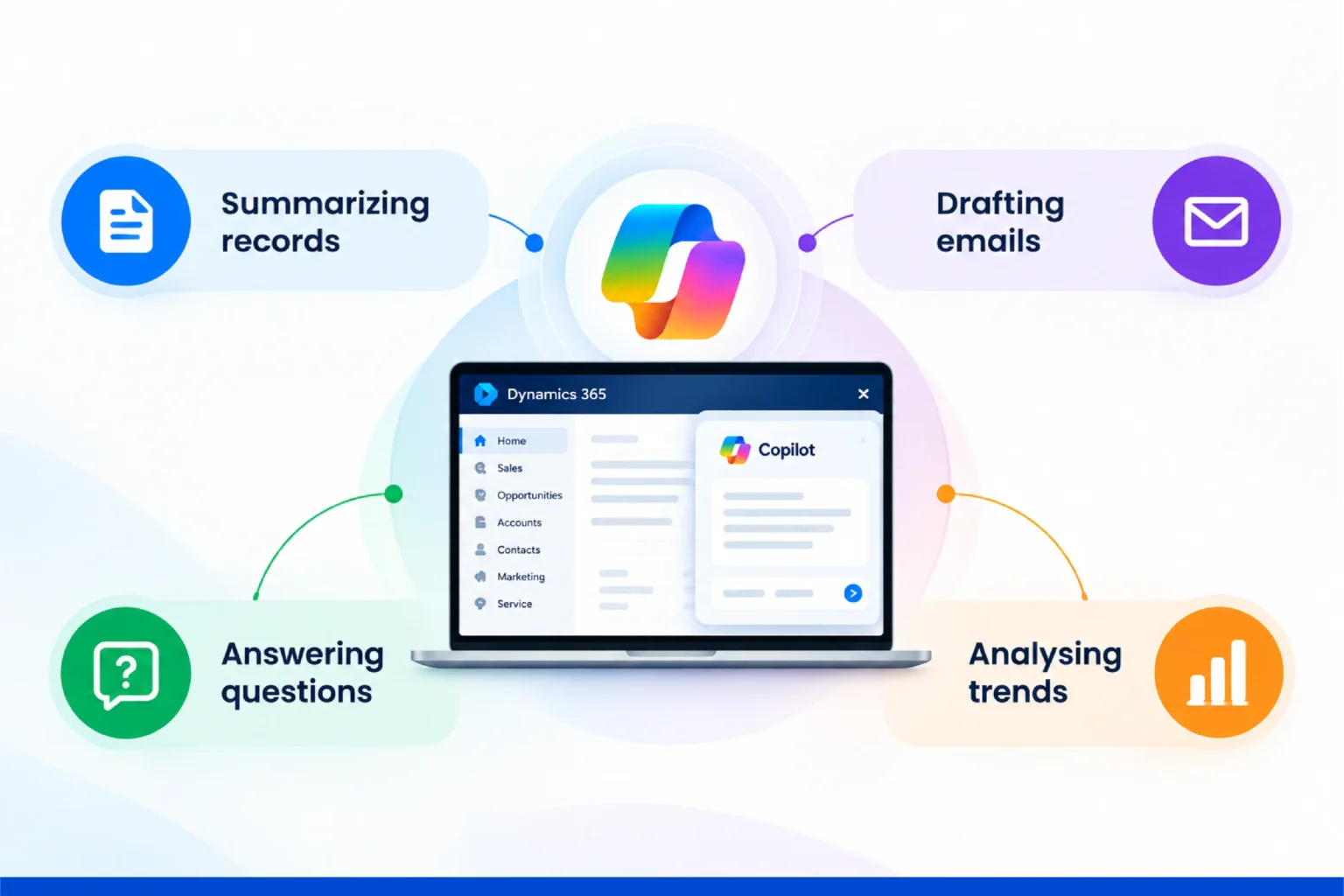
Microsoft Copilot in Dynamics 365 is a smart AI assistant embedded across Microsoft’s CRM and ERP applications. It leverages your organizational data and application context to perform tasks like
- Summarizing records
- Drafting emails
- Answering questions
- Analysing trends and helps in performing your daily tasks efficiently.
However, the usage experience may vary depending on the Dynamics 365 application. For instance, Copilot in Dynamics 365 Sales can help users summarise leads and opportunities, prepare them before meetings, stay updated on changes and generate the required content. On the other hand, in Customer Service, Copilot can help summarise conversations, answer queries, and draft email responses.
Microsoft Dynamics 365 Copilot is not just a simple chatbot that stays on top of your CRM or ERP system. It works within your business environment, uses relevant data and context to help employees complete tasks, find information, and make decisions more efficiently.
How Dynamics 365 Copilot Transforms Business Functionalities
Here’s how Dynamics 365 Copilot helps in common business workflows and help your team work faster:
| Business Function | Traditional Workflow Bottleneck | Dynamics 365 Copilot Transformation |
| Sales & Account Management | Sales teams spend significant time on researching leads, preparing for meetings, updating CRM records, and writing follow-up emails. | Copilot in Dynamics 365 can summarize account, opportunity history, prepare meeting insights, update records, and draft personalized follow-up emails. |
| Customer Service & Support | Agents often spend most of their time in reviewing lengthy case histories, searching for knowledge bases, and creating repetitive responses. | Copilot in Dynamics 365 helps in summarizing the cases, provide relevant knowledge, suggest next steps and draft customer responses. This helps the agents to resolve issues faster. |
| Finance & Operations | Finance teams deal with several repetitive reconciliations, invoice processing, and reporting, along with hectic, time-consuming month-end activities. | AI-powered capabilities can assist your team in performing transaction analysis, reconciliation, invoice processing, getting financial insights, and in other routine operational tasks. |
| Field Service & Dispatch | It is always challenging to create work orders, assign technicians, plan schedules, and prepare service reports. Plus, it also involves multiple manual interventions. | Copilot and AI-powered capabilities can help in creating work orders from service information, recommend scheduling options, provide technician insights, and simplify post-visit reporting. |
The above-mentioned table clearly shows that Copilot not only helps in performing individual tasks, but it can also be a part of your overall workflows and help your teams to work faster and with better context.
How Copilot in Dynamics 365 Actually Works
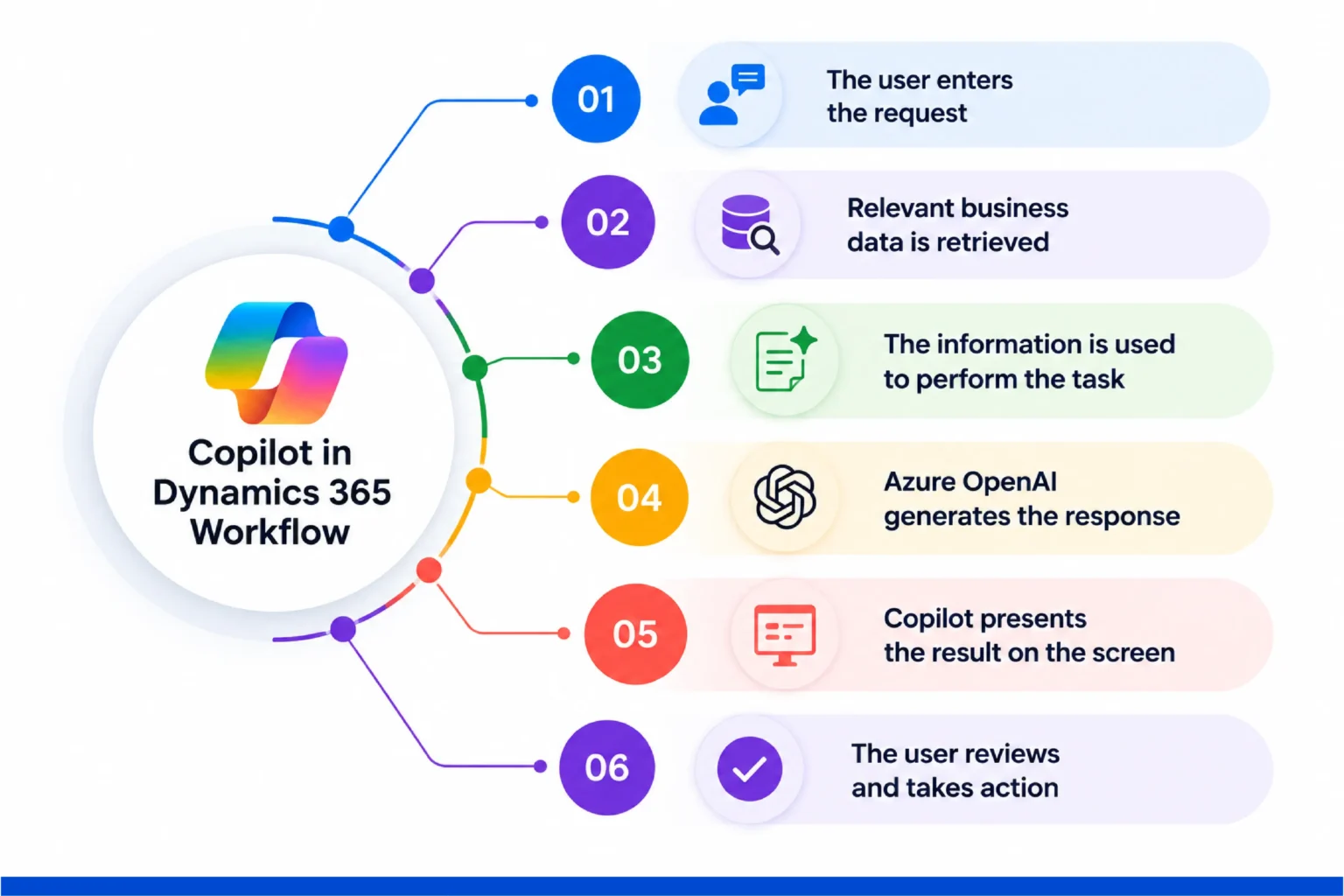
What happens when you ask your query to Copilot? The model in the backend combines all your business data and helps your users to complete everyday tasks faster.
Here’s the flow:
User asks a question → Dynamics 365 finds relevant data → Copilot understands the context → AI generates a response → User reviews the result
Let us now understand with a simple example.
Step 1: The User enters the request
The salesperson in your organisation enters a simple request query on Copilot. Microsoft Copilot will understand the request and then start fetching the information from Dynamics 365.
Step 2: Relevant business data is retrieved
Microsoft Copilot in the backend retrieves relevant CRM information from Dataverse. This includes information like customer details, opportunity status, activities, notes and old interactions. If applicable, Microsoft Graph can also provide relevant Microsoft context, such as emails and meetings.
Step 3: The information is used to perform the task
The relevant business information is then combined with the user’s request and shared with the AI model. This helps to prevent the response from being based only on the model’s general knowledge.
Step 4: Azure OpenAI generates the response
In the backend, an Azure OpenAI-powered model further processes the request along with the relevant context to generate a suitable response. For example, you get a personalized follow-up email based on the recent interaction with the customer.
Step 5: Copilot presents the result on the screen
Microsoft Copilot now provides the output on the screen. Depending on the scenario, Copilot can also help in initiating the appropriate business action.
Step 6: The user reviews and takes action
In the end, the salesperson can review, edit, approve or modify the suggestion before proceeding. While AI generates the response, the user is still responsible for reviewing the details before performing necessary business actions.
Note: Copilot follows the permissions that are already defined in Dynamics 365. It does not bypass access controls or expose data that a user is not authorized to access.
Why are Businesses Investing in Dynamics 365 Copilot?
In 2026, every business is looking to invest in AI tools that actually provide value. This is where Microsoft Copilot is really a game-changer, especially for businesses already invested in Dynamics 365 or Microsoft business tools. In both cases, Copilot seamlessly fits into your existing Microsoft environment. Thus, its adoption is effortless compared to other AI tools. Here are some of the key benefits:
- No steep learning curve required
- Secure and compliant
- Real-time collaboration
- 24/7 AI Assistant
- Better decision-making using predictive AI
- Faster Sales Cycles
- Increase in employee productivity
- Cost-savings
Summing Up
AI is revolutionizing overall business operations, and Copilot for Microsoft Dynamics 365 is leading this transformation. By providing intelligent assistance across sales, CRM, finance, and supply chain, Copilot brings AI-powered assistance into everyday workflows.
That’s why today employees are spending less time performing repetitive tasks and more time on other important tasks and enjoying personal time.
But ultimately, the result depends on how well it is aligned with your existing processes, data, and overall ecosystem.
If you are planning to implement, optimize, or scale Microsoft Dynamics 365 with Copilot, Soluzione can help.
As a certified Microsoft partner, we help businesses evaluating their Microsoft ecosystem identify practical AI and automation opportunities and design solutions that connect Dynamics 365, Power Platform, and Microsoft Copilot along with your business needs.
Ready to make your Dynamics 365 workflows smarter? Talk to SoluziOne and explore how Microsoft Copilot and intelligent automation can transform your overall workflow.
Frequently Asked Questions
What can Copilot automate in Dynamics 365?
Microsoft Copilot can handle repetitive tasks like approvals, notifications, data entry, and reporting. Moreover, with Dynamics 365 automation, it can intelligently perform tasks, predict outcomes, and eliminate bottlenecks as well.
Is Microsoft Copilot secure for Dynamics 365 business data?
Absolutely. Microsoft Copilot for Dynamics 365 is built with enterprise-grade security and compliance standards.
References
https://alrafayglobal.com/blog/copilot-in-dynamics-365-what-it-does/
https://www.confiz.com/blog/how-copilot-transforms-marketing-workflows-in-dynamics-365-customer-insights/
https://www.microsoft.com/en-us/microsoft-copilot/copilot-101/what-is-copilot
https://learn.microsoft.com/en-us/dynamics365/fin-ops-core/fin-ops/copilot/copilot-for-finance-operations
https://www.microsoft.com/en-us/microsoft-copilot/copilot-101/workflow-automation
https://msdynamicsworld.com/blog-post/copilot-integration-microsoft-dynamics-365-ai-powered-crm-erp
https://aimultiple.com/agentic-ai-erp