Every business wants to work faster, reduce operational costs, and deliver better customer experiences. Yet employees across industries still spend a significant portion of their time on repetitive administrative tasks such as data entry, invoice processing, report generation, customer onboarding, and email management. These manual processes can slow operations, increase the risk of errors, and limit the time available for higher-value work.
This is where robotic process automation helps.
Robotic process automation (RPA) is a software-based automation technology that uses bots to perform repetitive, rule-based tasks across digital systems. Rather than replacing employees, RPA helps businesses automate routine processes so teams can focus on strategic initiatives, creative problem-solving, and customer-facing activities.
Organizations across sectors including finance, healthcare, manufacturing, retail, and logistics use RPA to improve efficiency, reduce manual effort, increase process accuracy, and support broader digital transformation initiatives.
In this guide, we’ll explore what robotic process automation is, how it works, and how it can help your organization achieve long-term business goals.
- What is Robotic Process Automation (RPA)?
- How Do RPA Bots Work?
- Step 3: Data Extraction
- RPA vs. Traditional Automation: What Makes It Different?
- Implementing RPA: A Practical Approach
- Best Practices for a Successful RPA Implementation
- The Future of Robotic Process Automation
- Conclusion
- Frequently Asked Questions
- References
What is Robotic Process Automation (RPA)?
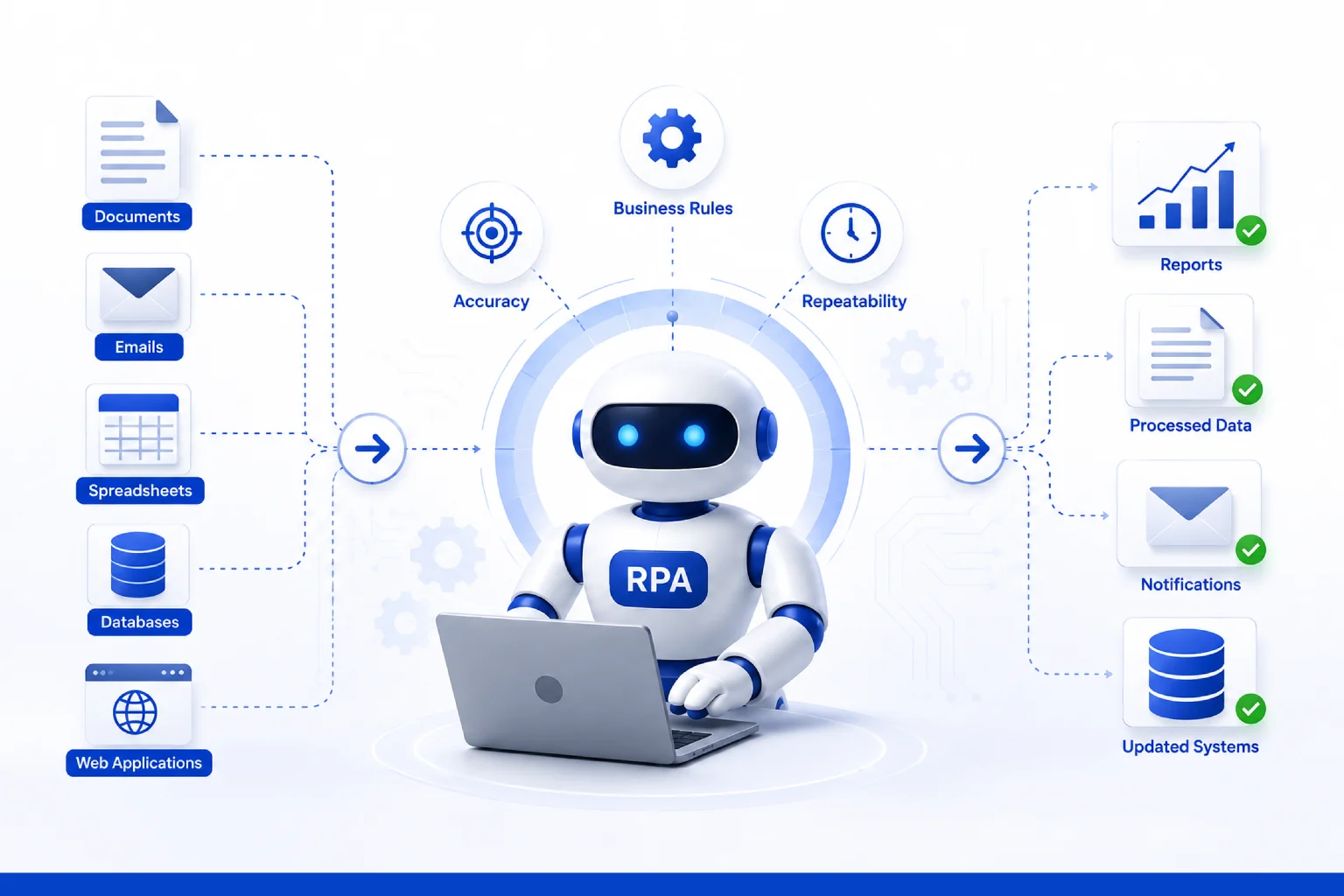
Robotic process automation (RPA) is a software automation technology that uses bots to execute repetitive, rule-based tasks across digital systems. These bots can log into applications, extract and transfer data, generate reports, process invoices, send emails, update records, and perform other routine business activities with minimal human involvement.
RPA interacts with applications through the user interface, much like a human employee would. As a result, organizations can often automate workflows using their existing systems and applications, reducing the need for extensive changes to underlying infrastructure.
By automating repetitive tasks, RPA helps improve operational efficiency, reduce manual errors, and free employees to focus on higher-value work that requires human judgment, creativity, and customer interaction.
How Do RPA Bots Work?
In simple terms, RPA bots work by following a set of predefined rules. Think of them as your digital employees; every employee knows what action to perform when a specific event happens.
Here’s a simple example of how an invoice-processing bot actually works:
Step 1: Trigger Event
A new invoice is received through email or a monitored folder
Step 2: Bot Initialization
The bot opens the email and downloads the attachment.
Step 3: Data Extraction
Invoice details such as vendor name, invoice number, amount, purchase order number, and line items are extracted using predefined rules or OCR-based document parsing
Step 4: Application Login
The bot securely logs into an ERP system such as SAP, Oracle, or Microsoft Dynamics
Step 5: Validation and Processing
The extracted data is validated against purchase orders, vendor records, approval rules, and business policies
Step 6: Workflow Execution
The invoice is then submitted for approval, recorded in the ERP system, and the transaction status is updated
Step 7: Completion
The bot sends a confirmation email, updates the workflow status, and also records the logs for audit and compliance purposes.
Modern robotic automation solutions can easily integrate with ERP, CRM, cloud applications, legacy software and databases. This helps businesses to process tasks faster, reduce errors, improve compliance, and scale automation across departments.
RPA vs. Traditional Automation: What Makes It Different?
One of the most common questions business leaders ask is: “If we already use custom scripts, APIs, or automation tools, why do we need RPA?”
The answer is that RPA solves a different kind of automation problem.
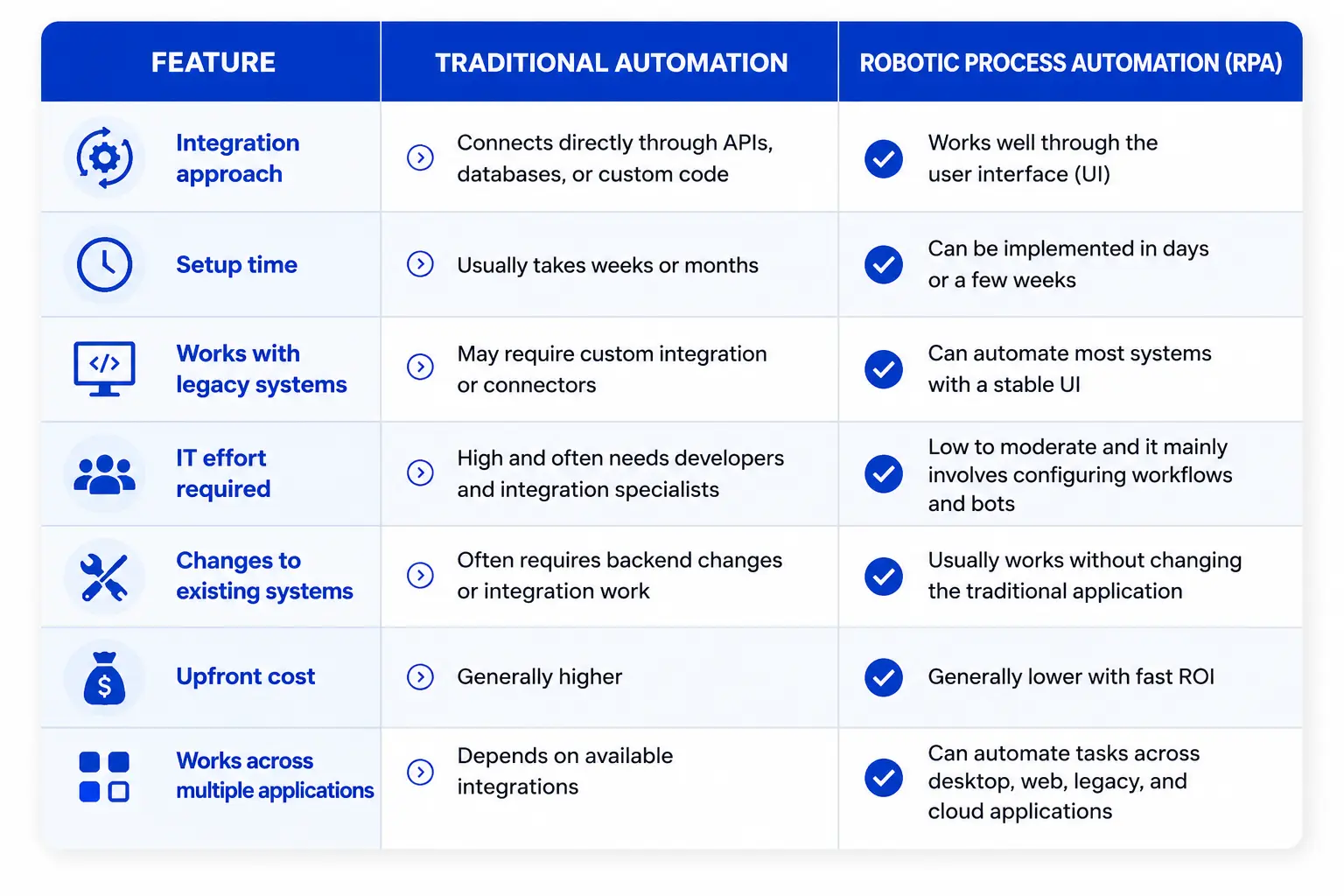
In many organizations, RPA fills the gap between modern cloud software and legacy business applications. It supports rapid workflow automation across disconnected systems, helping teams improve efficiency and reduce manual work without performing expensive infrastructure upgrades.
Implementing RPA: A Practical Approach
Deploying automated workflows requires a clear blueprint, and implementing RPA is usually a step-by-step process. The goal is to start with simple tasks, test carefully, and then expand it across the business. Here’s how it typically works:
Step 1: Identify the right processes
The first step is to identify tasks that are repetitive, rule-based, and time-consuming for employees. Processes such as data entry, invoice processing, report generation, and record updates are often good candidates for automation.
Step 2: Select the right RPA platform
Choose an RPA platform that matches your business and technical requirements. Organizations typically evaluate factors such as scalability, security, integration capabilities, governance features, and ease of deployment. Popular platforms include UiPath, Automation Anywhere, Microsoft Power Automate, and Blue Prism.
Step 3: Design and test the automation workflow
Once the process is selected, the bot will map the process, define business rules, identify exceptions, and design the bot workflow. It is then tested in a controlled environment to validate data accuracy, error handling, and performance before production deployment.
Step 4: Deploy and monitor
After testing, the bot is further deployed into the live production environment. Most organizations start with a pilot project or deploy the process in a single department. Then the team monitors the logs, processing time, exception rates, system performance and makes small improvements to ensure success.
RPA process automation works best in repetitive processes, and time-consuming processes. That is why it is widely used in business operations, especially for performing tasks that involve moving data between systems, validating records, and generating reports.
Best Practices for a Successful RPA Implementation
Businesses should think of RPA as a long-term business investment rather than a one-time automation project. Here are a few simple best practices to keep in mind:
Start small: Begin with a simple, repetitive, and rule-based process that can be automated quickly and deliver measurable results early.
Set clear goals: Define success metrics such as processing time, error rate, cost savings, or productivity improvements before implementation begins.
Monitor bot performance: Track how your bots perform in production and update workflows whenever business rules or applications change.
Build security into the workflow: Use secure credentials, role-based access, and activity logs to ensure automation follows company policies and compliance requirements.
Plan for exceptions: Design workflows that can handle errors, missing data, and other scenarios that require human review or approval.
Review and optimize regularly: RPA is not a one-time deployment. Continuously refine workflows, improve bot performance, and adapt automation as business processes evolve.
Apply across Departments: The biggest benefits come when RPA is integrated into broader digital transformation initiatives across finance, HR, operations, customer service, and other business functions.
The Future of Robotic Process Automation
The future of RPA is moving beyond simple task execution. As businesses adopt AI, predictive analytics, and cloud-based platforms, RPA is becoming more intelligent, flexible, and deeply connected to the way organizational workflows operate.
In the next phase of automation, software bots will do more than repeat rule-based tasks. They will help read and interpret documents, understand conversations, generate insights, recommend next steps, and support faster decision-making across teams and business functions.
This combination of RPA and AI is often called intelligent automation, and it is gradually becoming an important part of modern business operations.
Conclusion
Robotic process automation is not just a productivity tool; it has now become a strategic business capability that enables organizations to work smarter, operate faster, and scale more efficiently.
By performing repetitive tasks, RPA helps reduce manual work, improve accuracy, and give employees more time to focus on more valuable work.
At Soluzione, we help organizations identify the right opportunities, simplify workflows, and build smarter automation experiences that support long-term efficiency and business growth.
If your business is ready to explore robotic process automation, Soluzione can help you take the next step with confidence.
Contact us today and discover how our custom robotic automation solutions can transform your operational efficiency!
Frequently Asked Questions
What are the benefits of RPA for businesses?
RPA helps businesses improve speed, accuracy, productivity, and compliance while reducing repetitive manual work. It also allows teams to focus on higher-value tasks and can work also with existing software without major IT changes.
What processes can be automated using RPA?
RPA works best for tasks that are repetitive, rule-based, and performed regularly. Common examples include invoice processing, payroll, customer onboarding, data entry, claims processing, report generation, inventory updates, employee onboarding, email handling, and order processing. In general, if a process follows the same steps every time and uses structured data, then adopting RPA is a wise choice.
Is RPA secure for handling sensitive business data?
Yes, RPA can be very secure only when it is implemented properly. Most RPA platforms include features such as secure user access, encrypted credentials, activity logs, and audit trails to help protect sensitive business data. By following security best practices, RPA can securely handle sensitive business data while helping organizations meet regulatory and compliance requirements.
References
- https://www.uipath.com/resources/automation-whitepapers/automation-trends-report
- https://intelligentpathways.com.au/20-business-use-cases-for-rpa/
- https://www.oracle.com/uk/applications/robotic-process-automation-rpa/
- https://www.celonis.com/blog/9-key-benefits-of-using-rpa
- https://www.ibm.com/think/topics/rpa
- https://www.blueprism.com/resources/blog/future-automation-trends-predictions/