In 2025, Microsoft was named a Leader in The Forrester Wave™ for Low-Code Platforms for Professional Developers – Source. The source also states that Power Platform is a widely adopted low-code platform with 56 million active users monthly. With so many active users, companies achieving the biggest success aren’t necessarily the ones using the most features.
They are the ones who use it strategically — with the right implementation, thoughtful customization, strong governance, and clear alignment to business objectives. The true power of the Microsoft Power Platform lies in its rich set of capabilities, such as rapid app development, intelligent automation, advanced analytics, AI agents, external portals, and seamless integration across systems.
In this blog post, we will explore the key capabilities of Microsoft Power Platform and how businesses can use it effectively to drive better outcomes.
- Microsoft Power Platform Capabilities at a Glance
- Foundational Capabilities of Microsoft Power Platform
- Solutions & ALM (Application Lifecycle Management) in Microsoft Power Platform
- What are Power Platform Solutions?
- What is ALM (Application Lifecycle Management)?
- How to Get Started with Microsoft Power Platform
- 3. Application Development
- Final Thoughts
- Frequently Asked Questions
Microsoft Power Platform Capabilities at a Glance
Microsoft Power Platform is a comprehensive suite of integrated tools that empower organizations to build applications, automate processes, analyze data, and engage customers with minimal code. Below is a clear overview of its core components and key capabilities:
| Power Platform Components | Key Capabilities |
| Power Apps | Power Apps enables rapid development of custom business applications using a low-code/no-code approach. It allows both business users and professional developers to create powerful, secure, and scalable apps. Key Capabilities: • Build canvas and model-driven apps with rich data connectors, AI, and Microsoft Dataverse • Seamless integration with Power BI, Power Automate, Dynamics 365, Microsoft Teams, and Microsoft 365 • Develop secure, compliant, and enterprise-grade applications • Create cost-effective mobile and web applications that work across devices • Leverage AI Builder and Copilot to accelerate development |
| Power BI | Power BI is a leading business intelligence and data visualization tool that transforms raw data into interactive, actionable insights. Key Capabilities: • Create stunning, interactive dashboards and reports with drag-and-drop ease • Connect to hundreds of data sources, databases, and web services • Deliver consistent, real-time analytics across departments and teams • Use advanced AI visuals, natural language queries, and automated insights • Enable data-driven decision-making throughout the organization |
| Power Automate | Power Automate allows organizations to automate repetitive tasks and complex business processes across systems using intelligent workflows. Key Capabilities: • Build low-code workflows and Robotic Process Automation (RPA) • Integrate applications within and outside the Microsoft ecosystem • Reduce manual effort, human error, and operational costs • Use AI and Copilot to design sophisticated automations quickly • Streamline processes and improve overall workforce productivity |
| Copilot Studio (formerly Power Virtual Agents) | Copilot Studio enables the creation of intelligent AI agents and conversational copilots that enhance customer and employee experiences. Key Capabilities: • Build and deploy custom AI agents without complex coding. • Handle FAQs, advanced queries, form processing, and multi-step tasks. • Integrate with Power Platform tools and external systems. • Extend capabilities using Azure AI services. • Improve customer satisfaction, support efficiency, and internal productivity. |
| Power Pages | Power Pages makes it easy to create professional, secure external-facing websites and portals for customers, partners, and stakeholders. Key Capabilities: • Build responsive websites and portals with low/no-code tools. • Access and display data securely from Microsoft Dataverse. • Leverage hundreds of templates and easy customization options. • Integrate seamlessly with other Power Platform components. • Apply enterprise-grade security and Azure-powered features. |
Foundational Capabilities of Microsoft Power Platform
Beyond the five main applications, Microsoft Power Platform includes several powerful foundational services that enhance every component and make the platform truly enterprise-ready.
| Foundational Services | Key Capabilities |
| Microsoft Dataverse | Dataverse is the secure, scalable, cloud-based data platform at the heart of Power Platform. It acts as a central data hub for storing and managing business data. Key Capabilities: • Built-in enterprise-grade security, compliance, and governance • Rich relational data model with business logic and relationships • Supports complex data structures, file storage, and images • Standard and custom tables with business process flows • Real-time synchronization across Power Apps, Power Automate, Power BI, and Copilot Studio • Virtual tables to connect external data without duplication |
| AI Builder | AI Builder brings artificial intelligence capabilities to everyone — no data science expertise required. It allows you to add intelligent features to your apps, flows, and processes. Key Capabilities: • Prebuilt AI models (Invoice processing, Receipt scanning, Sentiment analysis, Form recognition, Prediction, etc.) • Custom AI models trained on your own business data • Integration directly into Power Apps and Power Automate • Document automation and intelligent data extraction • AI-powered decision making and process optimization • Natural language processing and object detection |
| Power Fx | Power Fx is the open-source, low-code formula language used across Power Platform. Often described as “Excel for developers,” it makes expressing business logic simple and consistent. Key Capabilities: • Familiar formula-style syntax for calculations, conditions, and rules • Used in Power Apps, Power Automate, and Copilot Studio • Enables complex business rules without traditional coding • Strong typing and declarative approach for better reliability |
| Connectors & Integration Layer | Power Platform offers one of the richest integration ecosystems available. Key Capabilities: • 1,000+ pre-built connectors to Microsoft and third-party services • Custom connectors for proprietary or legacy systems • On-premises Data Gateway for secure connection to internal systems • Seamless data flow between Power Platform, Microsoft 365, Dynamics 365, Azure, and external apps |
| Governance, Security & Administration | Enterprise features that allow organizations to scale Power Platform usage safely. Key Capabilities: • Power Platform Admin Center for centralized management • Environment strategy and Data Loss Prevention (DLP) policies • Solution-based ALM (Application Lifecycle Management) • Detailed auditing, compliance, and usage analytics • Copilot usage controls and responsible AI guardrails |
Solutions & ALM (Application Lifecycle Management) in Microsoft Power Platform
While the core components like Power Apps, Power Automate, and Power BI often get the spotlight, Solutions and ALM are the hidden foundation that determines whether your Power Platform implementation succeeds in the long run or becomes difficult to maintain. With these packages, users can securely manage the end-to-end lifecycles of their business apps. Here is why Solutions and ALM Matter:
- Prevent “works on my machine” problems
- Enable teamwork between multiple developers
- Reduce risk when updating live applications
- Support enterprise governance and compliance requirements
- Make it much easier to scale Power Platform usage across the organization
What are Power Platform Solutions?
A Solution is essentially a package or container that holds all the components of your Power Platform implementation. Think of it as a single bundle that includes:
- Apps (Power Apps)
- Flows (Power Automate)
- Tables and data models (Dataverse)
- Dashboards and reports (Power BI)
- AI models, connectors, security roles, business process flows, etc.
There are two types of Solutions:
- Unmanaged Solutions: Used in development environments (editable) for ongoing changes.
- Managed Solutions: Used in test and production environments (locked down, safer) where changes aren’t made directly.
Solutions allow you to move your entire application from one environment to another (Development → Testing → Production) cleanly and reliably.
What is ALM (Application Lifecycle Management)?
ALM refers to the end-to-end process of managing the lifecycle of your Power Platform applications — from initial planning and development to deployment, maintenance, and eventual retirement.
Key Aspects of ALM in Power Platform:
- Version Control – Tracking changes over time
- Environments Strategy – Separate Dev, Test, and Production environments
- CI/CD (Continuous Integration & Continuous Deployment) – Automated building and deployment
- Governance & Compliance – Managing who can change what
- Export / Import – Moving solutions between environments
- Monitoring & Optimization – Post-deployment performance and usage tracking
Microsoft provides excellent ALM tools for Power Platform, including:
- Solution packaging
- Power Platform CLI (Command Line Interface)
- Integration with Azure DevOps and Git
- Automated testing capabilities
- Environment management
How to Get Started with Microsoft Power Platform
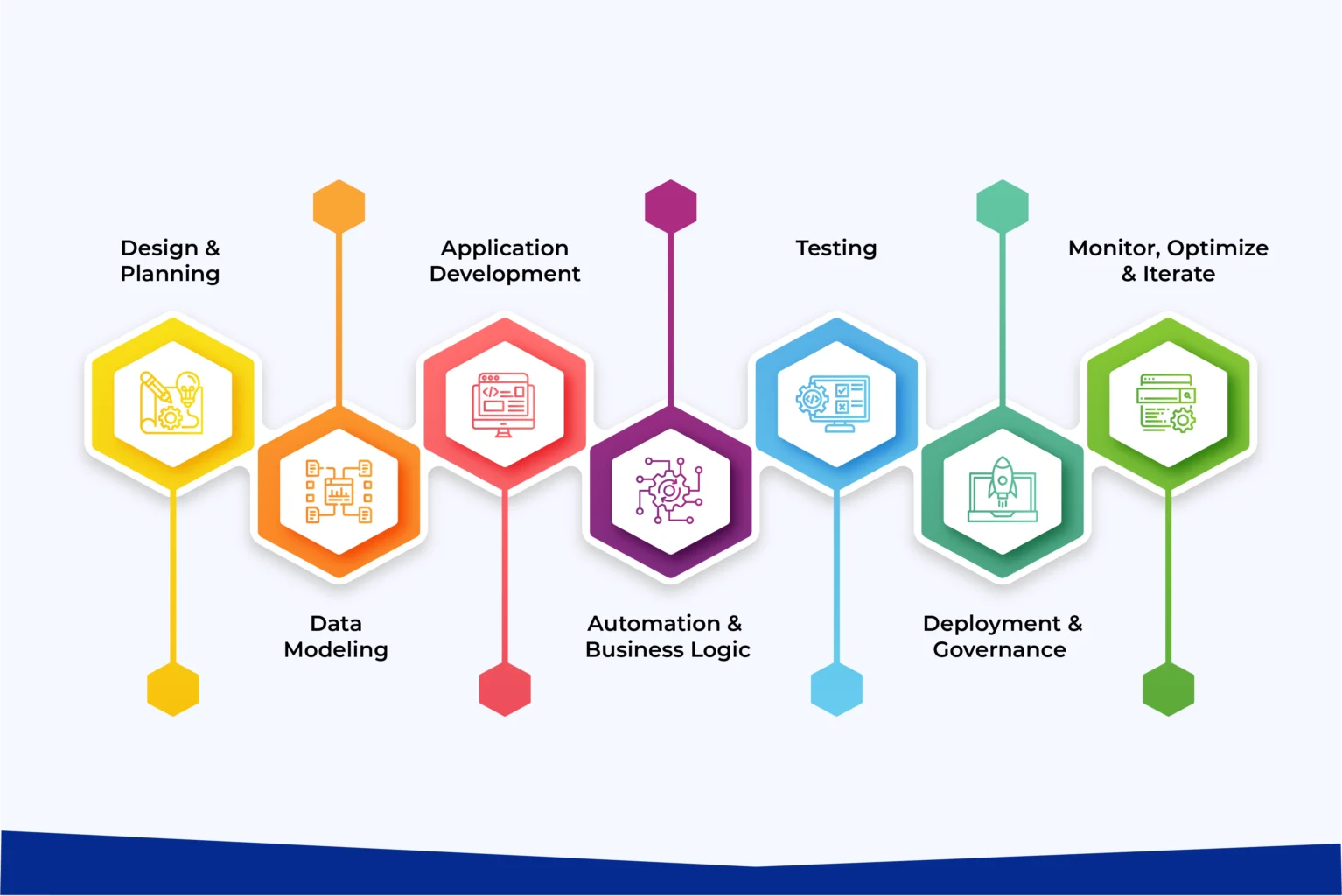
Microsoft Power Platform follows a structured yet flexible development lifecycle that enables faster delivery compared to traditional software development. Here’s a high-level overview of the typical process to utilize the tool to its best:
1. Design & Planning
Define business requirements, user journeys, and solution architecture. Power Platform’s low-code nature allows rapid prototyping using drag-and-drop tools, AI assistance (Copilot), and pre-built components, significantly shortening the design phase.
2. Data Modeling
Design a robust data foundation using Microsoft Dataverse (or other data sources). A well-planned data model is critical, especially for model-driven apps, as it influences security, performance, and scalability.
3. Application Development
Build apps using Power Apps (Canvas or Model-Driven), integrate intelligent automation with Power Automate, design reports in Power BI, and create websites/portals with Power Pages. Copilot accelerates development by generating formulas, flows, and components from natural language.
4. Automation & Business Logic
Create workflows and robotic process automation using Power Automate to eliminate manual tasks and connect systems.
5. Testing
Use the built-in Power Apps Test Framework (Test Studio) to automate UI and end-to-end testing. This helps catch issues early and ensures reliability before deployment.
6. Deployment & Governance
Export solutions as managed packages and deploy them across environments (Development → Test → Production). Power Platform’s ALM (Application Lifecycle Management) tools, combined with Azure DevOps, enable version control, CI/CD, and smooth deployments.
7. Monitor, Optimize & Iterate
Post-deployment, use analytics and monitoring tools to track usage, performance, and business impact, then continuously improve the solution.
Final Thoughts
Microsoft Power Platform has evolved far beyond its origins as a low-code development and automation tool. Today, it stands as a complete, intelligent digital transformation platform that combines rapid application development, intelligent automation, advanced analytics, AI agents, external portals, enterprise data management, and deep governance — all seamlessly integrated into one unified ecosystem.
What started as a way to build apps quickly and automate processes has now expanded into a full suite of capabilities powered by generative AI, Copilot intelligence, robust data platforms (Dataverse), and enterprise-grade ALM. Organizations can now not only build solutions faster but also create intelligent, autonomous, and highly connected business systems that drive real competitive advantage.
The true power of Microsoft Power Platform lies in this breadth and depth. It empowers business users to innovate independently while giving IT teams the control, security, and governance they need to scale confidently.
At Soluzione, we’ve witnessed how organizations that strategically adopt the full capabilities of Power Platform — not just individual components — achieve significantly higher returns on their investment through faster delivery, better user experiences, and measurable business outcomes.
Get in touch with the Soluzione team today for a detailed consultation and let us help you build a robust Power Platform strategy tailored to your business goals.
Read More: https://www.solzit.com/blog/
Frequently Asked Questions
Does Power Platform support third-party integrations and APIs?
Yes, it supports hundreds of connectors and APIs, allowing seamless integration with third-party applications, cloud services, and on-premise systems for unified business operations.
What is AI Builder, and how is it used within Power Platform?
AI Builder is a built-in AI tool that enables users to create models for predictions, form processing, and automation without coding, enhancing workflows and decision-making capabilities.