Choosing a CRM often becomes urgent when traditional methods of managing customers begin to break down. Initially, tools like spreadsheets, sticky notes, and email folders may seem sufficient. However, as your customer base expands, tracking every interaction becomes increasingly challenging. This can lead to missed follow-ups, disorganized customer information, and delayed responses, all of which can negatively affect your business relationships.
This is a common mistake many small businesses make. They may either select a tool with an overwhelming number of features that their team never uses, or they may opt for a popular option that isn’t well-suited to their needs. Alternatively, some may choose a simple system that cannot scale as their operations grow.
If you’re trying to determine how to choose the right CRM for your small business in the US, this blog will guide you through the essential factors to consider before making your decision.
- When Does a Small Business Actually Need a CRM?
- Key Factors To Consider When Choosing CRM Software
- CRM Selection Checklist Before You Commit
- Common CRM Selection Mistakes Small Businesses Should Avoid
- Which CRM Options Are Suitable for Small Businesses in the US?
- Should You Work With A CRM Consultant?
- Final Thoughts
- Frequently Asked Questions
When Does a Small Business Actually Need a CRM?
Many business owners wait too long before adopting a CRM. They often assume CRM systems are only for large enterprises, but that’s no longer true.
Here are a few signs your business may need one:
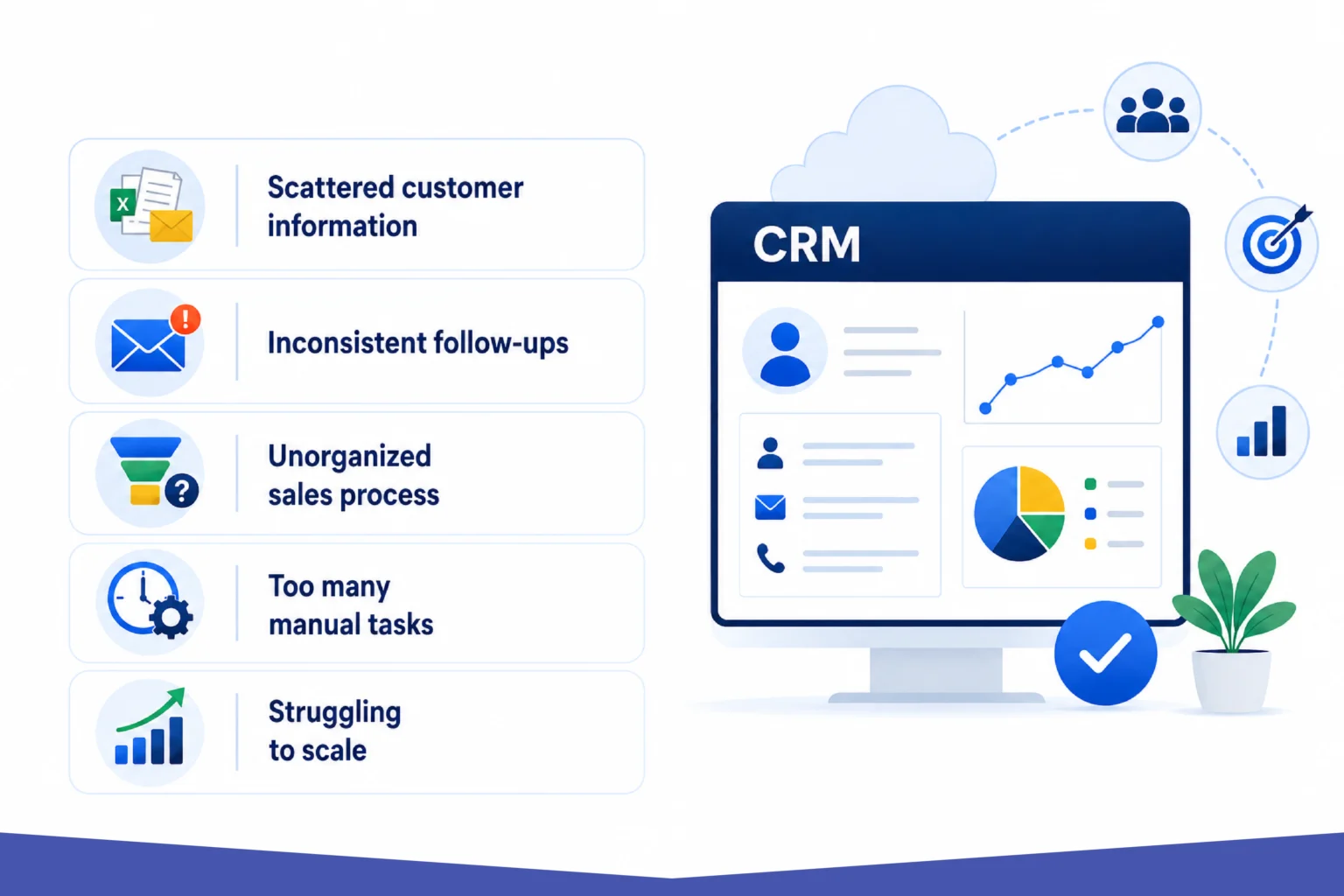
1. Scattered Customer information
If customer details are based on spreadsheets, emails, notebooks, and team members’ personal records, things can easily fall through.
2. Follow-ups are inconsistent
Missing a follow-up email or forgetting to reconnect with a lead can cost valuable opportunities.
3. An unorganized sales process
If you can’t clearly see where prospects are in the pipeline, growth becomes harder to manage.
4. Your team spends too much time on manual tasks
Repetitive data entry, manual reminders, and status updates can drain productivity, possibly affecting data accuracy.
5. You’re struggling to scale
Growth becomes difficult when your systems can’t keep up.
If any of these sound familiar, it may be time to explore CRM consulting services or invest in the right platform.
Key Factors To Consider When Choosing CRM Software
Not every CRM is built for every business. The right choice depends on your goals, processes, industry, and team size. Here’s what to evaluate.
1. Which CRM Features Matter Most for Small Businesses?
Before comparing platforms, ask yourself:
- What do you actually need the CRM to do?
- Different businesses have different priorities.
- Some need better sales pipeline tracking.
- Others need stronger customer support tools.
- Some need marketing automation.
For example:
- A law firm may need a CRM for professional services with strong client communication tracking.
- A retail business may need customer purchase insights.
- A service-based company may need appointment scheduling and workflow automation.
- This is where an industry-specific CRM can make a huge difference.
Choosing based on your business model ensures the CRM supports your real operations instead of forcing your team to adapt to a rigid system.
2. How Easy Will It Be for Your Team to Use?
One of the most common mistakes small businesses make is choosing a CRM loaded with advanced features they’ll never use.
The reality is simple:
- If your team finds it difficult to use, they won’t use it.
- A CRM should feel intuitive.
Your team should be able to:
- Navigate it easily
- Update records quickly
- Access reports without confusion
- Learn the basics without extensive training
The most powerful CRM in the world becomes useless if adoption is low.
When evaluating options, request a demo or trial version and test usability across your team, and check scalability.
3. What Tools Should Your CRM Integrate With?
Your CRM should work with the tools your business already uses.
These may include:
- Email platforms
- Accounting software
- Marketing automation tools
- Customer support systems
- Scheduling tools
- E-commerce platforms
Seamless integration reduces manual work and improves workflow efficiency.
For example, if your sales team relies heavily on Outlook and Microsoft products, Dynamics 365 CRM may be a natural fit.
If your operations involve multiple specialized tools, custom integrations through CRM development services may be worth considering.
The easier your systems communicate with each other, the more efficient your business becomes.
4. Customization And Scalability
Your business today will likely look very different in two or three years. That’s why scalability matters. The CRM you choose should grow with your business.
Look for platforms that allow:
- Custom fields
- Workflow automation
- Pipeline customization
- User expansion
- Reporting flexibility
A basic CRM may work now, but if your business grows quickly, switching later can be disruptive and expensive.
This is where working with a CRM consultant can be helpful. They can evaluate your future needs and recommend solutions that won’t limit your growth.
5. How Much Should a Small Business Budget for CRM?
Pricing matters, especially for small businesses. But choosing solely based on price often leads to poor decisions. Free or low-cost CRMs may seem attractive initially, but hidden limitations can appear later.
Watch for:
- User-based pricing increases
- Paid integrations
- Feature restrictions
- Support limitations
- Upgrade costs
Instead of asking, “What’s cheapest?”
Ask:
- “What delivers the best long-term value?”
- The right CRM saves time, improves conversions, and supports growth.
- That return often outweighs the monthly subscription cost.
CRM Selection Checklist Before You Commit
Never commit without testing.
Use free trials and demos to evaluate:
- How easy is it to use?
- Can your team adapt quickly?
- Does it solve your biggest workflow challenges?
- Does reporting provide useful insights?
- Can it integrate with your current systems?
Get feedback from everyone who will use it.
Their input often reveals practical concerns that decision-makers may miss.
Common CRM Selection Mistakes Small Businesses Should Avoid
Choosing a CRM can go wrong when businesses rush the process.
Here are common pitfalls.
- Choosing based only on popularity
A popular CRM isn’t automatically right for your business.
- Ignoring team feedback
The people using the system daily should be part of the decision.
- Overlooking future growth
What works for five customers may not work for five hundred.
- Underestimating implementation
Even great software needs proper setup.
- Focusing only on features
Usability and workflow fit matter just as much.
Which CRM Options Are Suitable for Small Businesses in the US?
Here are some widely used CRM software for businesses worth considering.
1. Microsoft Dynamics 365 CRM

Dynamics 365 CRM is ideal for businesses already invested in Microsoft’s ecosystem. It integrates well with:
- Outlook
- Teams
- Excel
- Microsoft 365
For businesses comfortable with Microsoft tools, it offers strong operational alignment.
2. HubSpot CRM
HubSpot is often a strong starting point for small businesses.
Why businesses like it:
- Easy to use
- Free basic version
- Strong marketing tools
- Clean interface
It works especially well for businesses focused on inbound marketing and lead nurturing.
3. Zoho CRM

Zoho offers flexibility at a competitive price point.
Best for:
- Budget-conscious businesses
- Growing teams
- Businesses needing customization
It offers solid automation and integration capabilities.
4. Salesforce
Salesforce is one of the most recognized names in CRM.
It’s powerful, highly customizable, and scalable.
Best for:
- Businesses planning long-term growth
- Companies needing advanced workflows
- Teams requiring deep customization
However, setup can be more complex, which is why some businesses seek CRM consulting services for implementation.
5. Freshsales

Freshsales is often appreciated for its balance between simplicity and functionality. It’s suitable for small teams wanting automation without complexity.
Should You Work With A CRM Consultant?
Many small businesses try to choose and implement CRM software on their own.
Sometimes that works.
But if your processes are complex or your team has specific workflow needs, working with a CRM consultant can save time and costly mistakes.
A consultant can help with:
- Requirement analysis
- Platform selection
- Setup and implementation
- Data migration
- Team training
- Workflow customization
For businesses needing advanced customization, CRM development services can further tailor the platform to match operational requirements.
The goal isn’t just installation.
It’s building a CRM system that your team actually benefits from.
Final Thoughts
Choosing the right CRM is less about finding the most advanced platform and more about finding the one that fits your business naturally.
The best CRM supports your daily operations, simplifies customer management, and grows with your business.
If you’re exploring simple CRM solutions for business or looking into advanced customization through CRM consulting services, taking time to evaluate your options carefully will pay off in the long run.
And if your business needs guidance navigating the process, working with experienced partners like Soluzione can help make CRM selection and implementation feel far less overwhelming while ensuring the solution truly supports your growth.
Read More: https://www.solzit.com/blog/
Frequently Asked Questions
Which features are essential in a CRM for small businesses?
Essential CRM features include contact management, sales tracking, automation tools, reporting dashboards, mobile access, integrations with existing software, customization options, and an easy-to-use interface that supports daily business operations.
How do you evaluate the right CRM based on your business needs?
Evaluate a CRM by identifying your goals, team size, budget, required integrations, usability preferences, scalability needs, and whether the platform solves your specific operational challenges effectively.
What are the best CRM options for small businesses in the US?
Popular CRM options for US small businesses include HubSpot CRM, Zoho CRM, Salesforce, Microsoft Dynamics 365 CRM, and Freshsales, depending on business goals, budget, and feature requirements.
Should small businesses choose an industry-specific CRM?
An industry-specific CRM can be valuable if your business has unique workflows, compliance requirements, or customer processes. It offers tailored features that improve efficiency compared to generic CRM systems.
How long does it take to set up a CRM system?
CRM setup can take anywhere from a few hours for basic systems to several weeks for customized implementations, depending on data migration, integrations, workflow configuration, and team training requirements.
Do small businesses need technical expertise to use a CRM?
Most modern CRM platforms are designed for non-technical users. Basic systems require minimal expertise, though complex customization, integrations, or advanced automation may benefit from professional guidance or technical support.