If your business still runs on Dynamics CRM 2011, 2013, 2015, 2016, or any legacy CRM solution, it’s time to upgrade to Dynamics 365.
This is because mainstream support for these older versions has ended or is ending. And your organizational data may no longer receive the same level of security updates, technical support, product improvements, or compatibility assurance expected from a modern business platform.
But migrating from a legacy CRM to a cloud-based platform like Dynamics 365 is not just about staying supported.
Business users now expect CRM systems to offer secure cloud access, automation, real-time reporting, Microsoft 365 integration, Power Platform flexibility, and AI-powered capabilities that help them work faster and make better decisions. Older CRM systems often struggle to support these expectations, while newer versions offer a more modern CRM foundation
In today’s post, we will discuss why businesses should modernize their traditional CRM systems to Dynamics 365 and how these modern CRM solutions can support their business goals.
Why Legacy CRM Systems Are No Longer Enough
In 2026, many organizations continue to use old-school CRM solutions because they have been used for years and employees have become familiar with them.
However, in today’s hyper-competitive digital era, relying on outdated software is not recommended. The same systems often end up slowing progress instead of supporting it.
Some common challenges include:
- Limited integration with modern business applications
- High maintenance and infrastructure costs
- Lack of AI-driven insights and automation
- Poor mobile accessibility
- Security vulnerabilities and compliance concerns
- Difficulty in scaling with business growth
According to Microsoft, businesses that adopt the Dynamics 365 platform experience better productivity, customer satisfaction, and efficiency. Because modern CRMs aren’t just databases anymore; they are intelligent business tools that work together and offer you a 360-degree view of your business activities.
And, as per Gartner, organizations that are still dependent on legacy systems can spend up to 70-80% of their IT budgets on routine maintenance. This makes a Dynamics 365 upgrade not just a choice, but a necessity.
Also Read: https://www.solzit.com/migrating-to-dynamics-365-key-benefits-and-strategies-for-success/
5 Key Signs It’s Time to Upgrade to Dynamics 365
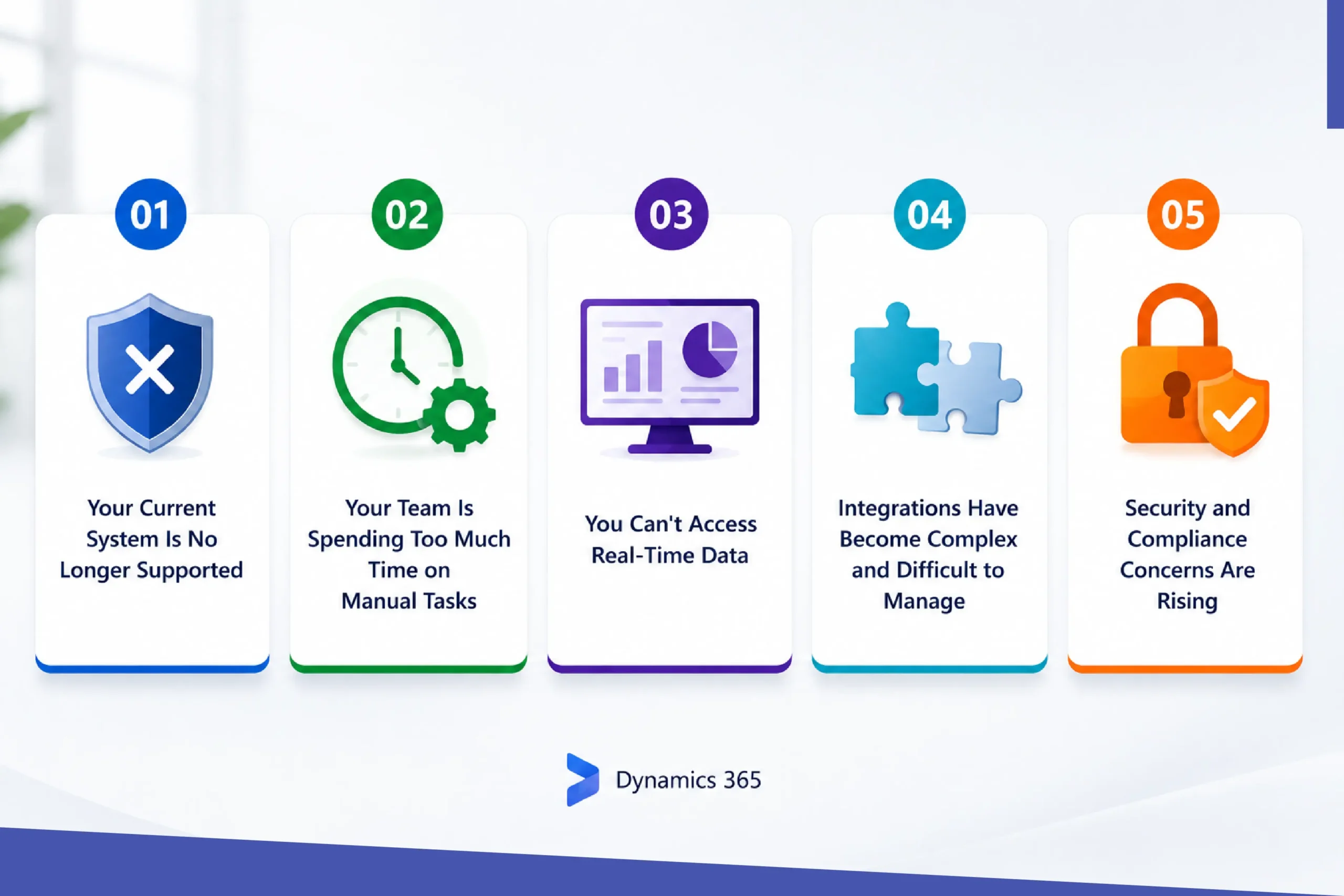
Many businesses continue working on the older CRM and ERP systems because they feel it’s “working fine”. However, as the business grows, outdated systems often become a barrier and impact your team’s productivity, innovation, and business security.
If you come across the following signs, then remember it’s now time to plan for a Microsoft Dynamics 365 upgrade.
1.Your Current System Is No Longer Supported
If you are still running Dynamics CRM 2011-2016 or legacy NAV/GP products, then Microsoft has already discontinued support. This means no security updates, compliance patches, or technical assistance from Microsoft.
This can make your business data vulnerable, prone to compliance risk, and create compatibility issues with new applications and technologies.
2.Your Team Is Spending Too Much Time on Manual Tasks
If your employees are still entering data manually, spending long hours creating reports, or switching between systems, then it’s a sign to upgrade your systems. Modern Dynamics 365 solutions automate many routine processes that can reduce manual tasks by 40-60%. This lets your team spend less time on administrative work and spend more time on core business activities.
3.You Can’t Access Real-Time Data
Legacy systems often store data in silos, and if data is spread across multiple systems and departments, it is impossible to produce real-time reports. To resolve this issue, Dynamics 365 brings all the information together in a unified view, providing real-time dashboards and insights that enable faster, more informed decision-making.
4. Integrations Have Become Complex and Difficult to Manage
If your CRM doesn’t integrate smoothly with email, accounting software, marketing tools, or customer service applications, then you are losing efficiency. With the Microsoft Dynamics 365 upgrade, businesses can seamlessly integrate across the Microsoft ecosystem and ensure data flows smoothly between systems.
5. Security and Compliance Concerns Are Rising
Without the latest security patches and updates, legacy CRM systems are always vulnerable to cyberattacks. Dynamics 365 comes with enterprise-grade security, identity management, compliance controls, and regular updates that help businesses to maintain a strong security posture.
Check This Too: Signs Your CRM Needs to Replaced
Navigating the Technical Challenges

For businesses, upgrading to Dynamics 365 is a major step, and like any other technology transition, it comes with certain challenges.
The most common issues are transferring and organizing existing data, connecting it with third-party applications, and helping employees adapt to the new systems.
Furthermore, without proper planning, these issues can lead to significant delays, data inconsistencies, or disruptions to daily operations.
This is where experienced Dynamics 365 experts can help you to make the process smooth. These specialists ensure your data is migrated accurately, integrations continue to work seamlessly, and the transition happens with minimal impact.
By partnering with the right Dynamics 365 partner, you can get custom features tailored to your workflows, along with detailed SOW documentation. The document includes details like planning, migration approach, architecture diagram, and knowledge transfer. This helps you to avoid costly mistakes, and your team can stay focused on running and growing the business instead of dealing with technical roadblocks.
Benefits of Migrating to Microsoft Dynamics 365
Upgrading to Dynamics 365 is more than a refreshed user interface. It modernizes your overall business application and streamlines operations. By adopting a cloud-based platform, organizations can improve overall productivity, security, and decision-making.
1. Enhanced Scalability
As businesses grow, Dynamics 365 can scale along with you. Whether you are adding new users, expanding to multiple locations or deploying additional modules like sales, customer service, finance, or supply chain management, the platform allows you to grow seamlessly without heavily investing in new infrastructure.
2.Stronger Security and Compliance
Dynamics 365 is built on Microsoft Azure, which means the platform includes enterprise-level security features such as MFA, role-based access control, data encryption, threat detection, continuous monitoring, and more.
Plus, regular updates help organizations stay aligned with evolving regulatory and compliance standards.
3. AI-Powered Intelligence and Automation
Dynamics 365 comes with Microsoft AI capabilities to help businesses to work smarter. Businesses can use predictive analytics, customer insights, sales forecasting, intelligent recommendations and automated workflows to improve overall efficiency and explore new opportunities.
These features reduce manual efforts and let your team make more data-driven decisions.
Also Read: Integrating AI into CRM | Top 6 AI-Integrated CRM Software 2024-2025
4. Seamless Mobility and Remote Access
Developed on a cloud-first architecture, your employees can securely access customer information, business data, reports, and workflows from any location and on any device. This allows sales teams, service agents, and on-field employees to stay connected and productive.
5. Faster and More Informed Decision-Making
Microsoft Dynamics 365 consolidates data from multiple business domains into a single platform, eliminating information silos. With real-time dashboards, interactive user reports, and advanced analytics through Microsoft Power BI connectivity, decision-makers can quickly gain visibility into business performance. As a result, it helps them to respond faster to changing market conditions and to customer needs.
6. Improved Integration Across Business Applications
Dynamics 365 integrates easily with its native business applications like Azure, Teams, and many more. This builds a unified digital environment where data flows continuously between departments and systems.
7. Reduced IT Complexity and Maintenance
Unlike traditional on-premises systems that require regular maintenance and manual upgrades, Dynamics 365 gets updated continuously from Microsoft.
New features, performance improvements, and security patches are delivered automatically. This reduces the overall burden on internal IT teams and ensures the platform remains updated and optimized.
Therefore, upgrading Dynamics 365 is more than just a technology improvement. It builds a modern and intelligent business platform that enhances your business operations and customer experiences and prepares the organization for long-term digital transformation.
Also Check: Why Should You Choose Dynamics 365 as Your CRM? | Soluzione
Why Partner with Soluzione for Your Dynamics 365 Journey?
Upgrading from a traditional CRM is a strategic decision. And you need a partner in this journey who not only understands the Microsoft ecosystem but also understands the unique challenges, processes, and goals of your industry.
At Soluzione, we are a Microsoft Solutions Partner, and we specialize in end-to-end digital transformation. From assessing your current environment to long-term maintenance support, our Dynamics 365 upgrade services are specially designed to minimize downtime and maximize ROI. We have helped multiple organizations from different industries move from older versions of Dynamics 365 CRM and other CRM solutions to the latest Microsoft Dynamics 365 CRM.
We don’t just implement software; we empower your team to achieve more.
Conclusion
In the end, sticking with old systems for too long leads to greater inefficiencies, higher maintenance costs, integration challenges, and missed opportunities for growth.
And modernizing your legacy CRM solutions is not just a tech upgrade; it’s an investment that results in streamlined operations, happier teams and better ROI.
The sooner you modernize your CRM environment, the sooner you can unlock greater efficiency, build stronger customer relationships and get a platform that’s built for long-term growth.
With Soluzione’s Dynamics 365 consulting and implementation expertise, you can enjoy the benefits of this modern, connected, and scalable business platform from day one.
Stop fighting your legacy CRM. Contact Soluzione today, and let’s plan your modernizing journey.
Read More: https://www.solzit.com/blog/
Frequently Asked Questions
How can outdated CRM systems impact business growth and productivity?
Outdated CRMs slow down the overall workflows, create data silos, and increase maintenance costs. Furthermore, they create poor visibility across teams, impacting overall revenue and also leading to poor customer satisfaction.
What are the key benefits of upgrading to Microsoft Dynamics 365?
A successful Microsoft Dynamics 365 upgrade transforms your CRM from an address book into an active growth engine. Key benefits include:
- Seamless Integration with Microsoft 365
- AI-Powered Business Insights
- Advanced Workflow Automation
- Enhanced Security and Compliance
How does Dynamics 365 support cloud-based business operations?
Dynamics 365 is powered by Microsoft Azure, providing secure and real-time data access from any device around the world. Through a successful Dynamics 365 implementation, organizations can improve collaboration, support remote work, automate processes, and ensure users always have access to the latest features and updates.
What should businesses consider before migrating from a legacy CRM?
Before starting with Dynamics 365 migration, businesses should evaluate their current CRM data quality, integration requirements, customization needs, user adoption plans and overall business goals. Thus, partnering with experts with Dynamics 365 consulting services can help to ensure a smooth and successful transition.
How long does a Dynamics 365 CRM migration typically take?
A typical Dynamics 365 migration takes around 3-6 months, depending on data complexity, customization needs, and team size. On the other hand, simple migrations with clean data can be completed within 2-3 months. While a complex enterprise implementation, along with customizations, might require 6-9 months for a successful handover. By partnering with an expert Dynamics 365 development services provider, most migrations can be completed within weeks based on the assessment results.