For more than three decades, Microsoft has stood as a pioneer in enterprise software, delivering solutions that have become the backbone of modern business operations. Countless organizations worldwide rely on Microsoft solutions as their absolute go-to solutions for productivity, collaboration, infrastructure, security, and digital transformation.
But how these solutions actually deliver value depends on how well these tools are managed, secured, optimized, and aligned with day-to-day business needs. This is where Microsoft Managed Services becomes essential. Ongoing support and management of Microsoft environments are provided by a Microsoft Service Provider (MSP), enabling businesses to keep their systems reliable, secure, up to date, cost-effective, and useful beyond the initial setup.
However, the term “Microsoft Managed Services” can be vague, leaving users unsure about its scope, what Microsoft supports, and the role of a Managed Services Provider. In this blog, we will clarify these aspects.
- What are Microsoft Managed Services?
- What are Core Microsoft Managed Services?
- 7 Benefits of Opting for Microsoft Managed Services
- When Should a Business Choose Microsoft Managed Services?
- How Microsoft Managed Services Support Is Usually Structured
- Microsoft Direct Support and Partner-Led Support
- How Do Microsoft Managed Services Work?
- How to Choose the Right Microsoft Managed Services Provider
- Common Misconception: Microsoft MSP vs CSP vs ISV
- Final Thoughts
- Frequently Asked Questions
What are Microsoft Managed Services?
Microsoft Managed Services refer to the ongoing management, support, monitoring, and optimization of Microsoft technologies by a Microsoft Managed Services Provider. These services help businesses manage their Microsoft environment beyond the initial implementation or subscription purchase.
In simple terms, if Microsoft solutions are the platforms a business uses, managed services are the continuous support system that keeps those platforms working properly, securely, and efficiently.
The important thing to understand is that Microsoft Managed Services is not one fixed service. Its scope can differ from one organization to another. For a small business, it may mean Microsoft 365 administration, license support, and basic security management. Whereas, for a growing or enterprise-level organization, it may include Azure infrastructure management, cloud cost optimization, security monitoring, compliance support, automation, reporting, governance, and continuous technical consulting with Microsoft consulting service providers.
Overall, managed services offer a more structured approach to managing the Microsoft ecosystem, enabling businesses to use its technology with better control, visibility, and long-term value.
What are Core Microsoft Managed Services?
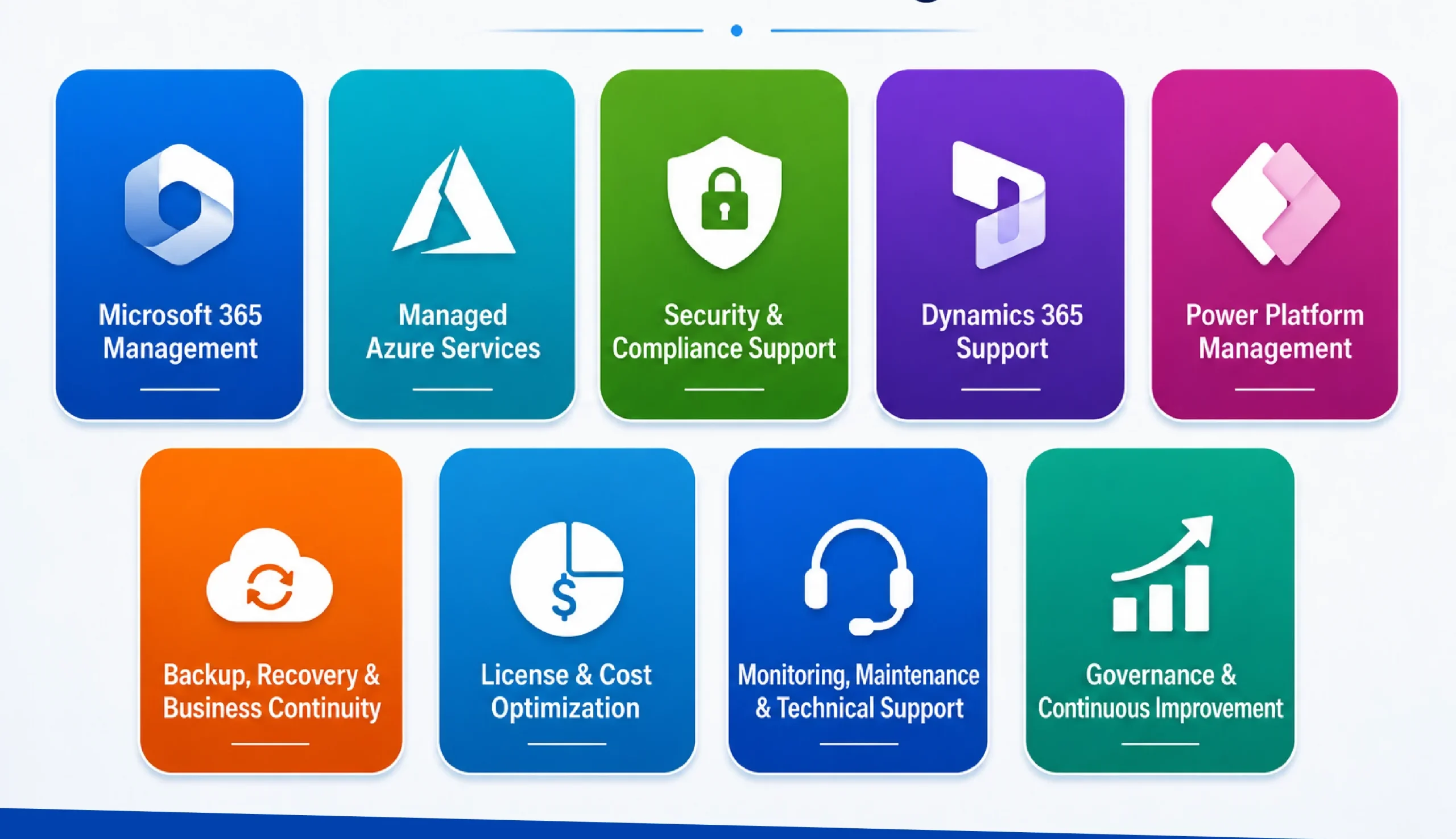
Microsoft Managed Services can cover different areas depending on the Microsoft products a business uses and the level of support it requires. They can cover productivity tools, cloud infrastructure, business applications, security, governance, cost control, and ongoing improvement across the Microsoft ecosystem. The actual scope depends on what the business uses, what challenges it faces, and how much support it needs from a Managed Services Provider.
Here are the core services that usually come under Microsoft Managed Services:
1. Microsoft 365 Management
Microsoft 365 is one of the most widely used business productivity platforms, but it still requires proper administration and ongoing support to keep collaboration secure and organized. This may include:
- User account creation, removal, and access management
- Email, Outlook, Exchange, Teams, and SharePoint support
- Microsoft 365 license assignment and optimization
- Data access and permission management
- Basic security configuration for users and devices
- Troubleshooting issues related to email, collaboration, and productivity tools
2. Managed Azure Services
For businesses using Microsoft Azure, Microsoft cloud managed services help in keeping cloud infrastructure stable, secure, scalable, and cost-efficient. Overall, it may include:
- Azure virtual machine monitoring and management
- Cloud storage, networking, and resource management
- Backup and disaster recovery planning
- Performance monitoring and optimization
- Azure cost monitoring and usage control
- Cloud security configuration and regular health checks
- Support for migration, scaling, and infrastructure updates
3. Security and Compliance Support
Security is one of the most important areas within Microsoft Managed Services, especially as organizations manage users, devices, cloud apps, business data, and remote access. Here is what this may cover:
- Identity and access management
- Multi-factor authentication setup and monitoring
- Role-based access control
- Security policy configuration
- Threat monitoring and alert management
- Compliance support based on business or industry requirements
- Regular review of permissions, users, and system access
4. Dynamics 365 Support and Administration
For organizations using D365, managed services help keep CRM and business applications aligned with daily operations rather than treating them as one-time implementations. So the service provider can support:
- User role and permission management
- CRM configuration support
- Workflow, automation, and plugin monitoring
- Dashboard and reporting support
- Issue resolution for sales, service, marketing, or custom modules
- Small enhancements based on changing business needs
- Integration support with Microsoft 365, Power Platform, or third-party systems
5. Power Platform Management
As more businesses use Power Apps, Power Automate, Power BI, and Power Pages, managed services help maintain control over apps, workflows, data, and automation.
- Power Apps support and maintenance
- Power Automate flow monitoring and troubleshooting
- Power BI report and dashboard support
- Dataverse administration
- Environment and solution management
- Governance for low-code apps and automation
- Support for improving or extending existing business processes
6. Backup, Recovery, and Business Continuity
Managed services also help businesses prepare for unexpected issues such as data loss, system downtime, accidental deletion, service disruption, and more, as given below:
- Backup configuration and monitoring
- Data recovery support
- Disaster recovery planning
- System restore assistance
- Continuity planning for critical Microsoft services
- Regular review of backup and recovery readiness
7. License and Cost Optimization
Many businesses use Microsoft products but do not always have complete visibility into license usage, cloud spend, or underutilized subscriptions. Managed services help review and optimize these areas. This may include:
- Microsoft 365 license review
- Azure cost monitoring
- Identifying unused or underused licenses
- Suggesting better license allocation
- Monitoring cloud resource usage
- Helping businesses avoid unnecessary spending
8. Monitoring, Maintenance, and Technical Support
This is the ongoing support layer that keeps the Microsoft environment running smoothly on a regular basis for the following:
- System health monitoring
- Issue detection and troubleshooting
- Regular updates and maintenance
- User support and helpdesk assistance
- Performance checks
- Incident management
- Technical guidance for internal teams
9. Governance and Continuous Improvement
Microsoft Managed Services are not limited to daily support. A well-managed services approach also helps businesses bring structure, control, and long-term improvement into their Microsoft environment. This may include:
- Reviewing how Microsoft tools are being used
- Improving security, access, and compliance practices
- Standardizing processes across teams
- Supporting better adoption of Microsoft solutions
- Recommending improvements based on changing business needs
- Helping organizations get more value from their existing Microsoft investments
7 Benefits of Opting for Microsoft Managed Services
When you go for Microsoft managed services, you are not just getting technical support, but you are also keeping all of your Microsoft products secure, optimized, and useful as business needs keep changing. Here is why businesses go to a Microsoft-managed IT services provider:
1. Better IT Cost Control
Many organizations continue paying for unused licenses, underutilized Azure resources, duplicate tools, or services that are not properly reviewed. With managed services, businesses can regularly assess license usage, cloud consumption, support needs, and system performance.
2. Stronger Security Management
A managed services provider supports areas such as multi-factor authentication, role-based access control, security alert monitoring, permission reviews, data protection settings, and user and device access policies reviewed and controlled.
3. Reliable Business Continuity
For organizations using both cloud and on-premises systems, where continuity depends on multiple connected layers working properly, managed services prepare businesses through monitoring, backup support, recovery planning, and regular system checks.
4. Continuous Monitoring and Maintenance
Managed services provide ongoing monitoring and maintenance, including tracking system health, reviewing alerts, checking performance, managing updates, and identifying recurring problems before they affect more users.
5. Reduced Pressure on Internal IT Teams
Managed services give internal teams an additional support layer, bringing specialized Microsoft expertise while reducing their workload.
6. Access to Skilled Microsoft Expertise
Microsoft’s ecosystem is wide. Managing Microsoft 365 is different from managing Azure. Managed services give businesses access to experts who understand these areas and can support them based on real operational needs
7. Smarter Use of Existing Microsoft Resources
Managed services help businesses review what they already have, improve usage, and make existing systems more useful over time. So, the benefit is not always about adding more technology. In many cases, it is about getting more value from what is already available.
When Should a Business Choose Microsoft Managed Services?
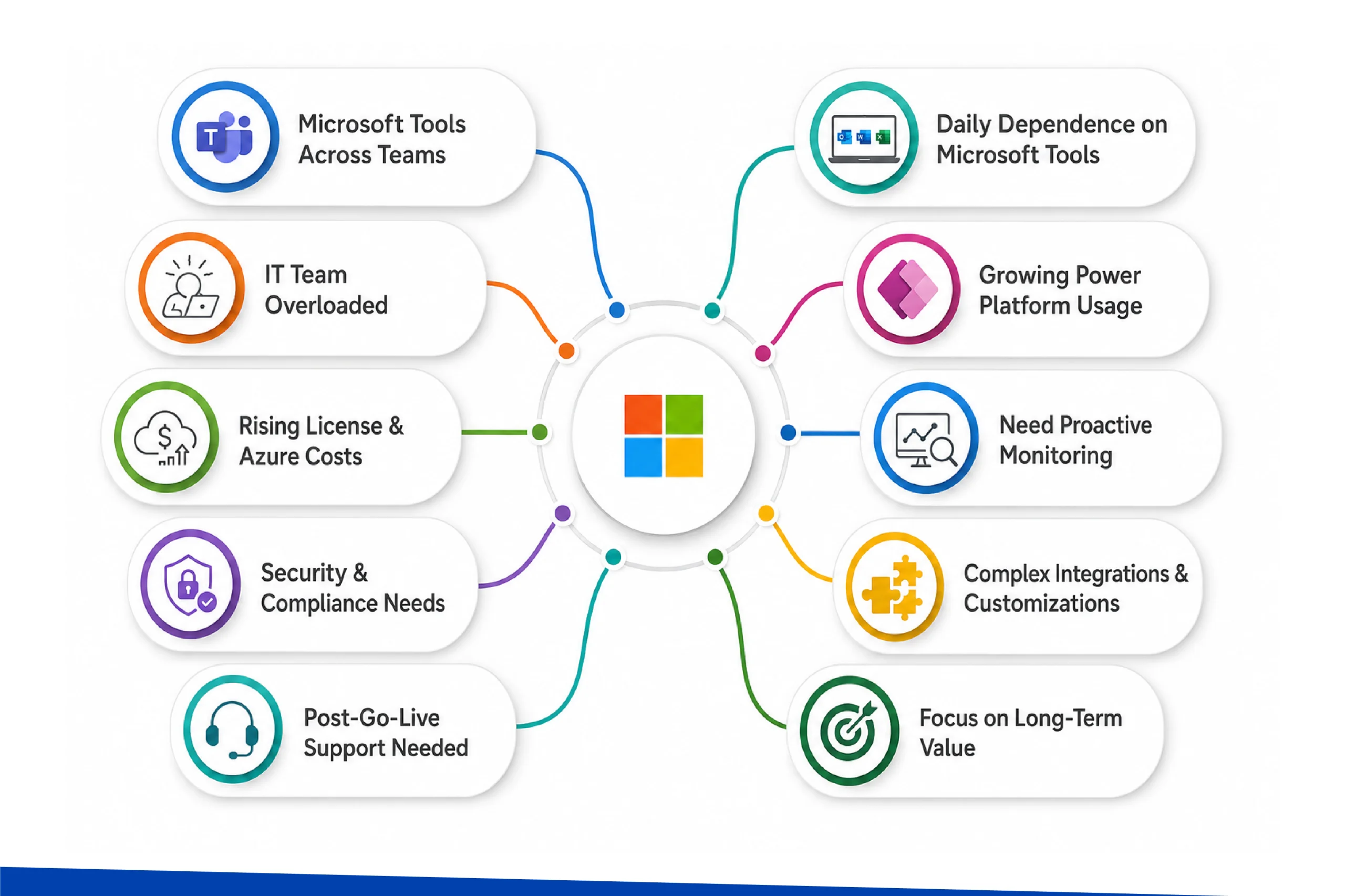
A business should consider Microsoft Managed Services when its Microsoft environment becomes important enough that occasional support is no longer sufficient. This does not mean every organization needs a full managed services model from day one. The need usually becomes clear when Microsoft tools start supporting daily operations, customer data, security, workflows, reporting, or cloud infrastructure.
We have identified instances when a business should go to a Microsoft Managed Service provider:
- Your business uses Microsoft 365, Azure, Microsoft Dynamics 365, or Power Platform across multiple teams.
- Internal IT teams are spending too much time on repetitive support tasks.
- Microsoft licenses or Azure costs are increasing but are not being reviewed properly.
- Security, compliance, user access, or permissions need regular attention.
- You have recently implemented or migrated to Microsoft solutions and need ongoing support after go-live.
- Business users depend on Teams, SharePoint, Outlook, CRM, reports, or workflows every day.
- Power Apps, Power Automate, or Power BI usage is growing without proper governance.
- You want proactive monitoring instead of only solving problems after they happen.
- Your Microsoft environment includes integrations, customizations, or hybrid systems that need regular care.
- You want long-term value from Microsoft investments instead of treating them as one-time setups.
How Microsoft Managed Services Support Is Usually Structured
Managed Services usually follow a layered support model where different types of issues are handled at different levels of expertise. In most managed services engagements, support is usually divided into three levels:
Level 1: Basic Helpdesk Support
This is the first level of support where the following common user issues are handled. These support helps resolve everyday issues quickly so users do not have to wait for advanced technical teams for simple problems.
- Password reset support
- Login or access-related issues
- Microsoft 365 user queries
- Basic Teams, Outlook, SharePoint, or OneDrive issues
- Simple license or account-related requests
- Initial ticket review and issue routing
Level 2: Advanced Administration Support
Level 2 support is useful when the issue requires engineering-level intervention. This level handles the following issues that need deeper product knowledge and administrative access:
- User permission and role management
- Microsoft 365 admin center support
- SharePoint or Teams configuration issues
- Azure resource configuration support
- Software sync or integration-related errors
- Power Automate flow troubleshooting
- Dynamics 365 configuration-level support
- Security and policy-related changes
Level 3: Engineering and Architecture Support
Level 3 support usually involves senior engineers, cloud architects, security experts, or solution consultants who understand both the technology and the business impact behind the issue. This may include:
- Azure architecture review
- Complex migration planning
- Network and infrastructure troubleshooting
- Disaster recovery planning
- Advanced security configuration
- Critical incident investigation
- Performance optimization
- Complex Dynamics 365, Power Platform, or integration issues
Microsoft Direct Support and Partner-Led Support
Microsoft also offers support plans for different customer needs, including product-specific support and enterprise-level support such as Microsoft Unified Enterprise.
Unified Enterprise Support is organization-wide support across the Microsoft Cloud and product portfolio, including Microsoft 365, Azure, Security, Dynamics 365, and hybrid workloads. This includes:
- Product-level issues
- Technical break-fix cases
- Escalations and guidance based on the support plan
A Microsoft Managed Services Provider, on the other hand, may manage users, monitor systems, optimize licenses, review security, maintain cloud resources, support internal teams, and coordinate with Microsoft support when deeper product-level escalation is needed.
How Do Microsoft Managed Services Work?
Microsoft Managed Services usually work through a structured engagement between the business and the Microsoft Managed Services Provider. The exact process may differ based on the organization’s Microsoft setup, but the overall approach usually follows a similar pattern as given below:
1.Understanding the Existing Microsoft Environment
The MSP first understands the actual condition of the environment before suggesting improvements or taking over management. They might review the existing setup, resources, environment, flows, user roles and permissions, licenses and subscriptions, and other issues, risks, and integrations.
2. Defining the Scope of Managed Services
Once the current environment is reviewed, the next step is to define exactly what needs to be managed to avoid confusion and bring clarity.
3. Setting Up Monitoring, Access, and Support Processes
After the scope is finalized, the MSP sets up the required access, monitoring tools, communication channels, support process, and reporting structure.
4. Ongoing Management and Issue Resolution
Once the managed services process is active, the MSP starts handling regular support, monitoring, maintenance, and issue resolution. This is the day-to-day layer of Microsoft Managed Services where the provider helps keep the Microsoft environment stable and usable for business teams.
5. Regular Optimization and Improvement
This is where managed services become more valuable than basic technical support. Instead of only reacting to problems, the MSP helps the business keep improving how Microsoft solutions are used.
6. Reporting and Strategic Guidance
This is where managed services become more valuable than basic technical support. Instead of only reacting to problems, the MSP helps the business keep improving how Microsoft solutions are used. This may include reports on:
- Support tickets and issue trends
- System health
- Security alerts
- License usage
- Azure cost and performance
- Backup status
- User activity
- Improvement recommendations
How to Choose the Right Microsoft Managed Services Provider
Choosing a Microsoft Managed Services Provider should not be based solely on who offers the lowest support cost. Since an MSP may be involved in managing your Microsoft 365, Azure, Dynamics 365, Power Platform, security, licenses, users, cloud resources, and business-critical systems, the selection should be practical and capability-driven, taking the following factors into account.
1. Check Microsoft Expertise and Relevant Capability
The first thing to look for is whether the provider has proven Microsoft expertise. This can include Microsoft partner status, relevant Solutions Partner designations, specializations, certifications, and practical experience across the Microsoft services your business already uses.
2. Evaluate SLAs and Support Availability
Service Level Agreements, or SLAs, are important because they define how support will be delivered. A well-defined SLA should explain response time, issue priority, escalation process, support hours, communication channels, and responsibilities.
3. Look for Proactive Support
Proactive managed services help reduce the chances of repeated problems and keep the Microsoft environment healthier over time.
4. Check Their Ability to Scale with Your Business
The right MSP should be able to support your current needs and also grow with your future requirements. For a small business, this may start with Microsoft 365 support and license management. For a growing business, it may expand into Azure management, Dynamics 365 support, Power Platform governance, advanced security, reporting, and cloud optimization.
5. Review Industry and Business Process Understanding
Microsoft technologies are used differently in every business. This becomes especially important for Dynamics 365, Power Platform, Azure, and security-related managed services, where the provider needs to understand how technology connects with actual business operations.
6. Check Flexibility in Engagement Model
Not every business needs a full managed services model from the beginning. Some may need monthly support hours. Some may need dedicated Microsoft experts. Some may need after-go-live support. Others may need full monitoring, administration, and optimization.
The MSP should offer flexibility based on your business stage and support requirements.
Common Misconception: Microsoft MSP vs CSP vs ISV
A common misconception in the Microsoft ecosystem is that terms like MSP, CSP, and ISV are often used as if they mean the same thing. This usually happens because all three can be connected to Microsoft solutions, Microsoft cloud services, or Microsoft partner offerings. This is why it is important to understand the difference.
| Difference | MSP | CSP | ISV |
| Full Form | Managed Services Provider | Cloud Solution Provider | Independent Software Vendor |
| Main Role | Manages and supports Microsoft environments on an ongoing basis | Helps customers buy, provision, bill, and manage Microsoft cloud subscriptions | Builds and sells its own software products or applications |
| What It Usually Covers | Microsoft 365 administration, Azure management, Security monitoring, Backup, User support, Dynamics 365 support, Power Platform governance, Cloud optimization, Technical support | Microsoft 365, Azure, Dynamics 365, Power Platform licenses, Subscription management, Billing support, Cloud service provisioning | Add-ons, connectors, SaaS products, Industry-specific applications, Marketplace solutions Software built on or integrated with Microsoft platforms |
| What It Does Not Mean | It does not only mean selling Microsoft licenses | It does not automatically mean full managed services, unless the CSP also offers MSP services | It does not mainly mean managing a customer’s Microsoft environment |
Final Thoughts
Microsoft Managed Services are not only about outsourcing IT support. They are about giving structure to how Microsoft technologies are managed after implementation. When you use any of the Microsoft tools, the actual value you will get only by consistently monitoring, securing, updating, optimizing, and aligning with business processes.
Microsoft itself suggests opting for managed services to make sure users’ Microsoft investments are used properly, supported consistently, and improved as the business grows. One such partner to consider is Soluzione, a Microsoft Solutions Partner. They have been a Microsoft Managed Services Provider, CSP, and ISV for over a decade. Their support extends to Microsoft licensing needs through trusted distribution channels, including Pax8 for the US market and Crayon for Singapore and India.
If you are looking to get practical, secure, and long-term value from the Microsoft ecosystem, then simply get in touch with us.
Frequently Asked Questions
What is the difference between CSP and MSP?
A cloud service provider (CSP) helps businesses buy, provision, bill, and manage Microsoft cloud subscriptions such as Microsoft 365, Azure, Dynamics 365, and Power Platform.
A managed service provider (MSP), on the other hand, provides ongoing support, monitoring, administration, security, optimization, and management of the Microsoft environment. A company can be both a CSP and an MSP, but the two roles are not the same.
What are Microsoft managed services, and what do they include?
Microsoft Managed Services refer to the ongoing management and support of Microsoft environments by a managed services provider. They may include Microsoft 365 support, Azure management, security monitoring, backup and recovery, license optimization, Dynamics 365 support, Power Platform management, user support, compliance assistance, and continuous system improvement.
Can managed services be customized based on business needs?
Yes, Microsoft Managed Services can be customized based on the products a business uses, the level of support required, the size of the organization, security needs, cloud usage, and internal IT capacity.
What are the cost models for Microsoft managed services?
The cost model depends on the service scope and support requirements. Common models include monthly managed support plans, per-user pricing, hourly support, dedicated resource models, project-based support, or customized service packages. The final cost usually depends on the number of users, Microsoft platforms covered, support hours, SLA expectations, and level of technical complexity.
Which Microsoft platforms can be covered under managed services?
The actual coverage depends on the MSP’s expertise and the business’s Microsoft environment. Usually, Microsoft Managed Services cover Microsoft 365, Azure, Dynamics 365, Power Platform, SharePoint, Teams, Exchange, OneDrive, Dataverse, Power BI, Microsoft security solutions, and other connected Microsoft services.