Microsoft Power Pages Consulting Services
Launch secure, low-code AI-driven business portals quickly and cost-effectively.
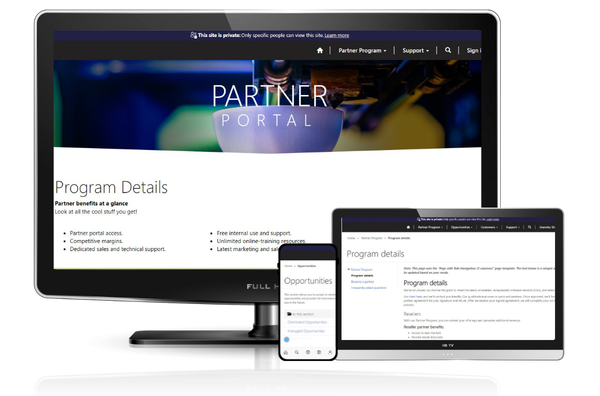

What Is Microsoft Power Pages?
Create, host, and administer data-driven portals
Microsoft Power Pages is a key component of the Microsoft Power Platform suite, designed for building low-code, secure, externally-facing business websites and portals. Its secure web portal development capabilities empower developers to quickly design, launch, customize, and support portal development. Used by businesses of all sizes, this SaaS (Software as a Service) platform quickly creates professional web experiences that connect directly with business data. Power Pages stands out for organizations looking for reliable web portal development services with native integration across Power Apps, Power Automate, Power BI, and Dataverse.
As a web portal development company and Microsoft Solutions Partner, Soluzione helps brands make the most of Power Pages with expert consulting services, customization, integration, support, and more. Our teams work with APIs, Visual Studio Code, and other Microsoft technologies to build Power Page web solutions.
The low-code capabilities, built-in security core, and agents, along with the specialization of Power Pages consultants, Microsoft Power Pages delivers solutions that are:

- Customizable: Solutions that can be tailored as per the evolving requirements of the business.
- Deeper Functionalities: The pro tools in Power Pages, such as Visual Studio Code, GitHub, and Azure DevOps, give deeper and advanced capabilities in business portals.
- Secure by Design: Advanced security features, such as IP and Geo filtering, defend solutions against cyberthreats and maintain admin and operational ownership.
- Cross-Platform Ready: Power Pages web solutions automatically render to different platforms, such as desktop or mobile, with a standard framework.
Our Power Pages Service Offerings
Soluzione supports organizations in designing, extending, and managing secure data-driven business portals using Microsoft Power Pages.
Our Power Pages Consultants guide you on architecture, licensing, role-based access, and best practices tailored to your business needs, unique use cases, data access requirements, and security expectations. This ensures that the web portal aligns and works seamlessly across browsers and devices.
We help businesses build responsive, secure Power Pages portals with custom tools and capabilities aligned with real operational needs, such as customer self-service, partner portals, application tracking, case management, and internal stakeholder access.
Soluzione supports businesses in seamless integration of Power Pages with Microsoft ecosystem tools such as Dataverse, Power Apps, Power Automate, Dynamics 365, and Power BI. This support also extends to API-based integrations that connect portals with external systems and third-party applications.
Manage your portal environments efficiently with us. We help with proper configuration, role and permission management, performance monitoring, and security controls to make sure it remains stable, compliant, and in line with business policies.
Our Power Pages services for portal development also offer continuous support, updates, performance tuning, and issue resolution as post-deployment support. This ensures that the web portal remains secure, efficient, and future-ready as business needs evolve.
Our Power Pages Service Offerings
Soluzione supports organizations in designing, extending, and managing secure data-driven business portals using Microsoft Power Pages.
Our Power Pages Consultants guide you on architecture, licensing, role-based access, and best practices tailored to your business needs, unique use cases, data access requirements, and security expectations. This ensures that the web portal aligns and works seamlessly across browsers and devices.
We help businesses build responsive, secure Power Pages portals with custom tools and capabilities aligned with real operational needs, such as customer self-service, partner portals, application tracking, case management, and internal stakeholder access.
Soluzione supports businesses in seamless integration of Power Pages with Microsoft ecosystem tools such as Dataverse, Power Apps, Power Automate, Dynamics 365, and Power BI. This support also extends to API-based integrations that connect portals with external systems and third-party applications.
Manage your portal environments efficiently with us. We help with proper configuration, role and permission management, performance monitoring, and security controls to make sure it remains stable, compliant, and in line with business policies.
Our Power Pages services for portal development also offer continuous support, updates, performance tuning, and issue resolution as post-deployment support. This ensures that the web portal remains secure, efficient, and future-ready as business needs evolve.
Not sure if Power Pages is the right fit for your portal?
No worries! We help you assess feasibility, architecture, and pricing before you commit.
What Is Power Pages Portal Used For?
From creating an entirely new portal to modernizing an existing one, MS Power Pages offers creating diverse forms of responsive enterprise-grade portals.
Student self-service portals help students to submit applications, access academic information, view schedules, raise requests, and track statuses safely through a single, role-based interface.Such a portal not only makes students self-reliant but also significantly reduces manual administrative tasks, inquiry volumes, and processing times.
Organizations use Power Pages to build self-service customer portals so users can log in securely, interact with business data, raise service requests, track cases, view documents, check order or subscription status, and communicate with support teams. These customer portal streams support and boost satisfaction.
Supplier Portals offer intuitive tools that help vendors to register, submit compliance documents, update information, and track purchase orders or requests. They support seamless onboarding, ongoing collaboration, controlled data access, security, traceability, and consistent communication across supply chains.
Power Pages portals manage several crucial event tasks, such as registrations, attendee information, schedules, and communications in one portal. Users can also sign up for events, access event details, and receive automated confirmations. Internal teams can also manage event data through connected Power Platform workflows.
Organizations use Power Pages to securely collect structured surveys and feedback, and the responses are stored directly in Dataverse. This helps them to analyze feedback, trigger automated actions, and integrate insights into reporting or follow-up processes.
Power Pages is widely used for controlled B2B ordering portals integrated with CRM, ERP, or inventory systems (e.g., Dynamics 365). These handle product catalogs, order submissions, approvals, pricing logic, and tracking—ideal for partner transactions, internal procurement, or vendor-managed scenarios where security and data governance are key.
Student self-service portals help students to submit applications, access academic information, view schedules, raise requests, and track statuses safely through a single, role-based interface. Such a portal not only makes students self-reliant but also significantly reduces manual administrative tasks, inquiry volumes, and processing times.
Organizations use Power Pages to build self-service customer portals so users can log in securely, interact with business data, raise service requests, track cases, view documents, check order or subscription status, and communicate with support teams. These customer portal streams support and boost satisfaction.
Supplier Portals offer intuitive tools that help vendors to register, submit compliance documents, update information, and track purchase orders or requests. They support seamless onboarding, ongoing collaboration, controlled data access, security, traceability, and consistent communication across supply chains.
Power Pages portals manage several crucial event tasks, such as registrations, attendee information, schedules, and communications in one portal. Users can also sign up for events, access event details, and receive automated confirmations. Internal teams can also manage event data through connected Power Platform workflows.
Organizations use Power Pages to securely collect structured surveys and feedback, and the responses are stored directly in Dataverse. This helps them to analyze feedback, trigger automated actions, and integrate insights into reporting or follow-up processes.
Power Pages is widely used for controlled B2B ordering portals integrated with CRM, ERP, or inventory systems (e.g., Dynamics 365). These handle product catalogs, order submissions, approvals, pricing logic, and tracking—ideal for partner transactions, internal procurement, or vendor-managed scenarios where security and data governance are key.
Our Power Pages Implementation Approach

Our Power Pages consultants first understand users’ roles, workflows, data, integrations, and success metrics to define the portal capabilities, data architectures, governance model, and development approach.

Now we build a clickable portal structure that outlines page flow, user journeys, and early UI direction.

Our developers now build the portal using Dataverse and Microsoft Power Pages, configuring data access, security roles, permissions, and automation. Where required we also use built-in AI agents and Power Platform tools support smarter workflows and scalable operations.

The portal goes through user acceptance testing (UAT) to validate functionality, performance, compatibility, and usability across scenarios, and bugs are fixed promptly.

After all the testing and approvals, the portals are finally launched, and we continue to monitor, optimize, administer, and support.
Our Power Pages Implementation Approach
Our Power Pages consultants first understand users’ roles, workflows, data, integrations, and success metrics to define the portal capabilities, Dataverse architectures, governance model, and development approach.
Now we build a clickable portal structure that outlines page flow, user journeys, and early UI direction.
Our developers now build the portal using Dataverse and Microsoft Power Pages, configuring data access, security roles, permissions, and automation. Where required we also use built-in AI agents and Power Platform tools support smarter workflows and scalable operations.
The portal goes through user acceptance testing (UAT) to validate functionality, performance, compatibility, and usability across scenarios, and bugs are fixed promptly.
After all the testing and approvals, the portals are finally launched, and we continue to monitor, optimize, administer, and support.
Power Platform Integration We Support


Power Pages Services for every industry
Our Microsoft Power Pages consulting services are meant to serve every industry that needs Power Platform and custom business or professional application solutions.

Real Estate & Property Management

Accreditation

Educational & RTOs

Insurance & Reinsurance

Lending Management & NBFCs

Aged Care & Health Services

Transport & Logistics

Nonprofit Organizations (NPOs)

Professional & Legal Services

Telecom & Utility Providers

Wealth Management

Travel & Tourism
Why Businesses Trust Us
Choosing Soluzione for Power Pages consulting services provides a team of certified and experienced industry experts who not only understand the solution but also how to tailor it to meet your business needs.
You will get the Power Pages solution along with innovative features that Microsoft provides, such as Copilot, to accelerate development and enhance user experiences.
Our insights into Microsoft Power Pages pricing and licensing help organizations maximize value,no matter whether they opt for pay-as-you-go models or subscription tiers.
We create web portals using Power Pages for global audiences, providing 24/7 service in various work models to ensure communication and solution delivery.
Our team is not just certified, but we have experience of more than a decade in different industries for different types of web portals that enable us to offer a custom solution for your goals and industry.
You will get the Power Pages solution along with innovative features that Microsoft provides, such as Copilot, to accelerate development and enhance user experiences.
Our insights into Microsoft Power Pages pricing and licensing help organizations maximize value, no matter whether they opt for pay-as-you-go models or subscription tiers.
We create web portals using Power Pages for global audiences, providing 24/7 service in various work models to ensure timely communication and solution delivery.
Our team is not just certified, but we have experience of more than a decade in different industries for different types of web portals that enable us to offer a custom solution for your goals and industry.
Microsoft Power Pages Pricing
Free
Microsoft Power Pages can be trialed with premium features at no cost for 30 days.
$200.00
Get low-code business portals with authenticated access, built-in content delivery network support, and Dataverse storage.
*Terms and Conditions Applicable
$75.00
Anonymously browse business portals powered by agentic AI, with support from a built-in content delivery network and Dataverse storage.
*Terms and Conditions Applicable
Note: These prices may vary by location and over time. We recommend checking the official site for updated prices.
Free
Microsoft Power Pages can be trialed with premium features at no cost for 30 days.
$200.00
Get low-code business portals with authenticated access, built-in content delivery network support, and Dataverse storage.
*Terms and Conditions Applicable
$75.00
Anonymously browse business portals powered by agentic AI, with support from a built-in content delivery network and Dataverse storage.
*Terms and Conditions Applicable
Note: These prices may vary by location and over time. We recommend checking the official site for updated prices.
Our Success Stories

Transforming Student Management with Custom Dynamics 365 CRM Solution
Education & Vocational Training

Transforming Student Management with Custom Dynamics 365 CRM Solution
Education & Vocational Training
Testimonials

We have been working with Soluzione for 5 years, from initial implementation through accommodating constant business-driven changes in our systems and multiple major software upgrades to support the unique set of services Renodis provides our clients. In my long career of systems development, consulting, and management, I cannot think of a better and more responsive partner to work with. We appreciate the long-term relationship, exceptional results, and trust that Soluzione has built with Renodis.

We have used many RTO student management systems in the past, but couldn’t meet our requirements due to inflexibility in customizing those systems according to our needs. We were looking for a system where sales, marketing, student admin, and student service all work in one platform rather than in multiple platforms. We came across Soluzione, which offered a customized solution (SolzRBM Framework) built in Power Platform and MS Dynamics 365 CRM. Their team spent one complete week with us to understand our processes. Now we have been using the system for the last 4 months and are very happy with the Outcome.
Frequently Asked Question
Microsoft Power Pages is the modern evolution of what was formerly called Power Apps Portals. It’s designed specifically for creating externally-facing business sites and portals with a simpler, low-code experience. While the underlying tech (Dataverse, security, APIs) is shared, Power Pages offers a more intuitive design studio, better templates, and faster site creation without heavy code. The focus has shifted from developer-centric “portals” to a platform anyone on your team can adopt with the right support.
Power Pages is for businesses that need a web portal or a website to create a strong digital presence. The following suggests who need Microsoft Power Pages:
1. If your customers, partners, vendors, or external stakeholders need secure access to data, workflows, case tracking, forms, dashboards, or self-service tools.
2. Power Pages is a strong fit — especially if you’re already in the Microsoft ecosystem (Dataverse, Dynamics 365).
3. Use it when you need controlled, role-based access, not just a public info site.
Microsoft Power Pages offers pricing based mostly on how many people use the portal and whether they log in:
1. Authenticated users plan: ~$200 per 100 users per site per month.
2. Anonymous users plan: ~$75 per 500 visitors per site per month.
3. You can also start with a free 30-day trial.
Exact costs vary by region and licensing method, and larger volumes usually have discounted rates.
Power Pages pricing is usage-based — you pay for capacity per website by user type:
1. Authenticated users: Users who log in and have secure access to data.
2. Anonymous users: Users who browse publicly without logging in.
You can choose:
1. Subscription capacity packs (fixed monthly commitment), or
2. Pay-as-you-go meters where you pay only for actual active users.
Yes. Power Pages supports customization through:
1. Built-in design tools (themes, layouts, forms),
2. Dataverse data customizations,
3. Power Platform integrations,
4. Developer extensibility (JavaScript, CSS, Liquid templates) when deeper control is needed.
This means you can tailor the portal experience to your business logic and branding while keeping it maintainable.
Yes — Power Pages automatically adapts to different screen sizes (desktop, tablet, mobile). The design studio lets you preview and refine layouts so users on any device have a consistent experience.
Yes — but capacity planning matters, for instance — high-traffic portals require adequate capacity packs for authenticated and anonymous users, good performance design (efficient queries, caching), and governance. With proper setup and licensing, Power Pages can scale for enterprise use.
Microsoft Power Pages is best for data-driven, secure portals, such as:
1. Customer self-service portals (tickets, support, profiles)
2. Partner or reseller portals
3. Vendor or supplier portals
4. Application or registration sites
5. Membership or community portals
6. Case tracking and dashboard sites tied to backend systems
Absolutely. Power Pages runs on Dataverse, so it naturally integrates with Dynamics 365 apps and data, letting portals read and write CRM data (cases, contacts, orders) and trigger automated workflows through Power Automate.
Power Pages supports secure login via:
1. Azure AD (Entra ID)
2. External identity providers
3. Local username/password
Role-based access controls ensure users only see what they are allowed to see, and external access can be managed efficiently without exposing internal systems.
It depends on complexity. For basic sites, you might explore Power Pages yourself. But if you need:
1. Secure login and data governance
2. Dataverse architecture
3. Dynamics 365 integration
4. Automation and performance optimization
A Power Pages consultant helps avoid common pitfalls, ensures correct capacity/licensing choices, and gives you a portal that works reliably at scale — which is what businesses ultimately care about.

180, Talmadge Road, Unit# 332, Edison (NJ) 08817 USA
Phone : +1-800-860-6531

10, Anson Road # 22-02, International Plaza 079903 SGD
Phone: +65-98-357-694

B-52, IT Park Badwai, Bhopal (MP) 462036 IND
Phone: +91 9302980560
180, Talmadge Road, Unit# 332, Edison (NJ) 08817 USA
Phone : +1-800-860-6531
10, Anson Road # 22-02, International Plaza 079903 SGD
Phone: +65-98-357-694
B-52, IT Park Badwai, Bhopal (MP) 462036 IND
Phone: +91-9302-980-560
